提示:
閱讀本文需要一定的3D圖形學和DirectX9基礎,如果你發現閱讀困難,請參閱
D3D中基本立體面的繪制。
本文用到的坐標系統變換函數請參閱
DirectX 9的坐標系統變換。
在現實世界中,物體在各種環境光線的照射下,吸收了光線的能量,并將這些能量進行反射而形成反射光。
顏色和光照
物體表面光澤是由于表面的反射光刺激人的眼睛視網膜而引起的一種視官感覺,這種色覺實際上是由光的波長決定的。每種波長的光在光譜中占據一定的位置,具有特定的色澤和亮度。
對于任意波長為s的光,由于s可分解為s = aR + bG +
cB,其中R,G,B為紅色光,綠色光和藍色光的波長,于是在RGB為基底的情況下,光波長由三元數(a, b,
c)來決定。因此光的顏色值量化可以這樣來進行:首先用顏色值(1, 0, 0)表示紅色R,用顏色值(0, 1, 0)表示綠色G,用(0, 0,
1)表示藍色B,而任意波長的光的顏色值C則可用(r, g, b)表示,以表明顏色s = aR + bG + cB 是用RGB三色通過混色而得來的,其中r,
g和b取區間的浮點數。
為了實現像素顏色由暗變明的處理,通常還添加一個alpha分量來說明顏色的飽和度。此時顏色值將用四元組(r ,g, b,
a)來表示,其中a就是alpha分量,也是一個介于區間[0, 1]的浮點數。當r,
g和b的顏色值確定以后,通過乘以一個a分量得到一個新的顏色值ar+ag+ab,這樣獲得的顏色值并沒有改變原有顏色的RGB成分比例。
DirectX提供了以下的一個存放四元顏色值的結構體D3DCOLORVALUE,來看看具體定義:
Describes color values.
typedef struct D3DCOLORVALUE {
    float r;
    float g;
    float b;
    float a;
} D3DCOLORVALUE, *LPD3DCOLORVALUE;
Members
- r
- Floating-point value specifying the red component of a color. This value
generally is in the range from 0.0 through 1.0, with 0.0 being black.
- g
- Floating-point value specifying the green component of a color. This
value generally is in the range from 0.0 through 1.0, with 0.0 being black.
- b
- Floating-point value specifying the blue component of a color. This
value generally is in the range from 0.0 through 1.0, with 0.0 being black.
- a
- Floating-point value specifying the alpha component of a color. This
value generally is in the range from 0.0 through 1.0, with 0.0 being black.
Remarks
You can set the members of this structure to values outside the range of 0
through 1 to implement some unusual effects. Values greater than 1 produce
strong lights that tend to wash out a scene. Negative values produce dark lights
that actually remove light from a scene.
由于使用了浮點數作為顏色值的分量,因而可方便地定義顏色值的加法和乘法等運算,以產生新的顏色值。例如:對于顏色C1 = (a1, r1, g1, b1)和C2 =
(a2, r2, g2, b2),定義C1+C2,kC1和C1C2的顏色值如下:
C1 + C2 = (a1 + a2, r1 + r2, g1 + g2, b1 + b2)
kC1 = (ka1, kr1, kg1, kb1)
C1C2 = (a1 x a2, r1 x r2, g1 x g2, b1 x b2)
為支持顏色值的算術運算,DirectX提供了一個顏色值的擴展結構D3DXCOLOR,來看看它的具體定義:
typedef struct D3DXCOLOR
{
#ifdef __cplusplus
public:
D3DXCOLOR() {}
D3DXCOLOR( DWORD argb );
D3DXCOLOR( CONST FLOAT * );
D3DXCOLOR( CONST D3DXFLOAT16 * );
D3DXCOLOR( CONST D3DCOLORVALUE& );
D3DXCOLOR( FLOAT r, FLOAT g, FLOAT b, FLOAT a );
// casting
operator DWORD () const;
operator FLOAT* ();
operator CONST FLOAT* () const;
operator D3DCOLORVALUE* ();
operator CONST D3DCOLORVALUE* () const;
operator D3DCOLORVALUE& ();
operator CONST D3DCOLORVALUE& () const;
// assignment operators
D3DXCOLOR& operator += ( CONST D3DXCOLOR& );
D3DXCOLOR& operator -= ( CONST D3DXCOLOR& );
D3DXCOLOR& operator *= ( FLOAT );
D3DXCOLOR& operator /= ( FLOAT );
// unary operators
D3DXCOLOR operator + () const;
D3DXCOLOR operator - () const;
// binary operators
D3DXCOLOR operator + ( CONST D3DXCOLOR& ) const;
D3DXCOLOR operator - ( CONST D3DXCOLOR& ) const;
D3DXCOLOR operator * ( FLOAT ) const;
D3DXCOLOR operator / ( FLOAT ) const;
friend D3DXCOLOR operator * ( FLOAT, CONST D3DXCOLOR& );
BOOL operator == ( CONST D3DXCOLOR& ) const;
BOOL operator != ( CONST D3DXCOLOR& ) const;
#endif //__cplusplus
FLOAT r, g, b, a;
} D3DXCOLOR, *LPD3DXCOLOR;
此外,DirectX還提供了一個使用整數來定義顏色值的D3DCOLOR類型,D3DCOLOR類型實際上是一個32bit的 DWORD類型。
typedef DWORD D3DCOLOR;
該類型的顏色值Alpha, Red, Green,
Blue分量各占8個bit,并從高位字節到低位字節進行存放,各分量的值范圍均為0~255之間。由于使用整數,D3DCOLOR類型的顏色值的范圍相對于使用浮點數的D3DCOLORVALUE顏色值的范圍少。
為了方便定義D3DCOLOR類型的顏色值, DirectX還提供了如下的兩個可直接將4個0~255之間的整數定義為D3DCOLOR顏色值的宏。
// maps unsigned 8 bits/channel to D3DCOLOR
#define D3DCOLOR_ARGB(a,r,g,b) \
((D3DCOLOR)((((a)&0xff)<<24)|(((r)&0xff)<<16)|(((g)&0xff)<<8)|((b)&0xff)))
#define D3DCOLOR_RGBA(r,g,b,a) D3DCOLOR_ARGB(a,r,g,b)
還可利用DirectX提供的D3DCOLOR_XRGB(r, g, b)宏,定義Alpha值為255的D3DCOLOR顏色值。
#define D3DCOLOR_XRGB(r,g,b) D3DCOLOR_ARGB(0xff,r,g,b)
光源設置
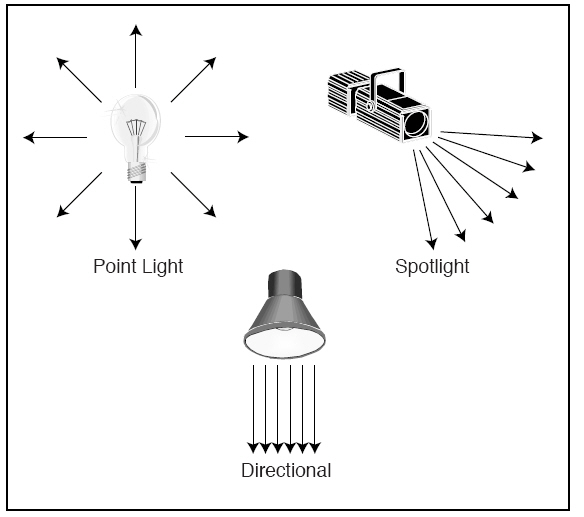
顏色是光的視覺感覺,DirectX為了支持場景的光照渲染,提供了點光源(Point Light),聚焦光源(Spot
Light),方向光源(Directional Light)和環境光源(Ambient Light)4種標準類型的光源設置。
點光源是一種向空間各個方向等強度發射光的光源,一個燈泡就是點光源的例子,點光源發射光的強度隨著距離的增加而逐漸減弱。
聚焦光源的發光區域是一個圓錐體,內錐光的強度沿著聚焦光的主發射方向,隨距離的增加而逐步衰減,外錐光的強度沿著外徑隨距離的增加而逐步衰減。手電筒是聚焦光源的一個例子。
方向光源從無限遠處以特定的方向發射平行光線到無窮遠處,光的強度不隨距離的增加而衰減。太陽光就是方向光源的一個例子,方向光源不需要設置光源位置,衰減系數和光照的作用范圍。
環境光是根據場景中的各種光源的綜合照射效果所模擬出的一種光源,這種光源的光來自各個方向,不做任何的衰減處理,能均勻地照射物體表面的各個部位。
如下圖所示:環境光、點光源、聚光燈以及直射光分別以不同的方式發射光線
當光源確定以后,就可以進一步設置照射光的各種屬性,以確定物體表面反射光的顏色。
光源及其反射光線的各種屬性可利用D3DLIGHT9結構體來進行設置,下面是該結構體的具體定義:
Defines a set of lighting properties.
typedef struct D3DLIGHT9 {
    D3DLIGHTTYPE Type;
    D3DCOLORVALUE Diffuse;
    D3DCOLORVALUE Specular;
    D3DCOLORVALUE Ambient;
    D3DVECTOR Position;
    D3DVECTOR Direction;
    float Range;
    float Falloff;
    float Attenuation0;
    float Attenuation1;
    float Attenuation2;
    float Theta;
    float Phi;
} D3DLIGHT9, *LPD3DLIGHT;
Members
- Type
- Type of the light source. This value is one of the members of the
D3DLIGHTTYPE enumerated type.
- Diffuse
- Diffuse color emitted by the light. This member is a D3DCOLORVALUE
structure.
- Specular
- Specular color emitted by the light. This member is a
D3DCOLORVALUE structure.
- Ambient
- Ambient color emitted by the light. This member is a
D3DCOLORVALUE structure.
- Position
- Position of the light in world space, specified by a D3DVECTOR
structure. This member has no meaning for directional lights and is ignored
in that case.
- Direction
- Direction that the light is pointing in world space, specified by a
D3DVECTOR structure. This member has meaning only for
directional and spotlights. This vector need not be normalized, but it
should have a nonzero length.
- Range
- Distance beyond which the light has no effect. The maximum allowable
value for this member is the square root of FLT_MAX. This member does not
affect directional lights.
- Falloff
Decrease in illumination between a spotlight's inner cone (the angle
specified by Theta) and the outer edge of the outer cone (the angle
specified by Phi).
- The effect of falloff on the lighting is subtle. Furthermore, a small
performance penalty is incurred by shaping the falloff curve. For these
reasons, most developers set this value to 1.0.
-
- Attenuation0
- Value specifying how the light intensity changes over distance.
Attenuation values are ignored for directional lights. This member
represents an attenuation constant. For information about attenuation, see
Light Properties (Direct3D 9). Valid values for this member range from 0.0
to infinity. For non-directional lights, all three attenuation values should
not be set to 0.0 at the same time.
- Attenuation1
- Value specifying how the light intensity changes over distance.
Attenuation values are ignored for directional lights. This member
represents an attenuation constant. For information about attenuation, see
Light Properties (Direct3D 9). Valid values for this member
range from 0.0 to infinity. For non-directional lights, all three
attenuation values should not be set to 0.0 at the same time.
- Attenuation2
- Value specifying how the light intensity changes over distance.
Attenuation values are ignored for directional lights. This member
represents an attenuation constant. For information about attenuation, see
Light Properties (Direct3D 9). Valid values for this member
range from 0.0 to infinity. For non-directional lights, all three
attenuation values should not be set to 0.0 at the same time.
- Theta
- Angle, in radians, of a spotlight's inner cone - that is, the fully
illuminated spotlight cone. This value must be in the range from 0 through
the value specified by Phi.
- Phi
- Angle, in radians, defining the outer edge of the spotlight's outer
cone. Points outside this cone are not lit by the spotlight. This value must
be between 0 and pi.
光源參數設置完畢,還需要利用IDirect3DDevice9接口的 SetLight函數將光源設置到渲染管道流水線中。
Assigns a set of lighting properties for this device.
HRESULT SetLight(
  DWORD Index,
  CONST D3DLight9 * pLight
);
Parameters
- Index
- [in] Zero-based index of the set of lighting properties to set. If a set
of lighting properties exists at this index, it is overwritten by the new
properties specified in pLight.
- pLight
- [in] Pointer to a D3DLIGHT9 structure, containing the lighting
parameters to set.
Return Values
If the method succeeds, the return value is D3D_OK. If the method fails, the
return value can be D3DERR_INVALIDCALL.
Remarks
Set light properties by preparing a D3DLIGHT9 structure and
then calling the IDirect3DDevice9::SetLight method. The
IDirect3DDevice9::SetLight method accepts the index at which the device
should place the set of light properties to its internal list of light
properties, and the address of a prepared D3DLIGHT9 structure
that defines those properties. You can call IDirect3DDevice9::SetLight
with new information as needed to update the light's illumination properties.
The system allocates memory to accommodate a set of lighting properties each
time you call the IDirect3DDevice9::SetLight method with an
index that has never been assigned properties. Applications can set a number of
lights, with only a subset of the assigned lights enabled at a time. Check the
MaxActiveLights member of the D3DCAPS9 structure when you retrieve device
capabilities to determine the maximum number of active lights supported by that
device. If you no longer need a light, you can disable it or overwrite it with a
new set of light properties.
The following example prepares and sets properties for a white point-light
whose emitted light will not attenuate over distance.
// Assume d3dDevice is a valid pointer to an IDirect3DDevice9 interface.
D3DLight9 d3dLight;
HRESULT   hr;

// Initialize the structure.
ZeroMemory(&D3dLight, sizeof(d3dLight));

// Set up a white point light.
d3dLight.Type = D3DLIGHT_POINT;
d3dLight.Diffuse.r  = 1.0f;
d3dLight.Diffuse.g  = 1.0f;
d3dLight.Diffuse.b  = 1.0f;
d3dLight.Ambient.r  = 1.0f;
d3dLight.Ambient.g  = 1.0f;
d3dLight.Ambient.b  = 1.0f;
d3dLight.Specular.r = 1.0f;
d3dLight.Specular.g = 1.0f;
d3dLight.Specular.b = 1.0f;

// Position it high in the scene and behind the user.
// Remember, these coordinates are in world space, so
// the user could be anywhere in world space, too.
// For the purposes of this example, assume the user
// is at the origin of world space.
d3dLight.Position.x = 0.0f;
d3dLight.Position.y = 1000.0f;
d3dLight.Position.z = -100.0f;

// Don't attenuate.
d3dLight.Attenuation0 = 1.0f;
d3dLight.Range        = 1000.0f;

// Set the property information for the first light.
hr = d3dDevice->SetLight(0, &d3dLight);
if (SUCCEEDED(hr))
    // Handle Success
else
    // Handle failure
Enable a light source by calling the IDirect3DDevice9::LightEnable method for
the device.
將光源設置給渲染管道流水線后,還需要利用IDirect3DDevice9接口的LightEnable函數開啟該光源,否則渲染管道流水線將不會采用該光源的參數進行光照處理。
Enables or disables a set of lighting parameters within a device.
HRESULT LightEnable(
  DWORD LightIndex,
  BOOL bEnable
);
- LightIndex
- [in] Zero-based index of the set of lighting parameters that are the
target of this method.
- bEnable
- [in] Value that indicates if the set of lighting parameters are being
enabled or disabled. Set this parameter to TRUE to enable lighting with the
parameters at the specified index, or FALSE to disable it.
If the method succeeds, the return value is D3D_OK. If the method fails, the
return value can be D3DERR_INVALIDCALL.
If a value for LightIndex is outside the range of the light property sets
assigned within the device, the IDirect3DDevice9::LightEnable method creates a
light source represented by a D3DLIGHT9 structure with the following properties
and sets its enabled state to the value specified in bEnable.
|
Member |
Default |
|
Type |
D3DLIGHT_DIRECTIONAL |
|
Diffuse |
(R:1, G:1, B:1, A:0) |
|
Specular |
(R:0, G:0, B:0, A:0) |
|
Ambient |
(R:0, G:0, B:0, A:0) |
|
Position |
(0, 0, 0) |
|
Direction |
(0, 0, 1) |
|
Range |
0 |
|
Falloff |
0 |
|
Attenuation0 |
0 |
|
Attenuation1 |
0 |
|
Attenuation2 |
0 |
|
Theta |
0 |
|
Phi |
0 |
當光源設置和開啟后,就需要調用IDirect3DDevice9接口的SetRenderState函數打開渲染管道流水線的光照開關。這樣,渲染管道流水線才會真正執行光照流程處理。
材質設置
物體受到光照而呈現出的表面顏色,一方面是照射光源的屬性來決定,另一方面則取決于物體對光的反射屬性和物體自身的表面顏色,即由物體的材質屬性來決定。
物體的材質屬性可用D3DMATERIAL9結構體進行設置:
Specifies material properties.
typedef struct D3DMATERIAL9 {
    D3DCOLORVALUE Diffuse;
    D3DCOLORVALUE Ambient;
    D3DCOLORVALUE Specular;
    D3DCOLORVALUE Emissive;
    float Power;
} D3DMATERIAL9, *LPD3DMATERIAL9;
Members
- Diffuse
- Value specifying the diffuse color of the material. See D3DCOLORVALUE.
- Ambient
- Value specifying the ambient color of the material. See
D3DCOLORVALUE.
- Specular
- Value specifying the specular color of the material. See
D3DCOLORVALUE.
- Emissive
- Value specifying the emissive color of the material. See
D3DCOLORVALUE.
- Power
- Floating-point value specifying the sharpness of specular highlights.
The higher the value, the sharper the highlight.
Remarks
To turn off specular highlights, set D3DRS_SPECULARENABLE to FALSE, using
D3DRENDERSTATETYPE. This is the fastest option because no specular highlights
will be calculated.
For more information about using the lighting engine to calculate specular
lighting, see Specular Lighting (Direct3D 9).
當材質結構體填充以后,就可以利用IDirect3DDevice9接口的SetMaterial函數設置渲染管道流水線進行物體表面渲染時所應采用的材質參數。
Sets the material properties for the device.
HRESULT SetMaterial(
  CONST D3DMATERIAL9 * pMaterial
);
Parameters
- pMaterial
- [in] Pointer to a D3DMATERIAL9 structure, describing the material
properties to set.
Return Values
If the method succeeds, the return value is D3D_OK. D3DERR_INVALIDCALL if the
pMaterial parameter is invalid.
頂點的法向量
三維場景物體的渲染歸結為各個剖分三角形面的渲染,每個三角形面的頂點坐標值用來確定三維物體的空間形態,而頂點的顏色值則可根據某種插值方法而計算出物體表面各個像素的顏色值。
在光源光的照射下,頂點的顏色值由光的入射方向與頂點的法向量的夾角來決定。為此,三維物體的光照處理必須提供頂點的坐標和法向量的坐標值,這樣渲染管道流水線執行到光照流程這一步時,就可取出頂點的法向量坐標值來計算頂點的實際光照顏色。
如下圖所示:每個頂點都有一個法線指向特定的方向,根據光線與法線之間的角度來確定光線如何在多邊形面上反彈以及如何進行陰影計算。
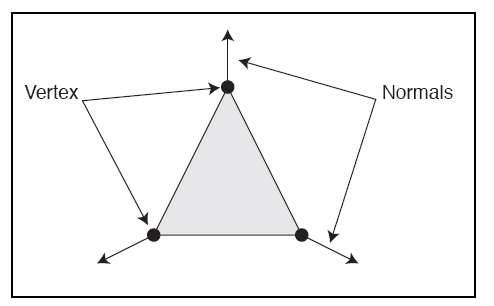
頂點往往是鄰接三角形面的公共交點,它的法向量可取為這些鄰接三角形面的法向量的一個平均向量,如此渲染出來頂點附近的表面顏色值將會是均勻變化的。如果頂點法向量直接取為某個所在三角形面的法向量,那么各個面的顏色將會互不相同。
無論頂點法向量采用三角形面的法向量,還是鄰接三角形面法向量的平均,都需要利用已知的三個頂點坐標,計算出三個頂點所在平面的法向量。
好了,我們現在來看看具體的編碼。
需要在工程中設置鏈接d3dx9.lib d3d9.lib dxguid.lib
dinput8.lib winmm.lib。
由于文件中用到了GE_APP和GE_INPUT這兩個類,它們的具體使用說明請參閱
主窗口和DirectInput的封裝。
同時用到了GE_TIMER這個類,具體請參閱游戲中時間的封裝。
若發現代碼中存在錯誤,敬請指出。
源碼下載
LightMaterial.h的定義:
/*************************************************************************************
[Include File]
PURPOSE:
Define for light and meterial.
*************************************************************************************/
#ifndef LIGHT_MATERIAL_H
#define LIGHT_MATERIAL_H
struct CUSTOM_VERTEX
{
float x, y, z;
float nx, ny, nz;
};
#define CUSTOM_VERTEX_FVF (D3DFVF_XYZ | D3DFVF_NORMAL)
class LIGHT_MATERIAL
{
private:
IDirect3D9* _d3d;
IDirect3DDevice9* _d3d_device;
IDirect3DVertexBuffer9* _vertex_buffer;
public:
LIGHT_MATERIAL();
~LIGHT_MATERIAL();
bool Create_D3D_Device(HWND hwnd, bool full_screen = true);
bool Init_Vertex_Buffer();
void Compute_Triangle_Normal(D3DXVECTOR3& v1, D3DXVECTOR3& v2, D3DXVECTOR3& v3, D3DVECTOR& normal);
void Set_Camera();
void Set_Point_Light(D3DCOLORVALUE& dif, D3DCOLORVALUE& amb, D3DCOLORVALUE& spe, D3DVECTOR& pos);
void Set_Object_Material(D3DCOLORVALUE& dif, D3DCOLORVALUE& amb, D3DCOLORVALUE& spe,
D3DCOLORVALUE& emi, float power);
void Render();
void Release_COM_Object();
};
#endif
LightMaterial.cpp的定義:
/*************************************************************************************
[Implement File]
PURPOSE:
Define for light and meterial.
*************************************************************************************/
#include "GE_COMMON.h"
#include "LightMaterial.h"
#define WINDOW_WIDTH 800
#define WINDOW_HEIGHT 600
//------------------------------------------------------------------------------------
// Constructor, do nothing.
//------------------------------------------------------------------------------------
LIGHT_MATERIAL::LIGHT_MATERIAL()
{
}
//------------------------------------------------------------------------------------
// Release all com object.
//------------------------------------------------------------------------------------
LIGHT_MATERIAL::~LIGHT_MATERIAL()
{
Release_COM_Object();
}
//------------------------------------------------------------------------------------
// Create direct3D interface and direct3D device.
//------------------------------------------------------------------------------------
bool LIGHT_MATERIAL::Create_D3D_Device(HWND hwnd, bool full_screen)
{
// Create a IDirect3D9 object and returns an interace to it.
_d3d = Direct3DCreate9(D3D_SDK_VERSION);
if(_d3d == NULL)
return false;
// retrieve adapter capability
D3DCAPS9 d3d_caps;
_d3d->GetDeviceCaps(D3DADAPTER_DEFAULT, D3DDEVTYPE_HAL, &d3d_caps);
bool hardware_process_enable = (d3d_caps.DevCaps & D3DDEVCAPS_HWTRANSFORMANDLIGHT ? true : false);
// Retrieves the current display mode of the adapter.
D3DDISPLAYMODE display_mode;
if(FAILED(_d3d->GetAdapterDisplayMode(D3DADAPTER_DEFAULT, &display_mode)))
return false;
// set present parameter for direct3D device
D3DPRESENT_PARAMETERS present_param = {0};
present_param.BackBufferWidth = WINDOW_WIDTH;
present_param.BackBufferHeight = WINDOW_HEIGHT;
present_param.BackBufferFormat = display_mode.Format;
present_param.BackBufferCount = 1;
present_param.hDeviceWindow = hwnd;
present_param.Windowed = !full_screen;
present_param.SwapEffect = D3DSWAPEFFECT_FLIP;
present_param.PresentationInterval = D3DPRESENT_INTERVAL_DEFAULT;
// Creates a device to represent the display adapter.
DWORD behavior_flags;
behavior_flags = hardware_process_enable ?
D3DCREATE_HARDWARE_VERTEXPROCESSING : D3DCREATE_SOFTWARE_VERTEXPROCESSING;
if(FAILED(_d3d->CreateDevice(D3DADAPTER_DEFAULT, D3DDEVTYPE_HAL, hwnd, behavior_flags,
&present_param, &_d3d_device)))
{
return false;
}
// create successfully
return true;
}
//------------------------------------------------------------------------------------
// Initialize vertex buffer.
//------------------------------------------------------------------------------------
bool LIGHT_MATERIAL::Init_Vertex_Buffer()
{
CUSTOM_VERTEX custom_vertex[12] = {0};
D3DXVECTOR3 v[]={
D3DXVECTOR3(5.0f, 6.0f, 5.0f), // left triangle
D3DXVECTOR3(6.0f, 0.0f, 3.0f),
D3DXVECTOR3(1.0f, 0.0f, 7.0f),
D3DXVECTOR3(5.0f, 6.0f, 5.0f), // right triangle
D3DXVECTOR3(10.0f, 0.0f, 8.0f),
D3DXVECTOR3(6.0f, 0.0f, 3.0f),
D3DXVECTOR3(5.0f, 6.0f, 5.0f), // back triangle
D3DXVECTOR3(1.0f, 0.0f, 7.0f),
D3DXVECTOR3(10.0f, 0.0f, 8.0f),
D3DXVECTOR3(1.0f, 0.0f, 7.0f), // bottom triangle
D3DXVECTOR3(6.0f, 0.0f, 3.0f),
D3DXVECTOR3(10.0f, 0.0f, 8.0f)
};
D3DVECTOR normal;
// compute all triangle normal
for(int i = 0; i < 12; i += 3)
{
// compute current triangle's normal
Compute_Triangle_Normal(v[i], v[i+1], v[i+2], normal);
// assign current vertex coordinate and current triangle normal to custom vertex array
for(int j = 0; j < 3; j++)
{
int k = i + j;
custom_vertex[k].x = v[k].x;
custom_vertex[k].y = v[k].y;
custom_vertex[k].z = v[k].z;
custom_vertex[k].nx = normal.x;
custom_vertex[k].ny = normal.y;
custom_vertex[k].nz = normal.z;
}
}
BYTE* vertex_data;
// create vertex buffer
if(FAILED(_d3d_device->CreateVertexBuffer(12 * sizeof(CUSTOM_VERTEX), 0, CUSTOM_VERTEX_FVF,
D3DPOOL_DEFAULT, &_vertex_buffer, NULL)))
{
return false;
}
// get data pointer to vertex buffer
if(FAILED(_vertex_buffer->Lock(0, 0, (void **) &vertex_data, 0)))
return false;
// copy custom vertex data into vertex buffer
memcpy(vertex_data, custom_vertex, sizeof(custom_vertex));
// unlock vertex buffer
_vertex_buffer->Unlock();
return true;
}
//------------------------------------------------------------------------------------
// Set camera position.
//------------------------------------------------------------------------------------
void LIGHT_MATERIAL::Set_Camera()
{
D3DXVECTOR3 eye(-6.0, 1.5, 10.0);
D3DXVECTOR3 at(6.0, 2.0, 3.0);
D3DXVECTOR3 up(0.0, 1.0, 0.0);
D3DXMATRIX view_matrix;
// Builds a left-handed, look-at matrix.
D3DXMatrixLookAtLH(&view_matrix, &eye, &at, &up);
// Sets d3d device view transformation state.
_d3d_device->SetTransform(D3DTS_VIEW, &view_matrix);
D3DXMATRIX proj_matrix;
// Builds a left-handed perspective projection matrix based on a field of view.
D3DXMatrixPerspectiveFovLH(&proj_matrix, D3DX_PI/2, 800/600, 1.0, 1000.0);
// Sets d3d device projection transformation state.
_d3d_device->SetTransform(D3DTS_PROJECTION, &proj_matrix);
// enable automatic normalization of vertex normals
_d3d_device->SetRenderState(D3DRS_NORMALIZENORMALS, true);
}
//------------------------------------------------------------------------------------
// Set point light.
//------------------------------------------------------------------------------------
void LIGHT_MATERIAL::Set_Point_Light(D3DCOLORVALUE& dif, D3DCOLORVALUE& amb, D3DCOLORVALUE& spe, D3DVECTOR& pos)
{
D3DLIGHT9 light;
// clear memory with 0
ZeroMemory(&light, sizeof(D3DLIGHT9));
light.Type = D3DLIGHT_POINT;
light.Diffuse = dif;
light.Ambient = amb;
light.Specular = spe;
light.Position = pos;
light.Attenuation0 = 1.0;
light.Attenuation1 = 0.0;
light.Attenuation2 = 0.0;
light.Range = 1000.0;
// Assigns point lighting properties for this device
_d3d_device->SetLight(0, &light);
// enable point light
_d3d_device->LightEnable(0, TRUE);
// enable light
_d3d_device->SetRenderState(D3DRS_LIGHTING, TRUE);
// add ambient light
_d3d_device->SetRenderState(D3DRS_AMBIENT, D3DCOLOR_XRGB(50, 50, 50));
}
//------------------------------------------------------------------------------------
// Sets the material properties for the device.
//------------------------------------------------------------------------------------
void LIGHT_MATERIAL::Set_Object_Material(D3DCOLORVALUE& dif, D3DCOLORVALUE& amb, D3DCOLORVALUE& spe,
D3DCOLORVALUE& emi, float power)
{
D3DMATERIAL9 material;
material.Diffuse = dif;
material.Ambient = amb;
material.Specular = spe;
material.Emissive = emi;
material.Power = power;
// Sets the material properties for the device.
_d3d_device->SetMaterial(&material);
}
//------------------------------------------------------------------------------------
// Compute triangle normal.
//------------------------------------------------------------------------------------
void LIGHT_MATERIAL::Compute_Triangle_Normal(D3DXVECTOR3& v1, D3DXVECTOR3& v2, D3DXVECTOR3& v3, D3DVECTOR& normal)
{
D3DXVECTOR3 vec1 = v1 - v2;
D3DXVECTOR3 vec2 = v1 - v3;
D3DXVECTOR3 normal_vec;
D3DXVec3Cross(&normal_vec, &vec1, &vec2);
D3DXVec3Normalize(&normal_vec, &normal_vec);
normal = (D3DVECTOR) normal_vec;
}
//------------------------------------------------------------------------------------
// Render object.
//------------------------------------------------------------------------------------
void LIGHT_MATERIAL::Render()
{
if(_d3d_device == NULL)
return;
// clear surface with black
_d3d_device->Clear(0, NULL, D3DCLEAR_TARGET, D3DCOLOR_XRGB(0, 0, 0), 1.0, 0);
// begin scene
_d3d_device->BeginScene();
// Binds a vertex buffer to a device data stream.
_d3d_device->SetStreamSource(0, _vertex_buffer, 0, sizeof(CUSTOM_VERTEX));
// Sets the current vertex stream declaration.
_d3d_device->SetFVF(CUSTOM_VERTEX_FVF);
// Renders a sequence of nonindexed, geometric primitives of the specified type from the current
// set of data input streams.
_d3d_device->DrawPrimitive(D3DPT_TRIANGLELIST, 0, 4);
// end scene
_d3d_device->EndScene();
// Presents the contents of the next buffer in the sequence of back buffers owned by the device.
_d3d_device->Present(NULL, NULL, NULL, NULL);
}
//------------------------------------------------------------------------------------
// Release vertex buffer, D3D device, D3D.
//------------------------------------------------------------------------------------
void LIGHT_MATERIAL::Release_COM_Object()
{
Safe_Release(_vertex_buffer);
Safe_Release(_d3d_device);
Safe_Release(_d3d);
}
再編寫個測試用例,main.cpp的定義如下所示:
/*************************************************************************************
[Implement File]
PURPOSE:
Test for material and lighting.
*************************************************************************************/
#define DIRECTINPUT_VERSION 0x0800
#include "GE_APP.h"
#include "GE_INPUT.h"
#include "GE_TIMER.h"
#include "LightMaterial.h"
#pragma warning(disable : 4305 4996)
int WINAPI WinMain(HINSTANCE instance, HINSTANCE, LPSTR cmd_line, int cmd_show)
{
GE_APP ge_app;
GE_INPUT ge_input;
GE_TIMER ge_timer;
LIGHT_MATERIAL light_material;
MSG msg = {0};
float last_time = 0;
// set for material property
D3DCOLORVALUE material_dif = {1.0f, 1.0f, 1.0f, 1.0f};
D3DCOLORVALUE material_amb = {1.0f, 1.0f, 1.0f, 1.0f};
D3DCOLORVALUE material_spe = {1.0f, 0.0f, 0.0f, 1.0f};
D3DCOLORVALUE material_emi = {0.0f, 0.0f, 1.0f, 1.0f};
// set for light property
D3DCOLORVALUE light_dif = {1.0f, 0.0f, 0.0f, 1.0f};
D3DCOLORVALUE light_amb = {0.0f, 0.7f, 0.0f, 1.0f};
D3DCOLORVALUE light_spe = {0.0f, 0.0f, 0.0f, 0.0f};
D3DVECTOR light_pos = {5.0f, 6.0f, -20.0f};
// create window
if(! ge_app.Create_Window("Material and light test", instance, cmd_show))
return false;
HWND hwnd = ge_app.Get_Window_Handle();
// create directinput
ge_input.Create_Input(instance, hwnd);
SetWindowPos(hwnd, 0, 0,0,0,0, SWP_NOSIZE);
SetCursorPos(0, 0);
// initialize game time
ge_timer.Init_Game_Time();
// Create direct3D interface and direct3D device.
if(! light_material.Create_D3D_Device(hwnd, false))
return false;
// Initialize vertex buffer with curstom vertex structure.
if(! light_material.Init_Vertex_Buffer())
return false;
// set camera position
light_material.Set_Camera();
// Sets the material properties for the device.
light_material.Set_Object_Material(material_dif, material_amb, material_spe, material_emi, 0);
// set point light
light_material.Set_Point_Light(light_dif, light_amb, light_spe, light_pos);
// render object
light_material.Render();
while(msg.message != WM_QUIT)
{
if(PeekMessage(&msg, NULL, 0,0 , PM_REMOVE))
{
TranslateMessage(&msg);
DispatchMessage(&msg);
}
else
{
// read data from keyboard buffer
if(ge_input.Read_Keyboard())
{
// press "ESC", close window.
if(ge_input.Is_Key_Pressed(DIK_ESCAPE))
PostQuitMessage(0);
}
// If it is time to render, reset point light property and render it.
if((ge_timer.Get_Game_Play_Time() - last_time) > 70)
{
if(light_amb.r < 1.0f)
light_amb.r += 0.001f;
else
light_amb.r = 0.0f;
if(light_amb.g < 1.0f)
light_amb.g += 0.02f;
else
light_amb.g = 0.0f;
if(light_amb.b < 1.0f)
light_amb.b += 0.03f;
else
light_amb.b = 0.0f;
// reset point light
light_material.Set_Point_Light(light_dif, light_amb, light_spe, light_pos);
// render object
light_material.Render();
// update last render time
last_time = ge_timer.Get_Game_Play_Time();
}
}
}
UnregisterClass(WINDOW_CLASS_NAME, instance);
return true;
}
該函數為了每隔一段時間改變三棱錐的光照顏色,調用時鐘的
Get_Game_Play_Time函數計算時間差,然后將頂點坐標和頂點法向量坐標倒入渲染管道流水線,架設攝影機進行取景,設置光源和三棱錐的材質屬性。最后,在定時器計算出的一幀時間內,改變光源的顏色屬性,完成每一幀的渲染。
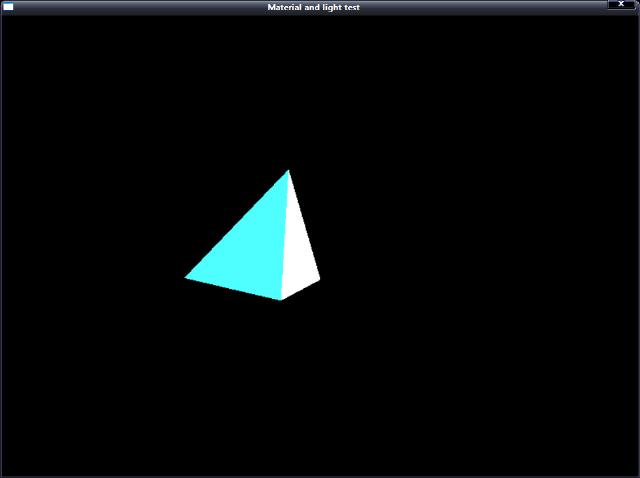
輸出效果: