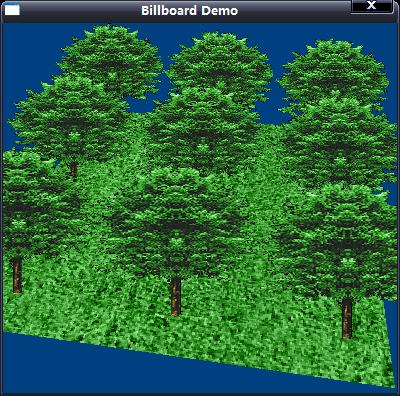
點擊下載源碼和素材
公告板(billboard)是一種允許在2D對象出現在3D中的很酷的技術。舉例來說,一個復雜的對象,諸如一棵樹,在一個建模程序中,可以從側視圖(side
view)進行渲染,然后在一個矩陣的多邊形上進行繪制。這個矩形的多邊形通常朝向觀察點,因此不論從多邊形的哪個角度進行觀察,樹紋理都好像是從渲染一側被觀察到。
如下所示,不管從哪個位置或角度觀察多邊形,公告板技術保證了多邊形始終朝向觀察點。
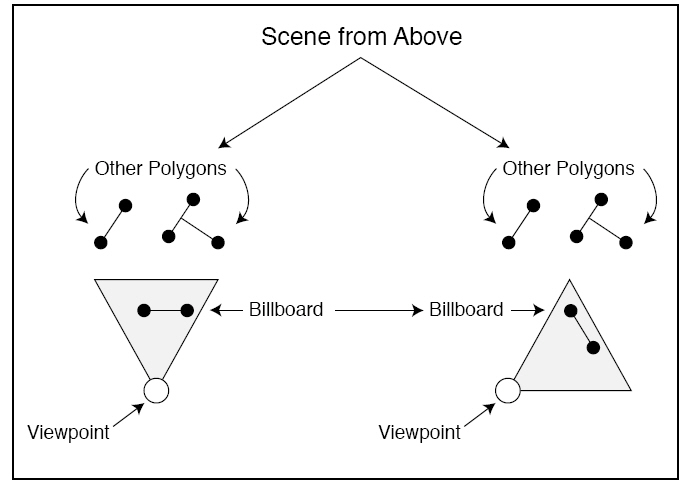
公告板的原理就是通過使用世界矩陣,根據觀察點來排列多邊形,因為觀察的角度已知(或能夠獲得一個觀察變換矩陣),就只需要使用相反的觀察角來構造矩陣。
不必改變多邊形的位置,因為角度就已經足夠了。
構造公告板世界矩陣(這個矩陣可以應用到一個網格或多邊形上)的第一種方法就是使用已知觀察角的相反值。
舉例來說,假設已經設置好了帶有頂點的頂點緩沖,觀察點角度存儲為x_rot,y_rot,z_rot,并且公告板對象的坐標是x_coord,y_coord,z_coord。下面的代碼演示了如何設置矩陣,以便用于渲染公告板頂點緩沖:
float x_rot = D3DX_PI / 4, y_rot = D3DX_PI / 2, z_rot = D3DX_PI / 8;
float x_coord = 2.0f, y_coord = 3.0f, z_coord = 5.0f;
D3DXMATRIX mat_billboard;
D3DXMATRIX mat_x_rot, mat_y_rot, mat_z_rot;
D3DXMATRIX mat_trans;
// 構造公告板矩陣
// 使用同觀察點相反的角度進行定位,以便進行觀察。
D3DXMatrixRotationX(&mat_x_rot, -x_rot);
D3DXMatrixRotationY(&mat_y_rot, -y_rot);
D3DXMatrixRotationZ(&mat_z_rot, -z_rot);
// 使用公告板對象坐標進行定位
D3DXMatrixTranslation(&mat_trans, x_coord, y_coord, z_coord);
// 合并矩陣
D3DXMatrixIdentity(&mat_billboard);
D3DXMatrixMultiply(&mat_billboard, &mat_billboard, &mat_trans);
D3DXMatrixMultiply(&mat_billboard, &mat_billboard, &mat_z_rot);
D3DXMatrixMultiply(&mat_billboard, &mat_billboard, &mat_y_rot);
D3DXMatrixMultiply(&mat_billboard, &mat_billboard, &mat_x_rot);
// 設置矩陣
g_d3d_device->SetTransform(D3DTS_WORLD, &mat_billboard);
// 繼續繪制頂點緩沖,此頂點緩沖已經在合適的坐標上進行定位,以朝向觀察點。
創建公告板世界矩陣的第二種方法是從Direct3D獲取當前的觀察矩陣并將此矩陣轉置。這個轉置矩陣會將所有的東西進行恰當的定位,以朝向觀察點。接著就只需應用網格的平移矩陣,在世界中正確地確定網格的位置。
下面的代碼演示了如何從觀察矩陣構造出公告板矩陣,并使用這個矩陣來繪制公告板對象:
float x_coord = 2.0f, y_coord = 3.0f, z_coord = 5.0f;
D3DXMATRIX mat_trans, mat_world, mat_transpose;
// 得到當前的Direct3D觀察矩陣
g_d3d_device->GetTransform(D3DTS_VIEW, &mat_transpose);
// 創建網格的平移矩陣
D3DXMatrixTranslation(&mat_trans, x_coord, y_coord, z_coord);
// 將前兩個矩陣相乘得到世界變換矩陣
D3DXMatrixMultiply(&mat_world, &mat_transpose, &mat_trans);
// 設置世界變換矩陣
g_d3d_device->SetTransform(D3DTS_WORLD, &mat_world);
// 繼續繪制頂點緩沖,此頂點緩沖已經在合適的坐標上進行定位,以朝向觀察點。
公告板是一種強大的技術,它實際上也是其他一些特效的基礎,比如粒子。
源碼中的Setup_Mesh函數用來創建頂點緩沖和從文件取得紋理數據,其中用到了D3DXCreateTextureFromFileEx函數,來看看它的使用信息:
Creates a texture from a file. This is a more advanced function than
D3DXCreateTextureFromFile.
HRESULT D3DXCreateTextureFromFileEx(
  LPDIRECT3DDEVICE9 pDevice,
  LPCTSTR pSrcFile,
  UINT Width,
  UINT Height,
  UINT MipLevels,
  DWORD Usage,
  D3DFORMAT Format,
  D3DPOOL Pool,
  DWORD Filter,
  DWORD MipFilter,
  D3DCOLOR ColorKey,
  D3DXIMAGE_INFO * pSrcInfo,
  PALETTEENTRY * pPalette,
  LPDIRECT3DTEXTURE9 * ppTexture
);
Parameters
- pDevice
- [in] Pointer to an IDirect3DDevice9 interface, representing the device
to be associated with the texture.
- pSrcFile
- [in] Pointer to a string that specifies the filename. If the compiler
settings require Unicode, the data type LPCTSTR resolves to LPCWSTR.
Otherwise, the string data type resolves to LPCSTR. See Remarks.
- Width
- [in] Width in pixels. If this value is zero or D3DX_DEFAULT, the
dimensions are taken from the file and rounded up to a power of two. If the
device supports non-power of 2 textures and D3DX_DEFAULT_NONPOW2 is
specified, the size will not be rounded.
- Height
- [in] Height, in pixels. If this value is zero or D3DX_DEFAULT, the
dimensions are taken from the file and rounded up to a power of two. If the
device supports non-power of 2 textures and D3DX_DEFAULT_NONPOW2 is
sepcified, the size will not be rounded.
- MipLevels
- [in] Number of mip levels requested. If this value is zero or
D3DX_DEFAULT, a complete mipmap chain is created. If D3DX_FROM_FILE, the
size will be taken exactly as it is in the file, and the call will fail if
this violates device capabilities.
- Usage
- [in] 0, D3DUSAGE_RENDERTARGET, or D3DUSAGE_DYNAMIC. Setting this
flag to D3DUSAGE_RENDERTARGET indicates that the surface is to be
used as a render target. The resource can then be passed to the
pNewRenderTarget parameter of the IDirect3DDevice9::SetRenderTarget method.
If either D3DUSAGE_RENDERTARGET or D3DUSAGE_DYNAMIC is
specified, Pool must be set to D3DPOOL_DEFAULT, and the application should
check that the device supports this operation by calling
IDirect3D9::CheckDeviceFormat. D3DUSAGE_DYNAMIC indicates that the
surface should be handled dynamically. See Using Dynamic Textures.
- Format
- [in] Member of the D3DFORMAT enumerated type, describing the requested
pixel format for the texture. The returned texture might have a different
format from that specified by Format. Applications should check the format
of the returned texture. If D3DFMT_UNKNOWN, the format is taken from the
file. If D3DFMT_FROM_FILE, the format is taken exactly as it is in the file,
and the call will fail if this violates device capabilities.
- Pool
- [in] Member of the D3DPOOL enumerated type, describing the memory class
into which the texture should be placed.
- Filter
- [in] A combination of one or more D3DX_FILTER constants controlling how
the image is filtered. Specifying D3DX_DEFAULT for this parameter is
the equivalent of specifying D3DX_FILTER_TRIANGLE | D3DX_FILTER_DITHER.
- MipFilter
- [in] A combination of one or more D3DX_FILTER constants
controlling how the image is filtered. Specifying D3DX_DEFAULT for this
parameter is the equivalent of specifying D3DX_FILTER_BOX. In addition, use
bits 27-31 to specify the number of mip levels to be skipped (from the top
of the mipmap chain) when a .dds texture is loaded into memory; this allows
you to skip up to 32 levels.
- ColorKey
- [in] D3DCOLOR value to replace with transparent black, or 0 to disable
the color key. This is always a 32-bit ARGB color, independent of the source
image format. Alpha is significant and should usually be set to FF for
opaque color keys. Thus, for opaque black, the value would be equal to
0xFF000000.
- pSrcInfo
- [in, out] Pointer to a D3DXIMAGE_INFO structure to be filled in with a
description of the data in the source image file, or NULL.
- pPalette
- [out] Pointer to a PALETTEENTRY structure, representing a 256-color
palette to fill in, or NULL.
- ppTexture
- [out] Address of a pointer to an IDirect3DTexture9 interface,
representing the created texture object.
Return Values
If the function succeeds, the return value is D3D_OK. If the function fails,
the return value can be one of the following: D3DERR_INVALIDCALL.
D3DERR_NOTAVAILABLED3DERR_OUTOFVIDEOMEMORYD3DXERR_INVALIDDATAE_OUTOFMEMORY
Remarks
The compiler setting also determines the function version. If Unicode is
defined, the function call resolves to D3DXCreateTextureFromFileExW. Otherwise,
the function call resolves to D3DXCreateTextureFromFileExA because ANSI strings
are being used.
Use D3DXCheckTextureRequirements to determine if your device can support the
texture given the current state.
This function supports the following file formats: .bmp, .dds, .dib, .hdr,
.jpg, .pfm, .png, .ppm, and .tga. See D3DXIMAGE_FILEFORMAT.
Mipmapped textures automatically have each level filled with the loaded
texture. When loading images into mipmapped textures, some devices are unable to
go to a 1x1 image and this function will fail. If this happens, then the images
need to be loaded manually.
For the best performance when using D3DXCreateTextureFromFileEx:
- Doing image scaling and format conversion at load time can be slow.
Store images in the format and resolution they will be used. If the target
hardware requires power of 2 dimensions, then create and store images using
power of 2 dimensions.
- For mipmap image creation at load time, filter using D3DX_FILTER_BOX.
A box filter is much faster than other filter types such as
D3DX_FILTER_TRIANGLE.
- Consider using DDS files. Since DDS files can be used to represent any
Direct3D 9 texture format, they are very easy for D3DX to read. Also, they
can store mipmaps, so any mipmap-generation algorithms can be used to author
the images.
When skipping mipmap levels while loading a .dds file, use the
D3DX_SKIP_DDS_MIP_LEVELS macro to generate the MipFilter value. This macro takes
the number of levels to skip and the filter type and returns the filter value,
which would then be passed into the MipFilter parameter.
我們來看看Do_Frame是如何進行公告板的繪制的,以下是關鍵代碼:
// build view matrix
D3DXMatrixLookAtLH(&mat_view, &D3DXVECTOR3(cos(angle) * 200.0, 200.0, sin(angle) * 200.0),
&D3DXVECTOR3(0.0, 0.0, 0.0), &D3DXVECTOR3(0.0, 1.0, 0.0));
// set view matrix
g_d3d_device->SetTransform(D3DTS_VIEW, &mat_view);
// Begin scene
if(SUCCEEDED(g_d3d_device->BeginScene()))
{
// 1) draw the floor
// binds a vertex buffer to a device data stream
g_d3d_device->SetStreamSource(0, g_floor_vb, 0, sizeof(VERTEX));
// set the current vertex stream declation
g_d3d_device->SetFVF(VERTEX_FVF);
// assigns a texture to a stage for a device
g_d3d_device->SetTexture(0, g_floor_texture);
// build world matrix, we only need identity matrix, because we do not need to change original floor position.
D3DXMatrixIdentity(&mat_world);
// set world matrix
g_d3d_device->SetTransform(D3DTS_WORLD, &mat_world);
// renders a sequence of noindexed, geometric primitives of the specified type from the current set
// of data input stream.
g_d3d_device->DrawPrimitive(D3DPT_TRIANGLESTRIP, 0, 2);
// 2) draw the billboards
g_d3d_device->SetStreamSource(0, g_billboard_vb, 0, sizeof(VERTEX));
g_d3d_device->SetTexture(0, g_billboard_texture);
// enable alpha test
g_d3d_device->SetRenderState(D3DRS_ALPHATESTENABLE, TRUE);
// get world matrix, just get it from view matrix's transpose.
D3DXMatrixTranspose(&mat_world, &mat_view);
// draw all billboard images
for(short i = 0; i < 3; i++)
{
for(short j = 0; j < 3; j++)
{
mat_world._41 = i * 80.0 - 80.0;
mat_world._42 = 0.0;
mat_world._43 = j * 80.0 - 80.0;
// set world matrix
g_d3d_device->SetTransform(D3DTS_WORLD, &mat_world);
// draw polygon
g_d3d_device->DrawPrimitive(D3DPT_TRIANGLESTRIP, 0, 2);
}
}
// disable alpha test
g_d3d_device->SetRenderState(D3DRS_ALPHATESTENABLE, FALSE);
// release texture
g_d3d_device->SetTexture(0, NULL);
// end the scene
g_d3d_device->EndScene();
}
1)
地板的繪制:首先調用
D3DXMatrixLookAtLH取得視口矩陣,接著調用SetTransform設置視口矩陣。繪制地板時先調用SetStreamSource和SetFVF設置頂點信息,再調用SetTexture設置紋理,接著調用D3DXMatrixIdentity單位化世界矩陣并設置世界矩陣,因為我們不需要改變地板的位置,所以世界矩陣直接設置為單位矩陣就可以了;再接著調用DrawPrimitive繪制圖形。
2)公告板的繪制:首先設置頂點數據格式,接著啟用alpha測試,再接著將視口矩陣轉置得到世界矩陣,使用兩層for循環來平移世界矩陣并設置世界矩陣,最后繪制這些公告板。
// draw all billboard images
for(short i = 0; i < 3; i++)
{
for(short j = 0; j < 3; j++)
{
mat_world._41 = i * 80.0 - 80.0;
mat_world._42 = 0.0;
mat_world._43 = j * 80.0 - 80.0;
// set world matrix
g_d3d_device->SetTransform(D3DTS_WORLD, &mat_world);
// draw polygon
g_d3d_device->DrawPrimitive(D3DPT_TRIANGLESTRIP, 0, 2);
}
}
完整源碼如下:
/***************************************************************************************
PURPOSE:
Billboard Demo
Required libraries:
WINMM.lib, D3D9.LIB, D3DX9.LIB.
***************************************************************************************/
#include <windows.h>
#include <stdio.h>
#include "d3d9.h"
#include "d3dx9.h"
#pragma comment(lib, "winmm.lib")
#pragma comment(lib, "d3d9.lib")
#pragma comment(lib, "d3dx9.lib")
#pragma warning(disable : 4305 4244)
#define WINDOW_WIDTH 400
#define WINDOW_HEIGHT 400
#define Safe_Release(p) if((p)) (p)->Release();
// window handles, class and caption text.
HWND g_hwnd;
HINSTANCE g_inst;
static char g_class_name[] = "BillboardClass";
static char g_caption[] = "Billboard Demo";
// the Direct3D and device object
IDirect3D9* g_d3d = NULL;
IDirect3DDevice9* g_d3d_device = NULL;
// The 3D vertex format and descriptor
typedef struct
{
float x, y, z; // 3D coordinates
float u, v; // texture coordinates
} VERTEX;
#define VERTEX_FVF (D3DFVF_XYZ | D3DFVF_TEX1)
// the billboard vertex buffer and texture
IDirect3DVertexBuffer9* g_billboard_vb = NULL;
IDirect3DTexture9* g_billboard_texture = NULL;
// the floor vertex buffer and texture
IDirect3DVertexBuffer9* g_floor_vb = NULL;
IDirect3DTexture9* g_floor_texture = NULL;
//--------------------------------------------------------------------------------
// Window procedure.
//--------------------------------------------------------------------------------
long WINAPI Window_Proc(HWND hwnd, UINT msg, WPARAM wParam, LPARAM lParam)
{
switch(msg)
{
case WM_DESTROY:
PostQuitMessage(0);
return 0;
}
return (long) DefWindowProc(hwnd, msg, wParam, lParam);
}
//--------------------------------------------------------------------------------
// Copy vertex data into vertex buffer, create texture from file.
//--------------------------------------------------------------------------------
BOOL Setup_Mesh()
{
BYTE* vertex_ptr;
VERTEX billboard_verts[] = {
{ -42.0f, 80.0f, 0.0f, 0.0f, 0.0f },
{ 40.0f, 80.0f, 0.0f, 1.0f, 0.0f },
{ -40.0f, 0.0f, 0.0f, 0.0f, 1.0f },
{ 40.0f, 0.0f, 0.0f, 1.0f, 1.0f }
};
VERTEX floor_verts[] = {
{ -100.0f, 0.0f, 100.0f, 0.0f, 0.0f },
{ 100.0f, 0.0f, 100.0f, 1.0f, 0.0f },
{ -100.0f, 0.0f, -100.0f, 0.0f, 1.0f },
{ 100.0f, 0.0f, -100.0f, 1.0f, 1.0f }
};
// create vertex buffers and stuff in data
// for billboard
if(FAILED(g_d3d_device->CreateVertexBuffer(sizeof(billboard_verts), 0, VERTEX_FVF, D3DPOOL_DEFAULT,
&g_billboard_vb, NULL)))
return FALSE;
// locks a range of vertex data and obtains a pointer to the vertex buffer memory
if(FAILED(g_billboard_vb->Lock(0, 0, (void**)&vertex_ptr, 0)))
return FALSE;
memcpy(vertex_ptr, billboard_verts, sizeof(billboard_verts));
// unlocks vertex data
g_billboard_vb->Unlock();
// for floor
if(FAILED(g_d3d_device->CreateVertexBuffer(sizeof(floor_verts), 0, VERTEX_FVF, D3DPOOL_DEFAULT, &g_floor_vb, NULL)))
return FALSE;
// locks a range of vertex data and obtains a pointer to the vertex buffer memory
if(FAILED(g_floor_vb->Lock(0, 0, (void**)&vertex_ptr, 0)))
return FALSE;
memcpy(vertex_ptr, floor_verts, sizeof(floor_verts));
// unlocks vertex data
g_floor_vb->Unlock();
// get textures
D3DXCreateTextureFromFile(g_d3d_device, "Floor.bmp", &g_floor_texture);
// Creates a texture from a file.
D3DXCreateTextureFromFileEx(g_d3d_device, "Billboard.bmp", D3DX_DEFAULT, D3DX_DEFAULT,
D3DX_DEFAULT, 0, D3DFMT_A1R5G5B5, D3DPOOL_MANAGED, D3DX_FILTER_TRIANGLE, D3DX_FILTER_TRIANGLE,
D3DCOLOR_RGBA(0,0,0,255), NULL, NULL, &g_billboard_texture);
return TRUE;
}
//--------------------------------------------------------------------------------
// Initialize d3d, d3d device, vertex buffer, texutre; set render state for d3d;
// set perspective matrix.
//--------------------------------------------------------------------------------
BOOL Do_Init()
{
D3DPRESENT_PARAMETERS present_param;
D3DDISPLAYMODE display_mode;
D3DXMATRIX mat_proj, mat_view;
// do a windowed mode initialization of Direct3D
if((g_d3d = Direct3DCreate9(D3D_SDK_VERSION)) == NULL)
return FALSE;
// retrieves the current display mode of the adapter
if(FAILED(g_d3d->GetAdapterDisplayMode(D3DADAPTER_DEFAULT, &display_mode)))
return FALSE;
ZeroMemory(&present_param, sizeof(present_param));
// initialize d3d presentation parameter
present_param.Windowed = TRUE;
present_param.SwapEffect = D3DSWAPEFFECT_DISCARD;
present_param.BackBufferFormat = display_mode.Format;
present_param.EnableAutoDepthStencil = TRUE;
present_param.AutoDepthStencilFormat = D3DFMT_D16;
// creates a device to represent the display adapter
if(FAILED(g_d3d->CreateDevice(D3DADAPTER_DEFAULT, D3DDEVTYPE_HAL, g_hwnd,
D3DCREATE_SOFTWARE_VERTEXPROCESSING, &present_param, &g_d3d_device)))
return FALSE;
// set render state
// disable d3d lighting
g_d3d_device->SetRenderState(D3DRS_LIGHTING, FALSE);
// enable z-buffer
g_d3d_device->SetRenderState(D3DRS_ZENABLE, D3DZB_TRUE);
// set alpha reference value and function
g_d3d_device->SetRenderState(D3DRS_ALPHAREF, 0x01);
g_d3d_device->SetRenderState(D3DRS_ALPHAFUNC, D3DCMP_GREATEREQUAL);
// create and set the projection matrix
// builds a left-handed perspective projection matrix based on a field of view
D3DXMatrixPerspectiveFovLH(&mat_proj, D3DX_PI/4.0, 1.0, 1.0, 1000.0);
// sets a single device transformation-related state
g_d3d_device->SetTransform(D3DTS_PROJECTION, &mat_proj);
// create the meshes
Setup_Mesh();
return TRUE;
}
//--------------------------------------------------------------------------------
// Release all d3d resource.
//--------------------------------------------------------------------------------
BOOL Do_Shutdown()
{
Safe_Release(g_billboard_vb);
Safe_Release(g_billboard_texture);
Safe_Release(g_floor_vb);
Safe_Release(g_floor_texture);
Safe_Release(g_d3d_device);
Safe_Release(g_d3d);
return TRUE;
}
//--------------------------------------------------------------------------------
// Render a frame.
//--------------------------------------------------------------------------------
BOOL Do_Frame()
{
D3DXMATRIX mat_view, mat_world;
// clear device back buffer
g_d3d_device->Clear(0, NULL, D3DCLEAR_TARGET | D3DCLEAR_ZBUFFER, D3DCOLOR_RGBA(0, 64, 128, 255), 1.0f, 0);
// update the view position
float angle = (float) timeGetTime() / 2000.0;
// build view matrix
D3DXMatrixLookAtLH(&mat_view, &D3DXVECTOR3(cos(angle) * 200.0, 200.0, sin(angle) * 200.0),
&D3DXVECTOR3(0.0, 0.0, 0.0), &D3DXVECTOR3(0.0, 1.0, 0.0));
// set view matrix
g_d3d_device->SetTransform(D3DTS_VIEW, &mat_view);
// Begin scene
if(SUCCEEDED(g_d3d_device->BeginScene()))
{
// 1) draw the floor
// binds a vertex buffer to a device data stream
g_d3d_device->SetStreamSource(0, g_floor_vb, 0, sizeof(VERTEX));
// set the current vertex stream declation
g_d3d_device->SetFVF(VERTEX_FVF);
// assigns a texture to a stage for a device
g_d3d_device->SetTexture(0, g_floor_texture);
// build world matrix, we only need identity matrix, because we do not need to change original floor position.
D3DXMatrixIdentity(&mat_world);
// set world matrix
g_d3d_device->SetTransform(D3DTS_WORLD, &mat_world);
// renders a sequence of noindexed, geometric primitives of the specified type from the current set
// of data input stream.
g_d3d_device->DrawPrimitive(D3DPT_TRIANGLESTRIP, 0, 2);
// 2) draw the billboards
g_d3d_device->SetStreamSource(0, g_billboard_vb, 0, sizeof(VERTEX));
g_d3d_device->SetTexture(0, g_billboard_texture);
// enable alpha test
g_d3d_device->SetRenderState(D3DRS_ALPHATESTENABLE, TRUE);
// get world matrix, just get it from view matrix's transpose.
D3DXMatrixTranspose(&mat_world, &mat_view);
// draw all billboard images
for(short i = 0; i < 3; i++)
{
for(short j = 0; j < 3; j++)
{
mat_world._41 = i * 80.0 - 80.0;
mat_world._42 = 0.0;
mat_world._43 = j * 80.0 - 80.0;
// set world matrix
g_d3d_device->SetTransform(D3DTS_WORLD, &mat_world);
// draw polygon
g_d3d_device->DrawPrimitive(D3DPT_TRIANGLESTRIP, 0, 2);
}
}
// disable alpha test
g_d3d_device->SetRenderState(D3DRS_ALPHATESTENABLE, FALSE);
// release texture
g_d3d_device->SetTexture(0, NULL);
// end the scene
g_d3d_device->EndScene();
}
// present the contents of the next buffer in the sequence of back buffers owned by the device
g_d3d_device->Present(NULL, NULL, NULL, NULL);
return TRUE;
}
//--------------------------------------------------------------------------------
// Main function, routine entry.
//--------------------------------------------------------------------------------
int WINAPI WinMain(HINSTANCE inst, HINSTANCE, LPSTR cmd_line, int cmd_show)
{
WNDCLASSEX win_class;
MSG msg;
g_inst = inst;
// create window class and register it
win_class.cbSize = sizeof(win_class);
win_class.style = CS_CLASSDC;
win_class.lpfnWndProc = Window_Proc;
win_class.cbClsExtra = 0;
win_class.cbWndExtra = 0;
win_class.hInstance = inst;
win_class.hIcon = LoadIcon(NULL, IDI_APPLICATION);
win_class.hCursor = LoadCursor(NULL, IDC_ARROW);
win_class.hbrBackground = NULL;
win_class.lpszMenuName = NULL;
win_class.lpszClassName = g_class_name;
win_class.hIconSm = LoadIcon(NULL, IDI_APPLICATION);
if(! RegisterClassEx(&win_class))
return FALSE;
// create the main window
g_hwnd = CreateWindow(g_class_name, g_caption, WS_CAPTION | WS_SYSMENU, 0, 0,
WINDOW_WIDTH, WINDOW_HEIGHT, NULL, NULL, inst, NULL);
if(g_hwnd == NULL)
return FALSE;
ShowWindow(g_hwnd, SW_NORMAL);
UpdateWindow(g_hwnd);
// initialize game
if(Do_Init() == FALSE)
return FALSE;
// start message pump, waiting for signal to quit.
ZeroMemory(&msg, sizeof(MSG));
while(msg.message != WM_QUIT)
{
if(PeekMessage(&msg, NULL, 0, 0, PM_REMOVE))
{
TranslateMessage(&msg);
DispatchMessage(&msg);
}
// draw a frame
if(Do_Frame() == FALSE)
break;
}
// run shutdown function
Do_Shutdown();
UnregisterClass(g_class_name, inst);
return (int) msg.wParam;
}
效果圖: