本篇是用DirectX
Audio和DirectShow播放聲音和音樂(2)的續篇。
調整聲道平衡
所謂聲道平衡就是調節左右聲道的大小,如下圖所示:
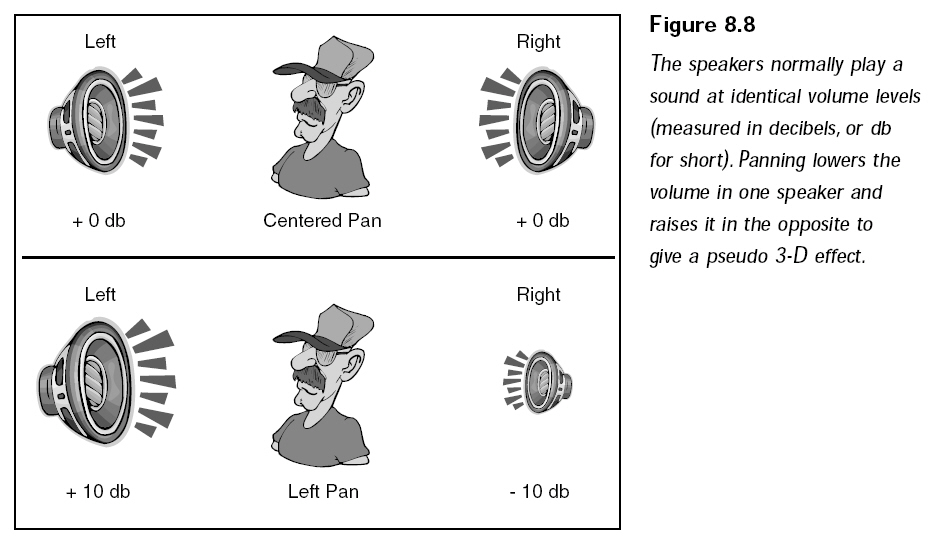
我們一般使用的喇叭或耳機都有左右兩個聲道,把自己想象成在左右聲道兩邊移動的點,一般情況下在中間,這樣聽到的來自左右聲道的音量是一樣的。你可以向左移動,移動過程中左聲道音量逐漸變大,右聲道音量逐漸變小。當移動到左聲道最左邊的時候,左聲道音量最大(10000),右聲道沒有聲音(-10000)。
DirectSound定義了兩個宏幫助把聲道平衡調節到最左邊和最右邊,使用DSBPAN_LEFT將聲道調整到最左邊,使用DSBPAN_RIGHT
將聲道調整到最右邊。
通過調用IDirectSoundBuffer8::SetPan函數可以調節聲道平衡。
The SetPan method sets the relative volume of the left and right channels.
HRESULT SetPan(
  LONG lPan
);
Parameters
- lPan
- Relative volume between the left and right channels.
Return Values
If the method succeeds, the return value is DS_OK. If the method fails, the
return value may be one of the following error values:
|
Return code |
|
DSERR_CONTROLUNAVAIL |
|
DSERR_GENERIC |
|
DSERR_INVALIDPARAM |
|
DSERR_PRIOLEVELNEEDED |
Remarks
The returned value is measured in hundredths of a decibel (dB), in the range
of DSBPAN_LEFT to DSBPAN_RIGHT. These values are defined in Dsound.h as -10,000
and 10,000 respectively. The value DSBPAN_LEFT means the right channel is
attenuated by 100 dB and is effectively silent. The value DSBPAN_RIGHT means the
left channel is silent. The neutral value is DSBPAN_CENTER, defined as 0, which
means that both channels are at full volume. When one channel is attenuated, the
other remains at full volume.
The pan control acts cumulatively with the volume control.
改變播放速度
改變播放速度實際上改變的是聲音的音調(pitch)。想象在游戲中通過改變播放速度將英雄的聲音變成花栗鼠的聲音。使用這種方法可以把一段男性的聲音變成女性的聲音,通過調用IDirectSoundBuffer8::SetFrequency來改變音調:
The SetFrequency method sets the frequency at which the audio samples are
played.
HRESULT SetFrequency(
  DWORD dwFrequency
);
Parameters
- dwFrequency
- Frequency, in hertz (Hz), at which to play the audio samples. A value of
DSBFREQUENCY_ORIGINAL resets the frequency to the default value of the
buffer format.
Return Values
If the method succeeds, the return value is DS_OK. If the method fails, the
return value may be one of the following error values:
|
Return code |
|
DSERR_CONTROLUNAVAIL |
|
DSERR_GENERIC |
|
DSERR_INVALIDPARAM |
|
DSERR_PRIOLEVELNEEDED |
Remarks
Increasing or decreasing the frequency changes the perceived pitch of the
audio data. This method does not affect the format of the buffer.
Before setting the frequency, you should ascertain whether the frequency is
supported by checking the dwMinSecondarySampleRate and dwMaxSecondarySampleRate
members of the DSCAPS structure for the device. Some operating systems do not
support frequencies greater than 100,000 Hz.
This method is not valid for the primary buffer.
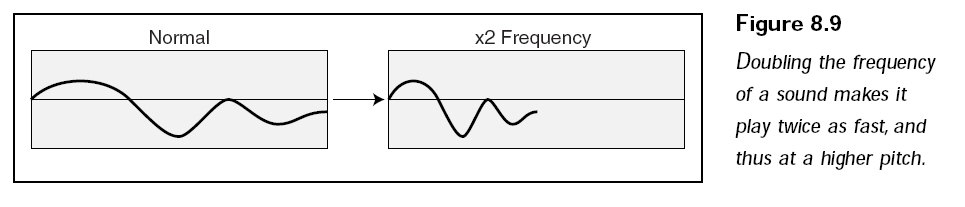
如下圖所示,它顯示了音頻緩沖以雙倍的速度播放,也就是把播放頻率調節為原來的兩倍,這樣音調就變高。
失去焦點
在很多情況下,其他程序會和你的程序搶占系統資源,然后把那些修改過配置的資源留給你的程序。這種情況多半發生在音頻緩存上,所以需要調用IDirectSoundBuffer8::Restore來還原音頻設置。如果緩沖區丟失,可以用這個函數找回。
The Restore method restores the memory allocation for a lost sound buffer.
HRESULT Restore();
Parameters
None.
Return Values
If the method succeeds, the return value is DS_OK. If the method fails, the
return value may be one of the following error values:
Return code
- DSERR_BUFFERLOST
- DSERR_INVALIDCALL
- DSERR_PRIOLEVELNEEDED
Remarks
If the application does not have the input focus,
IDirectSoundBuffer8::Restore might not succeed. For example, if the application
with the input focus has the DSSCL_WRITEPRIMARY cooperative level, no other
application will be able to restore its buffers. Similarly, an application with
the DSSCL_WRITEPRIMARY cooperative level must have the input focus to restore
its primary buffer.
After DirectSound restores the buffer memory, the application must rewrite
the buffer with valid sound data. DirectSound cannot restore the contents of the
memory, only the memory itself.
The application can receive notification that a buffer is lost when it
specifies that buffer in a call to the Lock or Play method. These methods return
DSERR_BUFFERLOST to indicate a lost buffer. The GetStatus method can also be
used to retrieve the status of the sound buffer and test for the
DSBSTATUS_BUFFERLOST flag.
使用這個函數會導致緩存中的音頻數據丟失,調用完此函數后需要重新加載。在創建音頻緩存的時候使用 DSBCAPS_LOCSOFTWARE標志,這樣DirectSound將在系統內存中分配緩沖區,因此數據基本上不可能丟失,也就不必擔心丟失資源了。
加載聲音到音頻緩沖
最簡單的方法就是通過Windows 最廣泛使用的數字音頻文件 ----
波表文件,這種文件通常以.WAV作為它的擴展名。一個波表文件通常由兩部分構成,一部分是文件開頭的波表文件頭,另外一部分是緊隨其后的原始音頻數據。這些原始音頻數據可能是經過壓縮的,也可能是未經壓縮的。如果是壓縮過的,操作起來會復雜很多,如果沒有壓縮過,操作起來就很容易。
下面的結構表示一個波表文件的文件頭,通過觀察能看出波表文件的文件頭結構。
// .WAV file header
struct WAVE_HEADER
{
char riff_sig[4]; // 'RIFF'
long waveform_chunk_size; // 8
char wave_sig[4]; // 'WAVE'
char format_sig[4]; // 'fmt ' (notice space after)
long format_chunk_size; // 16;
short format_tag; // WAVE_FORMAT_PCM
short channels; // # of channels
long sample_rate; // sampling rate
long bytes_per_sec; // bytes per second
short block_align; // sample block alignment
short bits_per_sample; // bits per second
char data_sig[4]; // 'data'
long data_size; // size of waveform data
};
處理文件頭非常簡單,只需要打開文件,讀取數據(讀取數據的大小和WAVE_HEADER結構的大小一致)、填充 WAVE_HEADER結構就可以了。這個結構包含了我們所需要的所有關于音頻文件的信息。你可以通過簽名段來判斷一個文件是否是波形文件,簽名段在
WAVE_HEADER中是"*Sig"。請仔細查看 WAVE_HEADER中每個段的特征,如果不符合特征,說明所讀取的不是一個波形文件。尤其是要檢查簽名段,如果簽名段不是'WAVE'則說明加載了錯誤的音頻文件。
有了必要的音頻數據的結構信息后,就可以基于這些信息創建音頻緩存,把音頻數據放入其中,然后執行各種各樣的操作。
可以編寫兩個函數來實現這樣的功能,
Create_Buffer_From_WAV讀取并解析波表文件頭,并且創建單獨的音頻緩沖區
,Load_Sound_Data讀取音頻數據到緩沖區。
IDirectSound8* g_ds; // directsound component
IDirectSoundBuffer8* g_ds_buffer; // sound buffer object
//--------------------------------------------------------------------------------
// Create wave header information from wave file.
//--------------------------------------------------------------------------------
IDirectSoundBuffer8* Create_Buffer_From_WAV(FILE* fp, WAVE_HEADER* wave_header)
{
IDirectSoundBuffer* ds_buffer_main;
IDirectSoundBuffer8* ds_buffer_second;
DSBUFFERDESC ds_buffer_desc;
WAVEFORMATEX wave_format;
// read in the header from beginning of file
fseek(fp, 0, SEEK_SET);
fread(wave_header, 1, sizeof(WAVE_HEADER), fp);
// check the sig fields. returning if an error.
if(memcmp(wave_header->riff_sig, "RIFF", 4) || memcmp(wave_header->wave_sig, "WAVE", 4) ||
memcmp(wave_header->format_sig, "fmt ", 4) || memcmp(wave_header->data_sig, "data", 4))
{
return NULL;
}
// setup the playback format
ZeroMemory(&wave_format, sizeof(WAVEFORMATEX));
wave_format.wFormatTag = WAVE_FORMAT_PCM;
wave_format.nChannels = wave_header->channels;
wave_format.nSamplesPerSec = wave_header->sample_rate;
wave_format.wBitsPerSample = wave_header->bits_per_sample;
wave_format.nBlockAlign = wave_format.wBitsPerSample / 8 * wave_format.nChannels;
wave_format.nAvgBytesPerSec = wave_format.nSamplesPerSec * wave_format.nBlockAlign;
// create the sound buffer using the header data
ZeroMemory(&ds_buffer_desc, sizeof(DSBUFFERDESC));
ds_buffer_desc.dwSize = sizeof(DSBUFFERDESC);
ds_buffer_desc.dwFlags = DSBCAPS_CTRLVOLUME;
ds_buffer_desc.dwBufferBytes = wave_header->data_size;
ds_buffer_desc.lpwfxFormat = &wave_format;
// create main sound buffer
if(FAILED(g_ds->CreateSoundBuffer(&ds_buffer_desc, &ds_buffer_main, NULL)))
return NULL;
// get newer interface
if(FAILED(ds_buffer_main->QueryInterface(IID_IDirectSoundBuffer8, (void**)&ds_buffer_second)))
{
ds_buffer_main->Release();
return NULL;
}
// return the interface
return ds_buffer_second;
}
//--------------------------------------------------------------------------------
// Load sound data from second directsound buffer.
//--------------------------------------------------------------------------------
BOOL Load_Sound_Data(IDirectSoundBuffer8* ds_buffer, long lock_pos, long lock_size, FILE* fp)
{
BYTE* ptr1;
BYTE* ptr2;
DWORD size1, size2;
if(lock_size == 0)
return FALSE;
// lock the sound buffer at position specified
if(FAILED(ds_buffer->Lock(lock_pos, lock_size, (void**)&ptr1, &size1, (void**)&ptr2, &size2, 0)))
return FALSE;
// read in the data
fread(ptr1, 1, size1, fp);
if(ptr2 != NULL)
fread(ptr2, 1, size2, fp);
// unlock it
ds_buffer->Unlock(ptr1, size1, ptr2, size2);
return TRUE;
}
接著編寫一個函數
Load_WAV封裝剛才那兩個函數,從文件名加載波形文件信息。
//--------------------------------------------------------------------------------
// Load wave file.
//--------------------------------------------------------------------------------
IDirectSoundBuffer8* Load_WAV(char* filename)
{
IDirectSoundBuffer8* ds_buffer;
WAVE_HEADER wave_header = {0};
FILE* fp;
// open the source file
if((fp = fopen(filename, "rb")) == NULL)
return NULL;
// create the sound buffer
if((ds_buffer = Create_Buffer_From_WAV(fp, &wave_header)) == NULL)
{
fclose(fp);
return NULL;
}
// read in the data
fseek(fp, sizeof(WAVE_HEADER), SEEK_SET);
// load sound data
Load_Sound_Data(ds_buffer, 0, wave_header.data_size, fp);
// close the source file
fclose(fp);
// return the new sound buffer fully loaded with sound
return ds_buffer;
}
以下給出完整示例:
點擊下載源碼和工程
/***************************************************************************************
PURPOSE:
Wave Playing Demo
***************************************************************************************/
#include <windows.h>
#include <stdio.h>
#include <dsound.h>
#include "resource.h"
#pragma comment(lib, "dxguid.lib")
#pragma comment(lib, "dsound.lib")
#pragma warning(disable : 4996)
#define Safe_Release(p) if((p)) (p)->Release();
// .WAV file header
struct WAVE_HEADER
{
char riff_sig[4]; // 'RIFF'
long waveform_chunk_size; // 8
char wave_sig[4]; // 'WAVE'
char format_sig[4]; // 'fmt ' (notice space after)
long format_chunk_size; // 16;
short format_tag; // WAVE_FORMAT_PCM
short channels; // # of channels
long sample_rate; // sampling rate
long bytes_per_sec; // bytes per second
short block_align; // sample block alignment
short bits_per_sample; // bits per second
char data_sig[4]; // 'data'
long data_size; // size of waveform data
};
// window handles, class and caption text.
HWND g_hwnd;
char g_class_name[] = "WavPlayClass";
IDirectSound8* g_ds; // directsound component
IDirectSoundBuffer8* g_ds_buffer; // sound buffer object
//--------------------------------------------------------------------------------
// Create wave header information from wave file.
//--------------------------------------------------------------------------------
IDirectSoundBuffer8* Create_Buffer_From_WAV(FILE* fp, WAVE_HEADER* wave_header)
{
IDirectSoundBuffer* ds_buffer_main;
IDirectSoundBuffer8* ds_buffer_second;
DSBUFFERDESC ds_buffer_desc;
WAVEFORMATEX wave_format;
// read in the header from beginning of file
fseek(fp, 0, SEEK_SET);
fread(wave_header, 1, sizeof(WAVE_HEADER), fp);
// check the sig fields. returning if an error.
if(memcmp(wave_header->riff_sig, "RIFF", 4) || memcmp(wave_header->wave_sig, "WAVE", 4) ||
memcmp(wave_header->format_sig, "fmt ", 4) || memcmp(wave_header->data_sig, "data", 4))
{
return NULL;
}
// setup the playback format
ZeroMemory(&wave_format, sizeof(WAVEFORMATEX));
wave_format.wFormatTag = WAVE_FORMAT_PCM;
wave_format.nChannels = wave_header->channels;
wave_format.nSamplesPerSec = wave_header->sample_rate;
wave_format.wBitsPerSample = wave_header->bits_per_sample;
wave_format.nBlockAlign = wave_format.wBitsPerSample / 8 * wave_format.nChannels;
wave_format.nAvgBytesPerSec = wave_format.nSamplesPerSec * wave_format.nBlockAlign;
// create the sound buffer using the header data
ZeroMemory(&ds_buffer_desc, sizeof(DSBUFFERDESC));
ds_buffer_desc.dwSize = sizeof(DSBUFFERDESC);
ds_buffer_desc.dwFlags = DSBCAPS_CTRLVOLUME;
ds_buffer_desc.dwBufferBytes = wave_header->data_size;
ds_buffer_desc.lpwfxFormat = &wave_format;
// create main sound buffer
if(FAILED(g_ds->CreateSoundBuffer(&ds_buffer_desc, &ds_buffer_main, NULL)))
return NULL;
// get newer interface
if(FAILED(ds_buffer_main->QueryInterface(IID_IDirectSoundBuffer8, (void**)&ds_buffer_second)))
{
ds_buffer_main->Release();
return NULL;
}
// return the interface
return ds_buffer_second;
}
//--------------------------------------------------------------------------------
// Load sound data from second directsound buffer.
//--------------------------------------------------------------------------------
BOOL Load_Sound_Data(IDirectSoundBuffer8* ds_buffer, long lock_pos, long lock_size, FILE* fp)
{
BYTE* ptr1;
BYTE* ptr2;
DWORD size1, size2;
if(lock_size == 0)
return FALSE;
// lock the sound buffer at position specified
if(FAILED(ds_buffer->Lock(lock_pos, lock_size, (void**)&ptr1, &size1, (void**)&ptr2, &size2, 0)))
return FALSE;
// read in the data
fread(ptr1, 1, size1, fp);
if(ptr2 != NULL)
fread(ptr2, 1, size2, fp);
// unlock it
ds_buffer->Unlock(ptr1, size1, ptr2, size2);
return TRUE;
}
//--------------------------------------------------------------------------------
// Load wave file.
//--------------------------------------------------------------------------------
IDirectSoundBuffer8* Load_WAV(char* filename)
{
IDirectSoundBuffer8* ds_buffer;
WAVE_HEADER wave_header = {0};
FILE* fp;
// open the source file
if((fp = fopen(filename, "rb")) == NULL)
return NULL;
// create the sound buffer
if((ds_buffer = Create_Buffer_From_WAV(fp, &wave_header)) == NULL)
{
fclose(fp);
return NULL;
}
// read in the data
fseek(fp, sizeof(WAVE_HEADER), SEEK_SET);
// load sound data
Load_Sound_Data(ds_buffer, 0, wave_header.data_size, fp);
// close the source file
fclose(fp);
// return the new sound buffer fully loaded with sound
return ds_buffer;
}
//--------------------------------------------------------------------------------
// Window procedure.
//--------------------------------------------------------------------------------
long WINAPI Window_Proc(HWND hwnd, UINT msg, WPARAM wParam, LPARAM lParam)
{
switch(msg)
{
case WM_DESTROY:
PostQuitMessage(0);
return 0;
}
return (long) DefWindowProc(hwnd, msg, wParam, lParam);
}
//--------------------------------------------------------------------------------
// Main function, routine entry.
//--------------------------------------------------------------------------------
int WINAPI WinMain(HINSTANCE inst, HINSTANCE, LPSTR cmd_line, int cmd_show)
{
WNDCLASS win_class;
MSG msg;
// create window class and register it
win_class.style = CS_HREDRAW | CS_VREDRAW;
win_class.lpfnWndProc = Window_Proc;
win_class.cbClsExtra = 0;
win_class.cbWndExtra = DLGWINDOWEXTRA;
win_class.hInstance = inst;
win_class.hIcon = LoadIcon(inst, IDI_APPLICATION);
win_class.hCursor = LoadCursor(NULL, IDC_ARROW);
win_class.hbrBackground = (HBRUSH) (COLOR_BTNFACE + 1);
win_class.lpszMenuName = NULL;
win_class.lpszClassName = g_class_name;
if(! RegisterClass(&win_class))
return FALSE;
// create the main window
g_hwnd = CreateDialog(inst, MAKEINTRESOURCE(IDD_WAVPLAY), 0, NULL);
ShowWindow(g_hwnd, cmd_show);
UpdateWindow(g_hwnd);
// initialize and configure directsound
// creates and initializes an object that supports the IDirectSound8 interface
if(FAILED(DirectSoundCreate8(NULL, &g_ds, NULL)))
{
MessageBox(NULL, "Unable to create DirectSound object", "Error", MB_OK);
return 0;
}
// set the cooperative level of the application for this sound device
g_ds->SetCooperativeLevel(g_hwnd, DSSCL_NORMAL);
// load a sound to play
g_ds_buffer = Load_WAV("test.wav");
if(g_ds_buffer)
{
// play sound looping
g_ds_buffer->SetCurrentPosition(0);
// set volume
g_ds_buffer->SetVolume(DSBVOLUME_MAX);
// play sound
g_ds_buffer->Play(0, 0, DSBPLAY_LOOPING);
}
// start message pump, waiting for signal to quit.
ZeroMemory(&msg, sizeof(MSG));
while(msg.message != WM_QUIT)
{
if(PeekMessage(&msg, NULL, 0, 0, PM_REMOVE))
{
TranslateMessage(&msg);
DispatchMessage(&msg);
}
}
// release directsound objects
g_ds->Release();
UnregisterClass(g_class_name, inst);
return (int) msg.wParam;
}
運行截圖:
閱讀下篇:
用DirectX
Audio和DirectShow播放聲音和音樂(4)