提示:
閱讀本文需要一定的3D圖形學(xué)和DirectX9基礎(chǔ),如果你發(fā)現(xiàn)閱讀困難,請(qǐng)參閱
D3D中基本三角形面的繪制。
本文用到的坐標(biāo)系統(tǒng)變換函數(shù)請(qǐng)參閱
DirectX 9的坐標(biāo)系統(tǒng)變換。
紋理是指物體表面本身所具有的圖案,可采用貼圖的方法將一張二維圖象張貼到一個(gè)三維物體的表面,這就是所謂的紋理貼圖技術(shù)。與材質(zhì)一樣,紋理也是物體表面的一種屬性,同時(shí)結(jié)合材質(zhì),光照和紋理技術(shù)可對(duì)三維場(chǎng)景進(jìn)行渲染,使渲染出來(lái)的三維圖形更為逼真。
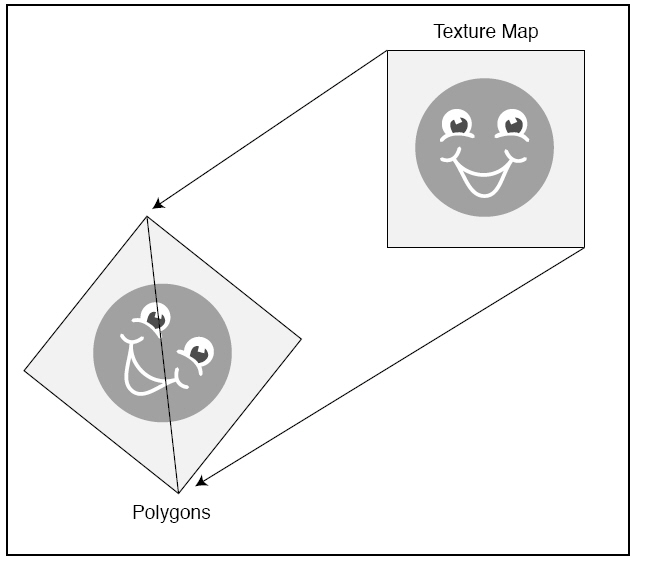
如下所示,使用紋理映射,就能在單色的多邊形表面上使用圖片進(jìn)行著色:
 頂點(diǎn)的紋理坐標(biāo)
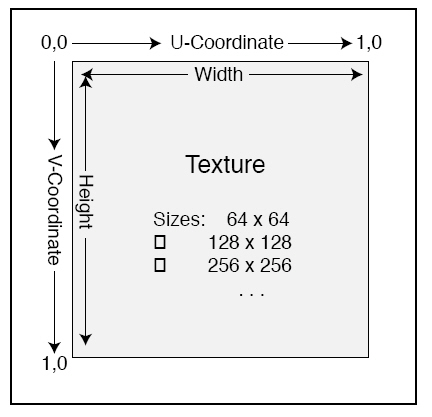
紋理貼圖也是利用三維物體的剖分三角形面來(lái)進(jìn)行的,當(dāng)每個(gè)三角形面貼圖處理完畢,整個(gè)三維物體表面就可呈現(xiàn)出整體紋理效果。為此,需要為剖分三角形面的頂點(diǎn)添加相應(yīng)的紋理坐標(biāo),以確定每個(gè)三角形面應(yīng)貼上的圖形區(qū)域。紋理圖象也是由一個(gè)個(gè)像素點(diǎn)組成,為頂點(diǎn)選定紋理坐標(biāo),實(shí)際就是把紋理圖象的像素點(diǎn)顏色值賦予相應(yīng)的頂點(diǎn)。這樣,三角形的內(nèi)部像素點(diǎn)的顏色值就可以根據(jù)頂點(diǎn)的顏色值進(jìn)行插值計(jì)算。頂點(diǎn)的紋理坐標(biāo)必須與頂點(diǎn)坐標(biāo)一起提供給渲染管道流水線。
如下所示,不管圖像的大小是多少,紋理圖像的u坐標(biāo)和v坐標(biāo)都是常數(shù)。
 創(chuàng)建紋理對(duì)象
當(dāng)頂點(diǎn)的紋理坐標(biāo)隨著整個(gè)頂點(diǎn)結(jié)構(gòu)體的數(shù)據(jù)倒入渲染管道流水線后,就必須將作為紋理的源圖象數(shù)據(jù)設(shè)置給渲染管道流水線。為此,需要利用D3DXCreateTextureFromFile函數(shù)創(chuàng)建一個(gè)紋理對(duì)象,然后將該對(duì)象設(shè)置到渲染管道流水線。
Creates a texture from a file.
HRESULT D3DXCreateTextureFromFile(
  LPDIRECT3DDEVICE9 pDevice,
  LPCTSTR pSrcFile,
  LPDIRECT3DTEXTURE9 * ppTexture
);
Parameters
- pDevice
- [in] Pointer to an IDirect3DDevice9 interface, representing the device
to be associated with the texture.
- pSrcFile
- [in] Pointer to a string that specifies the filename. If the compiler
settings require Unicode, the data type LPCTSTR resolves to LPCWSTR.
Otherwise, the string data type resolves to LPCSTR. See Remarks.
- ppTexture
- [out] Address of a pointer to an IDirect3DTexture9 interface,
representing the created texture object.
Return Values
If the function succeeds, the return value is D3D_OK. If the function fails,
the return value can be one of the following:
D3DERR_NOTAVAILABLED3DERR_OUTOFVIDEOMEMORYD3DERR_INVALIDCALLD3DXERR_INVALIDDATAE_OUTOFMEMORY
Remarks
The compiler setting also determines the function version. If Unicode is
defined, the function call resolves to D3DXCreateTextureFromFileW. Otherwise,
the function call resolves to D3DXCreateTextureFromFileA because ANSI strings
are being used.
This function supports the following file formats: .bmp, .dds, .dib, .hdr,
.jpg, .pfm, .png, .ppm, and .tga. See D3DXIMAGE_FILEFORMAT.
The function is equivalent to D3DXCreateTextureFromFileEx(pDevice, pSrcFile,
D3DX_DEFAULT, D3DX_DEFAULT, D3DX_DEFAULT, 0, D3DFMT_UNKNOWN, D3DPOOL_MANAGED,
D3DX_DEFAULT, D3DX_DEFAULT, 0, NULL, NULL, ppTexture).
Mipmapped textures automatically have each level filled with the loaded
texture.
When loading images into mipmapped textures, some devices are unable to go to
a 1x1 image and this function will fail. If this happens, the images need to be
loaded manually.
Note that a resource created with this function will be placed in the memory
class denoted by D3DPOOL_MANAGED.
Filtering is automatically applied to a texture created using this method.
The filtering is equivalent to D3DX_FILTER_TRIANGLE | D3DX_FILTER_DITHER in
D3DX_FILTER.
For the best performance when using D3DXCreateTextureFromFile:
- Doing image scaling and format conversion at load time can be slow.
Store images in the format and resolution they will be used. If the target
hardware requires power of two dimensions, create and store images using
power of two dimensions.
- Consider using DirectDraw surface (DDS) files. Because DDS files can be
used to represent any Direct3D 9 texture format, they are very easy for D3DX
to read. Also, they can store mipmaps, so any mipmap-generation algorithms
can be used to author the images.
可以使用更高級(jí)的函數(shù)D3DXCreateTextureFromFileEx來(lái)創(chuàng)建紋理對(duì)象。
Creates a texture from a file.
This is a more advanced function than D3DXCreateTextureFromFile.
HRESULT D3DXCreateTextureFromFileEx(
  LPDIRECT3DDEVICE9 pDevice,
  LPCTSTR pSrcFile,
  UINT Width,
  UINT Height,
  UINT MipLevels,
  DWORD Usage,
  D3DFORMAT Format,
  D3DPOOL Pool,
  DWORD Filter,
  DWORD MipFilter,
  D3DCOLOR ColorKey,
  D3DXIMAGE_INFO * pSrcInfo,
  PALETTEENTRY * pPalette,
  LPDIRECT3DTEXTURE9 * ppTexture
);
Parameters
- pDevice
- [in] Pointer to an
IDirect3DDevice9 interface, representing the device to be associated with
the texture.
- pSrcFile
- [in] Pointer to a string
that specifies the filename. If the compiler settings require Unicode, the
data type LPCTSTR resolves to LPCWSTR. Otherwise, the string data type
resolves to LPCSTR. See Remarks.
- Width
- [in] Width in pixels. If
this value is zero or D3DX_DEFAULT, the dimensions are taken from the file
and rounded up to a power of two. If the device supports non-power of 2
textures and D3DX_DEFAULT_NONPOW2 is specified, the size will not be
rounded.
- Height
- [in] Height, in pixels.
If this value is zero or D3DX_DEFAULT, the dimensions are taken from the
file and rounded up to a power of two. If the device supports non-power of 2
textures and D3DX_DEFAULT_NONPOW2 is sepcified, the size
will not be rounded.
- MipLevels
- [in] Number of mip levels
requested. If this value is zero or D3DX_DEFAULT, a complete mipmap chain is
created. If D3DX_FROM_FILE, the size will be taken exactly as it is in the
file, and the call will fail if this violates device capabilities.
- Usage
- [in] 0,
D3DUSAGE_RENDERTARGET, or D3DUSAGE_DYNAMIC. Setting this
flag to D3DUSAGE_RENDERTARGET indicates that the surface is
to be used as a render target. The resource can then be passed to the
pNewRenderTarget parameter of the IDirect3DDevice9::SetRenderTarget method.
If either D3DUSAGE_RENDERTARGET or D3DUSAGE_DYNAMIC
is specified, Pool must be set to D3DPOOL_DEFAULT, and the application
should check that the device supports this operation by calling
IDirect3D9::CheckDeviceFormat. D3DUSAGE_DYNAMIC indicates
that the surface should be handled dynamically. See Using Dynamic Textures.
- Format
- [in] Member of the
D3DFORMAT enumerated type, describing the requested pixel format for the
texture. The returned texture might have a different format from that
specified by Format. Applications should check the format of the returned
texture. If D3DFMT_UNKNOWN, the format is taken from the file. If
D3DFMT_FROM_FILE, the format is taken exactly as it is in the file, and the
call will fail if this violates device capabilities.
- Pool
- [in] Member of the
D3DPOOL enumerated type, describing the memory class into which the texture
should be placed.
- Filter
- [in] A combination of one
or more D3DX_FILTER constants controlling how the image is filtered.
Specifying D3DX_DEFAULT for this parameter is the
equivalent of specifying D3DX_FILTER_TRIANGLE | D3DX_FILTER_DITHER.
- MipFilter
- [in] A combination of one
or more D3DX_FILTER constants controlling how the image is
filtered. Specifying D3DX_DEFAULT for this parameter is the equivalent of
specifying D3DX_FILTER_BOX. In addition, use bits 27-31 to specify the
number of mip levels to be skipped (from the top of the mipmap chain) when a
.dds texture is loaded into memory; this allows you to skip up to 32 levels.
- ColorKey
- [in] D3DCOLOR value to
replace with transparent black, or 0 to disable the color key. This is
always a 32-bit ARGB color, independent of the source image format. Alpha is
significant and should usually be set to FF for opaque color keys. Thus, for
opaque black, the value would be equal to 0xFF000000.
- pSrcInfo
- [in, out] Pointer to a
D3DXIMAGE_INFO structure to be filled in with a description of the data in
the source image file, or NULL.
- pPalette
- [out] Pointer to a
PALETTEENTRY structure, representing a 256-color palette to fill in, or
NULL.
- ppTexture
- [out] Address of a
pointer to an IDirect3DTexture9 interface, representing the created texture
object.
Return Values
If the function succeeds, the
return value is D3D_OK. If the function fails, the return value can be one of
the following: D3DERR_INVALIDCALL.
D3DERR_NOTAVAILABLED3DERR_OUTOFVIDEOMEMORYD3DXERR_INVALIDDATAE_OUTOFMEMORY
Remarks
The compiler setting also
determines the function version. If Unicode is defined, the function call
resolves to D3DXCreateTextureFromFileExW. Otherwise, the function call resolves
to D3DXCreateTextureFromFileExA because ANSI strings are being used.
Use
D3DXCheckTextureRequirements to determine if your device can support the texture
given the current state.
This function supports the
following file formats: .bmp, .dds, .dib, .hdr, .jpg, .pfm, .png, .ppm, and
.tga. See D3DXIMAGE_FILEFORMAT.
Mipmapped textures
automatically have each level filled with the loaded texture. When loading
images into mipmapped textures, some devices are unable to go to a 1x1 image and
this function will fail. If this happens, then the images need to be loaded
manually.
For the best performance when
using D3DXCreateTextureFromFileEx:
- Doing image scaling and
format conversion at load time can be slow. Store images in the format and
resolution they will be used. If the target hardware requires power of 2
dimensions, then create and store images using power of 2 dimensions.
- For mipmap image creation
at load time, filter using D3DX_FILTER_BOX. A box filter is
much faster than other filter types such as D3DX_FILTER_TRIANGLE.
- Consider using DDS files.
Since DDS files can be used to represent any Direct3D 9 texture format, they
are very easy for D3DX to read. Also, they can store mipmaps, so any mipmap-generation
algorithms can be used to author the images.
When skipping mipmap levels
while loading a .dds file, use the D3DX_SKIP_DDS_MIP_LEVELS macro to generate
the MipFilter value. This macro takes the number of levels to skip and the
filter type and returns the filter value, which would then be passed into the
MipFilter parameter.
當(dāng)然也可以通過(guò)IDirect3DDevice9::CreateTexture來(lái)創(chuàng)建一個(gè)紋理對(duì)象。
Creates a texture resource.
HRESULT CreateTexture(
  UINT Width,
  UINT Height,
  UINT Levels,
  DWORD Usage,
  D3DFORMAT Format,
  D3DPOOL Pool,
  IDirect3DTexture9** ppTexture,
  HANDLE* pSharedHandle
);
Parameters
- Width
- [in] Width of the top-level of the texture, in pixels. The pixel
dimensions of subsequent levels will be the truncated value of half of the
previous level's pixel dimension (independently). Each dimension clamps at a
size of 1 pixel. Thus, if the division by 2 results in 0, 1 will be taken
instead.
- Height
- [in] Height of the top-level of the texture, in pixels. The pixel
dimensions of subsequent levels will be the truncated value of half of the
previous level's pixel dimension (independently). Each dimension clamps at a
size of 1 pixel. Thus, if the division by 2 results in 0, 1 will be taken
instead.
- Levels
- [in] Number of levels in the texture. If this is zero, Direct3D will
generate all texture sublevels down to 1 by 1 pixels for hardware that
supports mipmapped textures. Call IDirect3DBaseTexture9::GetLevelCount to
see the number of levels generated.
- Usage
- [in] Usage can be 0, which indicates no usage value. However, if usage
is desired, use a combination of one or more D3DUSAGE constants. It is good
practice to match the usage parameter with the behavior flags in
IDirect3D9::CreateDevice.
- Format
- [in] Member of the D3DFORMAT enumerated type, describing the format of
all levels in the texture.
- Pool
- [in] Member of the D3DPOOL enumerated type, describing the memory class
into which the texture should be placed.
- ppTexture
- [out, retval] Pointer to an IDirect3DTexture9 interface, representing
the created texture resource.
- pSharedHandle
- [in] Reserved. Set this parameter to NULL.
Return Values
If the method succeeds, the return value is D3D_OK. If the method fails, the
return value can be one of the following: D3DERR_INVALIDCALL,
D3DERR_OUTOFVIDEOMEMORY, E_OUTOFMEMORY.
Remarks
An application can discover support for Automatic Generation of Mipmaps
(Direct3D 9) in a particular format by calling IDirect3D9::CheckDeviceFormat
with D3DUSAGE_AUTOGENMIPMAP. If IDirect3D9::CheckDeviceFormat
returns D3DOK_NOAUTOGEN, IDirect3DDevice9::CreateTexture will succeed but it
will return a one-level texture.
通過(guò)IDirect3DTexture9::LockRect創(chuàng)建完IDirect3DTexture9對(duì)象后,可以通過(guò)IDirect3DTexture9::LockRect獲得紋理數(shù)據(jù)。
Locks a rectangle on a texture resource.
HRESULT LockRect(
  UINT Level,
  D3DLOCKED_RECT * pLockedRect,
  CONST RECT * pRect,
  DWORD Flags
);
Parameters
- Level
- [in] Specifies the level of the texture resource to lock.
- pLockedRect
- [out] Pointer to a D3DLOCKED_RECT structure, describing the locked
region.
- pRect
- [in] Pointer to a rectangle to lock. Specified by a pointer to a RECT
structure. Specifying NULL for this parameter expands the dirty region to
cover the entire texture.
- Flags
- [in] Combination of zero or more locking flags that describe the type of
lock to perform. For this method, the valid flags are:
- D3DLOCK_DISCARD
- D3DLOCK_NO_DIRTY_UPDATE
- D3DLOCK_NOSYSLOCK
- D3DLOCK_READONLY
You may not specify a subrect when using D3DLOCK_DISCARD. For a description
of the flags, see D3DLOCK.
Return Values
If the method succeeds, the return value is D3D_OK. If the method fails, the
return value can be D3DERR_INVALIDCALL.
Remarks
Textures created with D3DPOOL_DEFAULT are not lockable. Textures created in
video memory are lockable when created with USAGE_DYNAMIC.
For performance reasons, dirty regions are recorded only for level zero of a
texture. Dirty regions are automatically recorded when
IDirect3DTexture9::LockRect is called without D3DLOCK_NO_DIRTY_UPDATE
or D3DLOCK_READONLY. See IDirect3DDevice9::UpdateTexture for
more information.
The only lockable format for a depth-stencil texture is
D3DLOCK_D16_LOCKABLE.
Video memory textures cannot be locked, but must be modified by calling
IDirect3DDevice9::UpdateSurface or IDirect3DDevice9::UpdateTexture.
There are exceptions for some proprietary driver pixel formats that Direct3D 9
does not recognize. These can be locked.
This method cannot retrieve data from a texture resource created with
D3DUSAGE_RENDERTARGET because such a texture must be assigned to
D3DPOOL_DEFAULT memory and is therefore not lockable. In this case, use instead
IDirect3DDevice9::GetRenderTargetData to copy texture data from device memory to
system memory.
鎖定之后,必須通過(guò)IDirect3DTexture9::UnlockRect來(lái)對(duì)IDirect3DTexture9對(duì)象進(jìn)行解鎖。
Unlocks a rectangle on a texture resource.
HRESULT UnlockRect(
  UINT Level
);
Parameters
- Level
- [in] Specifies the level of the texture resource to unlock.
Return Values
If the method succeeds, the return value is D3D_OK. If the method fails, the
return value can be D3DERR_INVALIDCALL.
利用IDirect3DDevice9接口提供的SetTexture函數(shù)進(jìn)行紋理設(shè)置,由于可進(jìn)行多次紋理蒙皮,將紋理對(duì)象設(shè)置給固定渲染管道流水線時(shí),必須提供所在的采樣器序號(hào)或紋理狀態(tài)序號(hào),以區(qū)別不同的紋理處理。
Sets a texture.
HRESULT SetTexture(
  D3DXHANDLE hParameter,
  LPDIRECT3DBASETEXTURE9 pTexture
);
Parameters
- hParameter
- [in] Unique identifier. See Handles.
- pTexture
- [in] Texture object. See IDirect3DBaseTexture9.
Return Values
If the method succeeds, the return value is D3D_OK. If the method fails, the
return value can be D3DERR_INVALIDCALL.
可以通過(guò)GetLevelDesc來(lái)獲取特定采樣級(jí)別的紋理表面描述信息:
Retrieves a level description of a texture resource.
HRESULT GetLevelDesc(
  UINT Level,
  D3DSURFACE_DESC * pDesc
);
Parameters
- Level
- [in] Identifies a level of the texture resource. This method returns a
surface description for the level specified by this parameter.
- pDesc
- [out] Pointer to a D3DSURFACE_DESC structure, describing the returned
level.
Return Values
If the method succeeds, the return value is D3D_OK. D3DERR_INVALIDCALL is
returned if one of the arguments is invalid.
pDesc為一個(gè)指向D3DSURFACE_DESC數(shù)據(jù)類(lèi)型的指針,來(lái)看看它的具體定義:
Describes a surface.
typedef struct D3DSURFACE_DESC {
    D3DFORMAT Format;
    D3DRESOURCETYPE Type;
    DWORD Usage;
    D3DPOOL Pool;
    D3DMULTISAMPLE_TYPE MultiSampleType;
    DWORD MultiSampleQuality;
    UINT Width;
    UINT Height;
} D3DSURFACE_DESC, *LPD3DSURFACE_DESC;
Members
- Format
- Member of the D3DFORMAT enumerated type, describing the surface format.
- Type
- Member of the D3DRESOURCETYPE enumerated type, identifying this resource
as a surface.
- Usage
- Either the D3DUSAGE_DEPTHSTENCIL or D3DUSAGE_RENDERTARGET values. For
more information, see D3DUSAGE.
- Pool
- Member of the D3DPOOL enumerated type, specifying the class of memory
allocated for this surface.
- MultiSampleType
- Member of the D3DMULTISAMPLE_TYPE enumerated type, specifying the levels
of full-scene multisampling supported by the surface.
- MultiSampleQuality
- Quality level. The valid range is between zero and one less than the
level returned by pQualityLevels used by
IDirect3D9::CheckDeviceMultiSampleType. Passing a larger value returns the
error, D3DERR_INVALIDCALL. The MultisampleQuality values of paired render
targets, depth stencil surfaces and the MultiSample type must all match.
- Width
- Width of the surface, in pixels.
- Height
- Height of the surface, in pixels.
其中Type描述了資源的類(lèi)型:
Defines resource types.
typedef enum D3DRESOURCETYPE
{
    D3DRTYPE_SURFACE = 1,
    D3DRTYPE_VOLUME = 2,
    D3DRTYPE_TEXTURE = 3,
    D3DRTYPE_VOLUMETEXTURE = 4,
    D3DRTYPE_CubeTexture = 5,
    D3DRTYPE_VERTEXBUFFER = 6,
    D3DRTYPE_INDEXBUFFER = 7,
    D3DRTYPE_FORCE_DWORD = 0x7fffffff,
} D3DRESOURCETYPE, *LPD3DRESOURCETYPE;
Constants
- D3DRTYPE_SURFACE
- Surface resource.
- D3DRTYPE_VOLUME
- Volume resource.
- D3DRTYPE_TEXTURE
- Texture resource.
- D3DRTYPE_VOLUMETEXTURE
- Volume texture resource.
- D3DRTYPE_CubeTexture
- Cube texture resource.
- D3DRTYPE_VERTEXBUFFER
- Vertex buffer resource.
- D3DRTYPE_INDEXBUFFER
- Index buffer resource.
- D3DRTYPE_FORCE_DWORD
- Forces this enumeration to compile to 32 bits in size. Without this
value, some compilers would allow this enumeration to compile to a size
other than 32 bits. This value is not used.
紋理過(guò)濾技術(shù)
當(dāng)三角形頂點(diǎn)對(duì)應(yīng)的紋理像素點(diǎn)選定以后,具體如何確定三角形面的內(nèi)部像素點(diǎn)的顏色值,就需要應(yīng)用插值方法進(jìn)行計(jì)算,即所謂的紋理過(guò)濾技術(shù),包括Mipmap過(guò)濾技術(shù),MagFilter過(guò)濾技術(shù),
MinFilter過(guò)濾技術(shù)等。
Mipmap技術(shù)是指利用同一幅紋理源圖的不同大小,對(duì)遠(yuǎn)近不同的物體采用不同的表面紋理,即較遠(yuǎn)的物體采用尺寸大的紋理圖象進(jìn)行貼圖,較近的物體采用尺寸小的紋理圖象進(jìn)行貼圖,既可提高紋理貼圖的速度,又不致于使三維物體的紋理渲染效果產(chǎn)生較大的失真。
由于二維貼圖的三角形面的大小一般與紋理圖象的大小不同,因此需要將紋理源圖進(jìn)行相應(yīng)的放大或縮小,以確定渲染三角形面內(nèi)部像素點(diǎn)的顏色值,這就是MagFilter過(guò)濾技術(shù)和MinFilter過(guò)濾技術(shù)。
當(dāng)使用D3DXCreateTextureFromFile創(chuàng)建紋理對(duì)象時(shí),該函數(shù)會(huì)自動(dòng)根據(jù)紋理源圖的大小,創(chuàng)建出一連串的逐級(jí)減少的紋理對(duì)象,這樣當(dāng)紋理圖象貼上三維物體表面時(shí),會(huì)自動(dòng)根據(jù)渲染表面的大小,選擇合適尺寸的紋理對(duì)象進(jìn)行貼圖,以減少三角形內(nèi)部像素點(diǎn)顏色值的插值計(jì)算量。
注: 紋理圖象的大小不一定是寬高相等的,例如紋理源圖為256 x 128大小,那么它的各級(jí)Mipmap圖象大小分別為128 x 64, 64 x 32, 32
x 16, 16 x 8, 8 x 4, 4 x 2和2 x 1。
渲染管道流水線所使用的過(guò)濾技術(shù)類(lèi)型可通過(guò)IDirect3DDevice9設(shè)備接口提供的 SetSampleState函數(shù)來(lái)設(shè)定。
Sets the
sampler state value.
HRESULT SetSamplerState(
  DWORD Sampler,
  D3DSAMPLERSTATETYPE Type,
  DWORD Value
);
Parameters
- Sampler
- [in] The sampler stage index.
- Type
- [in] This parameter can be any member of the D3DSAMPLERSTATETYPE
enumerated type.
- Value
- [in] State value to set. The meaning of this value is determined by the
Type parameter.
Return Values
If the method succeeds, the return value is D3D_OK. If the method fails, the
return value can be D3DERR_INVALIDCALL.
來(lái)看看D3DSAMPLERSTATETYPE的具體定義:
Sampler states define texture sampling operations such as texture addressing
and texture filtering. Some sampler states set-up vertex processing, and some
set-up pixel processing. Sampler states can be saved and restored using
stateblocks (see State Blocks Save and Restore State (Direct3D 9)).
typedef enum D3DSAMPLERSTATETYPE
{
    D3DSAMP_ADDRESSU = 1,
    D3DSAMP_ADDRESSV = 2,
    D3DSAMP_ADDRESSW = 3,
    D3DSAMP_BORDERCOLOR = 4,
    D3DSAMP_MAGFILTER = 5,
    D3DSAMP_MINFILTER = 6,
    D3DSAMP_MIPFILTER = 7,
    D3DSAMP_MIPMAPLODBIAS = 8,
    D3DSAMP_MAXMIPLEVEL = 9,
    D3DSAMP_MAXANISOTROPY = 10,
    D3DSAMP_SRGBTEXTURE = 11,
    D3DSAMP_ELEMENTINDEX = 12,
    D3DSAMP_DMAPOFFSET = 13,
    D3DSAMP_FORCE_DWORD = 0x7fffffff,
} D3DSAMPLERSTATETYPE, *LPD3DSAMPLERSTATETYPE;
Constants
- D3DSAMP_ADDRESSU
- Texture-address mode for the u coordinate. The default is
D3DTADDRESS_WRAP. For more information, see D3DTEXTUREADDRESS.
- D3DSAMP_ADDRESSV
- Texture-address mode for the v coordinate. The default is
D3DTADDRESS_WRAP. For more information, see D3DTEXTUREADDRESS.
- D3DSAMP_ADDRESSW
- Texture-address mode for the w coordinate. The default is
D3DTADDRESS_WRAP. For more information, see D3DTEXTUREADDRESS.
- D3DSAMP_BORDERCOLOR
- Border color or type D3DCOLOR. The default color is 0x00000000.
- D3DSAMP_MAGFILTER
- Magnification filter of type D3DTEXTUREFILTERTYPE. The default value is
D3DTEXF_POINT.
- D3DSAMP_MINFILTER
- Minification filter of type D3DTEXTUREFILTERTYPE. The default
value is D3DTEXF_POINT.
- D3DSAMP_MIPFILTER
- Mipmap filter to use during minification. See D3DTEXTUREFILTERTYPE.
The default value is D3DTEXF_NONE.
- D3DSAMP_MIPMAPLODBIAS
- Mipmap level-of-detail bias. The default value is zero.
- D3DSAMP_MAXMIPLEVEL
- level-of-detail index of largest map to use. Values range from 0 to (n -
1) where 0 is the largest. The default value is zero.
- D3DSAMP_MAXANISOTROPY
- DWORD maximum anisotropy. The default value is 1.
- D3DSAMP_SRGBTEXTURE
- Gamma correction value. The default value is 0, which means gamma is 1.0
and no correction is required. Otherwise, this value means that the sampler
should assume gamma of 2.2 on the content and convert it to linear (gamma
1.0) before presenting it to the pixel shader.
- D3DSAMP_ELEMENTINDEX
- When a multielement texture is assigned to the sampler, this indicates
which element index to use. The default value is 0.
- D3DSAMP_DMAPOFFSET
- Vertex offset in the presampled displacement map. This is a constant
used by the tessellator, its default value is 0.
- D3DSAMP_FORCE_DWORD
- Forces this enumeration to compile to 32 bits in size. Without this
value, some compilers would allow this enumeration to compile to a size
other than 32 bits. This value is not used.
對(duì)于過(guò)濾技術(shù)來(lái)說(shuō),Type參數(shù)可取值D3DSAMP_MIPFILTER,D3DSAMP_MAGFILTER和
D3DSAMP_MINFILTER,而Value參數(shù)可取如下類(lèi)型的枚舉值。
Defines texture filtering modes for a texture stage.
typedef enum D3DTEXTUREFILTERTYPE
{
    D3DTEXF_NONE = 0,
    D3DTEXF_POINT = 1,
    D3DTEXF_LINEAR = 2,
    D3DTEXF_ANISOTROPIC = 3,
    D3DTEXF_PYRAMIDALQUAD = 6,
    D3DTEXF_GAUSSIANQUAD = 7,
    D3DTEXF_FORCE_DWORD = 0x7fffffff,
} D3DTEXTUREFILTERTYPE, *LPD3DTEXTUREFILTERTYPE;
Constants
- D3DTEXF_NONE
- Mipmapping disabled. The rasterizer should use the magnification filter
instead.
- D3DTEXF_POINT
- Point filtering used as a texture magnification or minification filter.
The texel with coordinates nearest to the desired pixel value is used. The
texture filter to be used between mipmap levels is nearest-point mipmap
filtering. The rasterizer uses the color from the texel of the nearest
mipmap texture.
- D3DTEXF_LINEAR
- Bilinear interpolation filtering used as a texture magnification or
minification filter. A weighted average of a 2 x 2 area of texels
surrounding the desired pixel is used. The texture filter to use between
mipmap levels is trilinear mipmap interpolation. The rasterizer linearly
interpolates pixel color, using the texels of the two nearest mipmap
textures.
- D3DTEXF_ANISOTROPIC
- Anisotropic texture filtering used as a texture magnification or
minification filter. Compensates for distortion caused by the difference in
angle between the texture polygon and the plane of the screen.
- D3DTEXF_PYRAMIDALQUAD
- A 4-sample tent filter used as a texture magnification or minification
filter.
- D3DTEXF_GAUSSIANQUAD
- A 4-sample Gaussian filter used as a texture magnification or
minification filter.
- D3DTEXF_FORCE_DWORD
- Forces this enumeration to compile to 32 bits in size. Without this
value, some compilers would allow this enumeration to compile to a size
other than 32 bits. This value is not used.
Remarks
To check if a format supports texture filter types other than D3DTEXF_POINT
(which is always supported), call IDirect3D9::CheckDeviceFormat with
D3DUSAGE_QUERY_FILTER.
Set a texture stage's magnification filter by calling
IDirect3DDevice9::SetSamplerState with the D3DSAMP_MAGFILTER value as the second
parameter and one member of this enumeration as the third parameter.
Set a texture stage's minification filter by calling
IDirect3DDevice9::SetSamplerState with the D3DSAMP_MINFILTER value as the
second parameter and one member of this enumeration as the third parameter.
Set the texture filter to use between-mipmap levels by calling
IDirect3DDevice9::SetSamplerState with the D3DSAMP_MIPFILTER value as the
second parameter and one member of this enumeration as the third parameter.
Not all valid filtering modes for a device will apply to volume maps. In
general, D3DTEXF_POINT and D3DTEXF_LINEAR magnification filters will be
supported for volume maps. If D3DPTEXTURECAPS_MIPVOLUMEMAP is set, then the
D3DTEXF_POINT mipmap filter and D3DTEXF_POINT and D3DTEXF_LINEAR minification
filters will be supported for volume maps. The device may or may not support the
D3DTEXF_LINEAR mipmap filter for volume maps. Devices that support anisotropic
filtering for 2D maps do not necessarily support anisotropic filtering for
volume maps. However, applications that enable anisotropic filtering will
receive the best available filtering (probably linear) if anisotropic filtering
is not supported.
紋理地址模式
紋理源圖像的像素點(diǎn)都用紋理坐標(biāo)系的[0, 1] x [0,
1]范圍內(nèi)的坐標(biāo)來(lái)量度,如果選定的頂點(diǎn)紋理坐標(biāo)u和v大于1或小于0時(shí),那么對(duì)應(yīng)的紋理像素點(diǎn)在紋理源圖上是不存在的。因此需要用相應(yīng)的紋理地址模式來(lái)尋址,確定該頂點(diǎn)顏色值應(yīng)該采用的紋理像素顏色值。由此可見(jiàn),當(dāng)選定的待渲染三角形面頂點(diǎn)的紋理坐標(biāo)超出[0,
1]區(qū)間時(shí),可獲得一些特別的渲染效果。
紋理地址模式具有包裝模式(Wrap),鏡像模式(Mirror),夾子模式(Clamp),邊界模式(Border)和一次鏡像模式(MirrorOnce)等多種尋址控制方式,來(lái)看看這些模式的枚舉定義:
Defines constants that describe the supported texture-addressing modes.
typedef enum D3DTEXTUREADDRESS
{
    D3DTADDRESS_WRAP = 1,
    D3DTADDRESS_MIRROR = 2,
    D3DTADDRESS_CLAMP = 3,
    D3DTADDRESS_BORDER = 4,
    D3DTADDRESS_MIRRORONCE = 5,
    D3DTADDRESS_FORCE_DWORD = 0x7fffffff,
} D3DTEXTUREADDRESS, *LPD3DTEXTUREADDRESS;
Constants
- D3DTADDRESS_WRAP
- Tile the texture at every integer junction. For example, for u values
between 0 and 3, the texture is repeated three times; no mirroring is
performed.
- D3DTADDRESS_MIRROR
- Similar to D3DTADDRESS_WRAP, except that the texture is flipped at every
integer junction. For u values between 0 and 1, for example, the texture is
addressed normally; between 1 and 2, the texture is flipped (mirrored);
between 2 and 3, the texture is normal again; and so on.
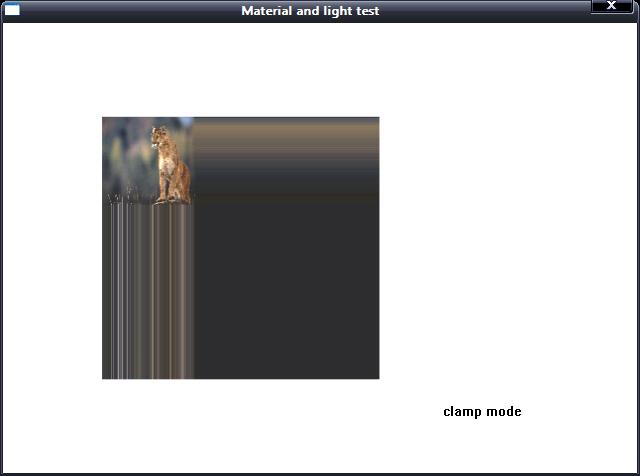
- D3DTADDRESS_CLAMP
- Texture coordinates outside the range [0.0, 1.0] are set to the texture
color at 0.0 or 1.0, respectively.
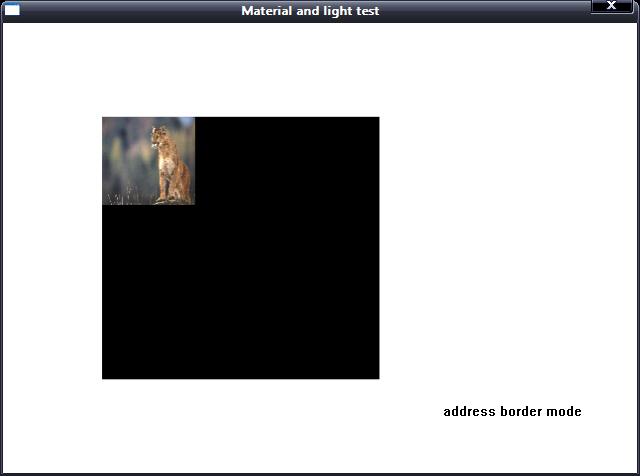
- D3DTADDRESS_BORDER
- Texture coordinates outside the range [0.0, 1.0] are set to the border
color.
- D3DTADDRESS_MIRRORONCE
- Similar to D3DTADDRESS_MIRROR and D3DTADDRESS_CLAMP. Takes the absolute
value of the texture coordinate (thus, mirroring around 0), and then clamps
to the maximum value. The most common usage is for volume textures, where
support for the full D3DTADDRESS_MIRRORONCE texture-addressing mode is not
necessary, but the data is symmetric around the one axis.
- D3DTADDRESS_FORCE_DWORD
- Forces this enumeration to compile to 32 bits in size. Without this
value, some compilers would allow this enumeration to compile to a size
other than 32 bits. This value is not used.
好了,下面來(lái)看一個(gè)具體的例子。
需要在工程中設(shè)置鏈接d3dx9.lib d3d9.lib dxguid.lib
dinput8.lib winmm.lib。
由于文件中用到了GE_APP和GE_INPUT這兩個(gè)類(lèi),它們的具體使用說(shuō)明請(qǐng)參閱
主窗口和DirectInput的封裝。
若發(fā)現(xiàn)代碼中存在錯(cuò)誤,敬請(qǐng)指出。
源碼及素材下載
TextureAddress.h的定義:
/*************************************************************************************
[Include File]
PURPOSE:
Define for texture mapped.
*************************************************************************************/
#ifndef TEXTURE_ADDRESS_H
#define TEXTURE_ADDRESS_H
#define CUSTOM_VERTEX_FVF (D3DFVF_XYZRHW | D3DFVF_TEX1)
struct CUSTOM_VERTEX
{
float x, y, z, rhw; // vertex coordinate
float u, v; // texture coordinate
};
class TEXTURE_ADDRESS
{
private:
IDirect3D9* _d3d;
IDirect3DDevice9* _d3d_device;
IDirect3DVertexBuffer9* _vertex_buffer;
IDirect3DTexture9* _d3d_texture;
public:
TEXTURE_ADDRESS();
~TEXTURE_ADDRESS();
bool Create_D3D_Device(HWND hwnd, bool full_screen = true);
bool Init_Vertex_Buffer();
void Set_Texture_Address_Mode(int mode);
void Render();
void Release_Direct3D();
};
#endif
頭文件使用結(jié)構(gòu)體CUSTOM_VERTEX定義了一個(gè)正方形的頂點(diǎn)格式,包括頂點(diǎn)坐標(biāo)和頂點(diǎn)紋理坐標(biāo),
Set_Texture_Address_Mode函數(shù)用來(lái)設(shè)置紋理地址模式,Render函數(shù)將使用三角形帶方式進(jìn)行渲染,并將紋理對(duì)象貼在正方形面上。
來(lái)看看TextureAddress.cpp的實(shí)現(xiàn):
/*************************************************************************************
[Implement File]
PURPOSE:
Define for texture mapped.
*************************************************************************************/
#include "GE_COMMON.h"
#include "TextureAddress.h"
//------------------------------------------------------------------------------------
// Constructor, initialize all pointer with NULL.
//------------------------------------------------------------------------------------
TEXTURE_ADDRESS::TEXTURE_ADDRESS()
{
_d3d = NULL;
_d3d_device = NULL;
_vertex_buffer = NULL;
_d3d_texture = NULL;
}
//------------------------------------------------------------------------------------
// Destructor, release resource allocated for Direct3D.
//------------------------------------------------------------------------------------
TEXTURE_ADDRESS::~TEXTURE_ADDRESS()
{
Release_Direct3D();
}
//------------------------------------------------------------------------------------
// Create direct3D interface and direct3D device.
//------------------------------------------------------------------------------------
bool TEXTURE_ADDRESS::Create_D3D_Device(HWND hwnd, bool full_screen)
{
// Create a IDirect3D9 object and returns an interace to it.
_d3d = Direct3DCreate9(D3D_SDK_VERSION);
if(_d3d == NULL)
return false;
// retrieve adapter capability
D3DCAPS9 d3d_caps;
_d3d->GetDeviceCaps(D3DADAPTER_DEFAULT, D3DDEVTYPE_HAL, &d3d_caps);
bool hardware_process_enable = (d3d_caps.DevCaps & D3DDEVCAPS_HWTRANSFORMANDLIGHT ? true : false);
// Retrieves the current display mode of the adapter.
D3DDISPLAYMODE display_mode;
if(FAILED(_d3d->GetAdapterDisplayMode(D3DADAPTER_DEFAULT, &display_mode)))
return false;
// set present parameter for direct3D device
D3DPRESENT_PARAMETERS present_param = {0};
present_param.BackBufferWidth = WINDOW_WIDTH;
present_param.BackBufferHeight = WINDOW_HEIGHT;
present_param.BackBufferFormat = display_mode.Format;
present_param.BackBufferCount = 1;
present_param.hDeviceWindow = hwnd;
present_param.Windowed = !full_screen;
present_param.SwapEffect = D3DSWAPEFFECT_FLIP;
present_param.PresentationInterval = D3DPRESENT_INTERVAL_DEFAULT;
// Creates a device to represent the display adapter.
DWORD behavior_flags;
behavior_flags = hardware_process_enable ?
D3DCREATE_HARDWARE_VERTEXPROCESSING : D3DCREATE_SOFTWARE_VERTEXPROCESSING;
if(FAILED(_d3d->CreateDevice(D3DADAPTER_DEFAULT, D3DDEVTYPE_HAL, hwnd, behavior_flags,
&present_param, &_d3d_device)))
{
return false;
}
// create successfully
return true;
}
//------------------------------------------------------------------------------------
// Initialize vertex buffer.
//------------------------------------------------------------------------------------
bool TEXTURE_ADDRESS::Init_Vertex_Buffer()
{
CUSTOM_VERTEX custom_vertex[] =
{
{100.0f, 100.0f, 0.0f, 1.0f, 0.0f, 0.0f},
{380.0f, 100.0f, 0.0f, 1.0f, 3.0f, 0.0f},
{100.0f, 380.0f, 0.0f, 1.0f, 0.0f, 3.0f},
{380.0f, 380.0f, 0.0f, 1.0f, 3.0f, 3.0f}
};
BYTE* vertex_data;
// create vertex buffer
if(FAILED(_d3d_device->CreateVertexBuffer(4 * sizeof(CUSTOM_VERTEX), 0, CUSTOM_VERTEX_FVF,
D3DPOOL_MANAGED, &_vertex_buffer, NULL)))
{
return false;
}
// get data pointer to vertex buffer
if(FAILED(_vertex_buffer->Lock(0, 0, (void **) &vertex_data, 0)))
return false;
// copy custom vertex data into vertex buffer
memcpy(vertex_data, custom_vertex, sizeof(custom_vertex));
// unlock vertex buffer
_vertex_buffer->Unlock();
return true;
}
//------------------------------------------------------------------------------------
// Sets the sampler state value.
//------------------------------------------------------------------------------------
void TEXTURE_ADDRESS::Set_Texture_Address_Mode(int mode)
{
switch(mode)
{
case D3DTADDRESS_WRAP:
_d3d_device->SetSamplerState(0, D3DSAMP_ADDRESSU, D3DTADDRESS_WRAP);
_d3d_device->SetSamplerState(0, D3DSAMP_ADDRESSV, D3DTADDRESS_WRAP);
break;
case D3DTADDRESS_MIRROR:
_d3d_device->SetSamplerState(0, D3DSAMP_ADDRESSU, D3DTADDRESS_MIRROR);
_d3d_device->SetSamplerState(0, D3DSAMP_ADDRESSV, D3DTADDRESS_MIRROR);
break;
case D3DTADDRESS_CLAMP:
_d3d_device->SetSamplerState(0, D3DSAMP_ADDRESSU, D3DTADDRESS_CLAMP);
_d3d_device->SetSamplerState(0, D3DSAMP_ADDRESSV, D3DTADDRESS_CLAMP);
break;
case D3DTADDRESS_BORDER:
_d3d_device->SetSamplerState(0, D3DSAMP_ADDRESSU, D3DTADDRESS_BORDER);
_d3d_device->SetSamplerState(0, D3DSAMP_ADDRESSV, D3DTADDRESS_BORDER);
break;
case D3DTADDRESS_MIRRORONCE:
_d3d_device->SetSamplerState(0, D3DSAMP_ADDRESSU, D3DTADDRESS_MIRRORONCE);
_d3d_device->SetSamplerState(0, D3DSAMP_ADDRESSV, D3DTADDRESS_MIRRORONCE);
break;
}
}
//------------------------------------------------------------------------------------
// Render object.
//------------------------------------------------------------------------------------
void TEXTURE_ADDRESS::Render()
{
if(_d3d_device == NULL)
return;
// clear surface with color white
_d3d_device->Clear(0, NULL, D3DCLEAR_TARGET, D3DCOLOR_XRGB(255, 255, 255), 1.0, 0);
// begin scene
_d3d_device->BeginScene();
// Binds a vertex buffer to a device data stream.
_d3d_device->SetStreamSource(0, _vertex_buffer, 0, sizeof(CUSTOM_VERTEX));
// Sets the current vertex stream declaration.
_d3d_device->SetFVF(CUSTOM_VERTEX_FVF);
// Creates a texture from a file.
if(FAILED(D3DXCreateTextureFromFile(_d3d_device, _T("tiger.jpg"), &_d3d_texture)))
{
MessageBox(NULL, "Create texture interface failed.", "ERROR", MB_OK);
return;
}
// Assigns a texture to a stage for a device.
_d3d_device->SetTexture(0, _d3d_texture);
// Renders a sequence of nonindexed, geometric primitives of the specified type from the current
// set of data input streams.
_d3d_device->DrawPrimitive(D3DPT_TRIANGLESTRIP, 0, 2);
// end scene
_d3d_device->EndScene();
// Presents the contents of the next buffer in the sequence of back buffers owned by the device.
_d3d_device->Present(NULL, NULL, NULL, NULL);
}
//------------------------------------------------------------------------------------
// Release resource allocated for Direct3D.
//------------------------------------------------------------------------------------
void TEXTURE_ADDRESS::Release_Direct3D()
{
Safe_Release(_d3d_texture);
Safe_Release(_vertex_buffer);
Safe_Release(_d3d_device);
Safe_Release(_d3d);
}
再來(lái)看看測(cè)試代碼:
/*************************************************************************************
[Implement File]
PURPOSE:
Test for texture render.
*************************************************************************************/
#define DIRECTINPUT_VERSION 0x0800
#include "GE_APP.h"
#include "GE_INPUT.h"
#include "TextureAddress.h"
#pragma warning(disable : 4305 4996)
int WINAPI WinMain(HINSTANCE instance, HINSTANCE, LPSTR cmd_line, int cmd_show)
{
GE_APP ge_app;
GE_INPUT ge_input;
TEXTURE_ADDRESS texture_address;
MSG msg = {0};
// create window
if(! ge_app.Create_Window("Material and light test", instance, cmd_show))
return false;
HWND hwnd = ge_app.Get_Window_Handle();
HDC hdc = GetDC(hwnd);
// create directinput
ge_input.Create_Input(instance, hwnd);
SetWindowPos(hwnd, 0, 0,0,0,0, SWP_NOSIZE);
SetCursorPos(0, 0);
// Create direct3D interface and direct3D device.
if(! texture_address.Create_D3D_Device(hwnd, false))
return false;
// Initialize vertex buffer with curstom vertex structure.
if(! texture_address.Init_Vertex_Buffer())
return false;
while(msg.message != WM_QUIT)
{
if(PeekMessage(&msg, NULL, 0,0 , PM_REMOVE))
{
TranslateMessage(&msg);
DispatchMessage(&msg);
}
else
{
// read data from keyboard buffer
if(ge_input.Read_Keyboard())
{
bool key_w_pressed = ge_input.Is_Key_Pressed(DIK_W);
bool key_m_pressed = ge_input.Is_Key_Pressed(DIK_M);
bool key_c_pressed = ge_input.Is_Key_Pressed(DIK_C);
bool key_b_pressed = ge_input.Is_Key_Pressed(DIK_B);
bool key_o_pressed = ge_input.Is_Key_Pressed(DIK_O);
const char* text = NULL;
// set texture address mode
if(key_w_pressed || key_m_pressed || key_c_pressed || key_b_pressed || key_o_pressed)
{
if(key_w_pressed)
{
texture_address.Set_Texture_Address_Mode(D3DTADDRESS_WRAP);
text = "wrap mode";
}
if(key_m_pressed)
{
texture_address.Set_Texture_Address_Mode(D3DTADDRESS_MIRROR);
text = "morror mode";
}
if(key_c_pressed)
{
texture_address.Set_Texture_Address_Mode(D3DTADDRESS_CLAMP);
text = "clamp mode";
}
if(key_b_pressed)
{
texture_address.Set_Texture_Address_Mode(D3DTADDRESS_BORDER);
text = "address border mode";
}
if(key_o_pressed)
{
texture_address.Set_Texture_Address_Mode(D3DTADDRESS_MIRRORONCE);
text = "address mirror once mode";
}
// render object
texture_address.Render();
// print hint information
TextOut(hdc, WINDOW_WIDTH - 200, WINDOW_HEIGHT - 100, text, (int) strlen(text));
}
// press "ESC", close window.
if(ge_input.Is_Key_Pressed(DIK_ESCAPE))
PostQuitMessage(0);
}
}
}
UnregisterClass(WINDOW_CLASS_NAME, instance);
return true;
}
按下W鍵將啟用包裹(Wrap)模式,按下M鍵將啟用鏡像(Mirror)模式,按下C鍵將啟用夾子(Clamp)模式,按下B鍵將啟用邊界(Border)模式,按下O鍵將啟用一次鏡像(MirrorOnce)模式。
運(yùn)行效果:

包裹模式

鏡像模式
夾子模式
邊界模式
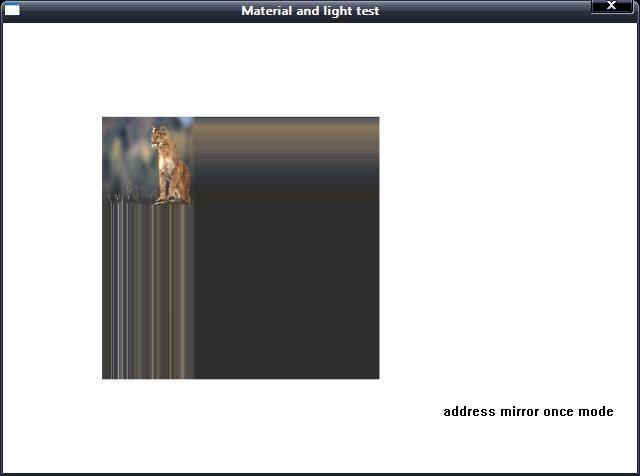
一次鏡像模式
點(diǎn)擊查閱下篇:
D3D中的紋理貼圖(2)