Defining Routes
A path by its lonesome self does you little good; there are times when you
need to string together a series of paths that an object must follow. I'm
talking about complex paths that are both straight and curved. In fact, we're no
longer discussing paths; we've moved on to the advanced topic of routes!
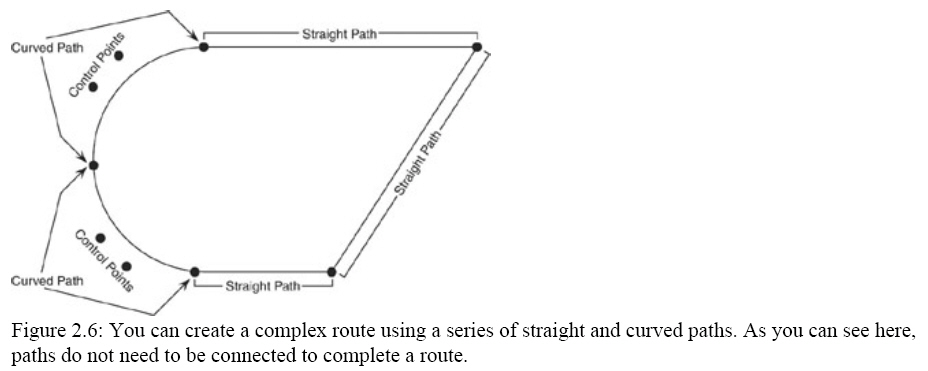
As you can see in Figure 2.6, a route is a series of paths that are commonly
connected from endpoint to endpoint.
As you have probably surmised, you can define a route using an array of path
objects. By creating a generic path structure, you can store information for
both straight and curved paths in one structure. The secret is to look for
commonalities and expand on those. For example, the straight and curved paths
both have starting and ending points. Therefore, you can define two sets of
coordinates that represent the starting and ending coordinates inside your
generic path structure, as follows:
typedef struct {
D3DXVECTOR3 vecStart, vecEnd;
} sPath;
The only real difference between the two path types is that the curved paths
have two additional control points. Adding another two vector objects to your
budding sPath structure will work just fine for holding the control point
coordinates.
typedef struct {
D3DXVECTOR3 vecStart, vecEnd;
D3DXVECTOR3 vecPoint1, vecPoint2;
} sPath;
Now the only thing missing is a flag in the sPath structure to determine
which type of path is defined−straight or curved. Include a DWORD variable and
an enum declaration to determine which type of path is defined.
enum { PATH_STRAIGHT = 0, PATH_CURVED };
typedef struct {
DWORD Type;
D3DXVECTOR3 vecStart, vecEnd;
D3DXVECTOR3 vecPoint1, vecPoint2;
} sPath;
From here on, you only need to store a PATH_STRAIGHT value or a PATH_CURVED
value in the sPath::Type variable to determine the use of the contained
data−either for a straight path with starting and ending points or for a curved
path with starting, ending, and two mid−path control points.
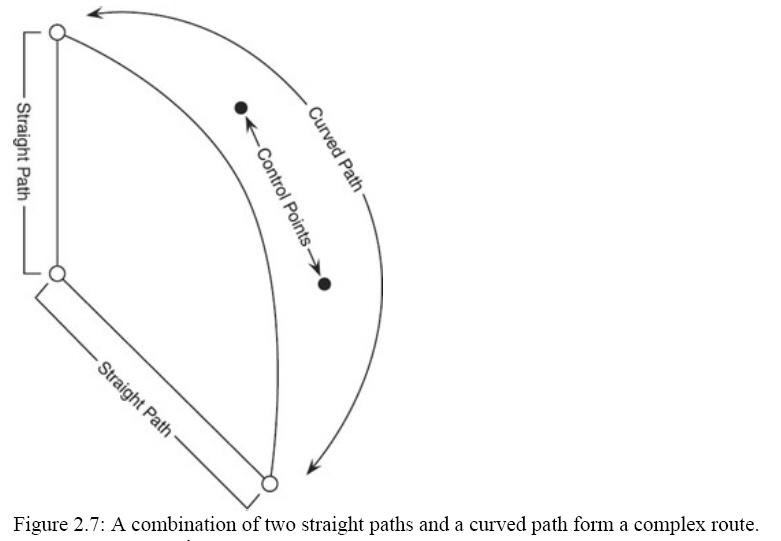
Allocating an array of sPath structures is easy, and filling that array with
your path's data (such as the data shown in Figure 2.7) is as simple as the
following code demonstrates.
sPath Path[3] = {
{ PATH_STRAIGHT, D3DXVECTOR3(−50.0f, 0.0f, 0.0f),
D3DXVECTOR3(−50.0f, 0.0f, 25.0f),
D3DXVECTOR3(0.0f, 0.0f, 0.0f),
D3DXVECTOR3(0.0f, 0.0f, 0.0f) },
{ PATH_CURVED, D3DXVECTOR3(−50.0f, 0.0f, 25.0f),
D3DXVECTOR3(0.0f, 0.0f, 50.0f),
D3DXVECTOR3(50.0f, 0.0f, 0.0f),
D3DXVECTOR3(25.0f, 0.0f, −50.0f) },
{ PATH_STRAIGHT, D3DXVECTOR3(25.0f, 0.0f, −50.0f),
D3DXVECTOR3(−50.0f, 0.0f, 0.0f),
D3DXVECTOR3(0.0f, 0.0f, 0.0f),
D3DXVECTOR3(0.0f, 0.0f, 0.0f) }
};
Of course, you really shouldn't hand−code routes into your project; it's best
to use an external source such as an .X file to contain your route data.
Creating an .X Path Parser
The easiest place from which to obtain your path data is−you guessed it−an .X
file! That's right, you can construct a couple simple templates to use with a
custom .X parser to obtain the paths you want to use for your project. You can
even construct routes from your path templates to make things easier!
You can duplicate the generic path structure you developed in the previous
section to use as a template in your .X files. This generic path template will
contain four vectors−the first two being the starting and ending coordinates of
the path (for either a straight or curved path), and the last two being the
handles' coordinates (for curved paths). Take a look at the single template
definition you can use.
// {F8569BED−53B6−4923−AF0B−59A09271D556}
// DEFINE_GUID(Path,
// 0xf8569bed, 0x53b6, 0x4923,
// 0xaf, 0xb, 0x59, 0xa0, 0x92, 0x71, 0xd5, 0x56);
template Path {
<F8569BED−53B6−4923−AF0B−59A09271D556>
DWORD Type; // 0=straight, 1=curved
Vector Start; // Start point
Vector Point1; // Midpoint 1
Vector Point2; // Midpoint 2
Vector End; // End point
}
After you've defined your .X file Path template, you can instance as many
times as you need in your data files. To load those paths, you should create a
route template (called Route) that allows you to define multiple path data
objects. This route template merely contains an array of Path data objects, as
you can see here:
// {18AA1C92−16AB−47a3−B002−6178F9D2D12F}
// DEFINE_GUID(Route,
// 0x18aa1c92, 0x16ab, 0x47a3,
// 0xb0, 0x2, 0x61, 0x78, 0xf9, 0xd2, 0xd1, 0x2f);
template Route {
<18AA1C92−16AB−47a3−B002−6178F9D2D12F>
DWORD NumPaths;
array Path Paths[NumPaths];
}
For an example of using the Route template, take a look at how the route
defined in the previous section would look in an .X file.
Route MyRoute {
3; // 3 paths
0; // Straight path type
−50.0, 0.0, 0.0;
0.0, 0.0, 0.0;
0.0, 0.0, 0.0;
−50.0, 0.0, 25.0;,
1; // Curved path type
−50.0, 0.0, 25.0;
0.0, 0.0, 50.0;
50.0, 0.0, 0.0;
25.0, 0.0, −50.0;,
0; // Straight path type
25.0, 0.0, −50.0;
0.0, 0.0, 0.0;
0.0, 0.0, 0.0;
−50.0, 0.0, 0.0;;
}
You can access the route data objects from your .X files by using a custom .X
parser. This parser only needs to look for Route objects. When it finds one, it
will allocate an array of sPath structures and read in the data. The route data
itself is kept inside a linked list of structures so that you can load multiple
routes. This route data uses the following class:
class cRoute
{
public:
char* m_name;
DWORD m_num_paths;
sPath* m_paths;
cRoute* m_next;
public:
cRoute()
{
m_name = NULL;
m_paths = NULL;
m_next = NULL;
}
~cRoute()
{
delete[] m_name; m_name = NULL;
delete[] m_paths;
delete m_next;
}
cRoute* find(const char* name)
{
if(name == NULL)
return this;
if(!stricmp(name, m_name))
return this;
if(m_next)
return m_next->find(name);
return NULL;
}
};
The sPath structure also needs to be spruced up a bit. You need to add the
length of each path to its respective structure, as well as to the starting
position of the path in the series of paths. This is a simple process. The
length, as you saw in the previous few sections, is only a floating−point
number, and the starting position of the path is the combination of the lengths
of all prior paths in the list. Your new sPath structure should look like this:
enum { PATH_STRAIGHT = 0, PATH_CURVED };
struct sPath
{
DWORD type;
D3DXVECTOR3 start, end;
D3DXVECTOR3 control1, control2;
float start_pos; // total length of all prior paths
float length; // length of current path
};
The reason to include the length and starting position of the path in the sPath
structure is really a matter of speed. By pre−computing the length values
loading the path data, you can quickly access that data (the length and starting
position) when you are determining the path in which an object is located based
on its distance into the route.
I know it sounds strange, but think of it like
this−the starting positions and lengths of each path are like key frames;
instead of measuring time, you are measuring the lengths of the paths. By taking
the position of an object in the route (say 516 units), you can scan through the
list of paths and see the path within which the object lies.
Suppose the route uses six paths, and the fourth path starts at 400 units.
The fourth path is 128 units long, meaning that it covers the lengths from 400
to 528 units. The object at 516 units is located in the fourth path; by
subtracting the object's position (516) from the ending position of the path
(528), you can discover the offset in the path that you can use as a scalar
value to calculate the object's coordinates along the path. In this case, that
position would be 528−516, or 12 units, and the scalar value would be 12/128, or
0.09375.
Enough talk, let's get to some code! The following class, cXRouteParser, is
derived from the cXParser class, meaning that you have access to the data−object
parsing code. All you want to do with the cXRouteParser class is scan for Route
data objects and load the appropriate path data into a newly allocated Route
class that is linked to a list of routes.
Check out the cXRouteParser declaration, which contains the root Route class
pointer and six functions (three of which contain code inline to the class).
class cXRouteParser : public cXParser
{
public:
cRoute* m_root_route;
public:
cXRouteParser() { m_root_route = NULL; }
~cXRouteParser() { free(); }
void free() { delete m_root_route; m_root_route = NULL; }
bool load(const char* filename);
void locate(const char* name, float distance, D3DXVECTOR3* pos);
float get_length(const char* name);
protected:
virtual bool parse_objects(ID3DXFileData* xfile_data,
ID3DXFileData* parent_xfile_data,
DWORD depth,
void** data,
bool force_ref);
};
The most important function of cXRouteParser is the template data object parser,
of course. I'll show you the parser function in a moment. The
load function merely sets up the call to
parse, which in turn loads all your Route templates
into the linked list. The
locate function
calculates the position along the route's path that you can use to position an
object. Again, I'll get to the
locate function in a
moment. For now, I want to get back to the
parse_objects
function.
The parse_objects function only scans
for one template data object−Route. Once it is found, a cRoute class and the
path structures are allocated, and the data is loaded. The cRoute class is
linked in the list of loaded routes, and the parsing of the .X file continues.
Here's what the parse_objects function code looks
like:
// {F8569BED-53B6-4923-AF0B-59A09271D556}
DEFINE_GUID(PATH_GUID,
0xf8569bed, 0x53b6, 0x4923,
0xaf, 0xb, 0x59, 0xa0, 0x92, 0x71, 0xd5, 0x56);
// {18AA1C92-16AB-47a3-B002-6178F9D2D12F}
DEFINE_GUID(ROUTE_GUID,
0x18aa1c92, 0x16ab, 0x47a3,
0xb0, 0x2, 0x61, 0x78, 0xf9, 0xd2, 0xd1, 0x2f);
///////////////////////////////////////////////////////////////////////////////////////////
bool cXRouteParser::parse_objects(ID3DXFileData* xfile_data,
ID3DXFileData* parent_xfile_data,
DWORD depth, void** data, bool force_ref)
{
GUID type;
get_object_guid(xfile_data, &type);
if(type == ROUTE_GUID) // only process route templates
{
SIZE_T size;
const DWORD* data_ptr;
xfile_data->Lock(&size, (const void **) &data_ptr);
// allocate and link in a route
cRoute* route = new cRoute;
route->m_next = m_root_route;
m_root_route = route;
route->m_name = get_object_name(xfile_data);
route->m_num_paths = *data_ptr++;
route->m_paths = new sPath[route->m_num_paths];
// get path data
for(DWORD i = 0; i < route->m_num_paths; i++)
{
sPath& path = route->m_paths[i];
path.type = *data_ptr++;
D3DXVECTOR3* pos_ptr = (D3DXVECTOR3*) data_ptr;
data_ptr += 12; // start, end, control1, control2; total 12 elements.
path.start = *pos_ptr++;
path.control1 = *pos_ptr++;
path.control2 = *pos_ptr++;
path.end = *pos_ptr++;
D3DXVECTOR3 line;
// calculate path length based on type
if(path.type == PATH_STRAIGHT)
{
line = path.end - path.start;
path.length = D3DXVec3Length(&line);
}
else
{
line = path.control1 - path.start;
float length01 = D3DXVec3Length(&line);
line = path.control2 - path.control1;
float length12 = D3DXVec3Length(&line);
line = path.end - path.control2;
float length23 = D3DXVec3Length(&line);
line = path.end - path.start;
float length03 = D3DXVec3Length(&line);
path.length = (length01 + length12 + length23) * 0.5f + length03 * 0.5f;
}
// storing starting position of path
if(i != 0)
path.start_pos = route->m_paths[i-1].start_pos + route->m_paths[i-1].length;
else
path.start_pos = 0.0f;
}
xfile_data->Unlock();
}
return parse_child_objects(xfile_data, depth, data, force_ref);
}
As usual, you don't call
parse_objects
directly−it's up to your cXRouteParser::Load function to call Parse, which in
turn calls
parse_objects. Knowing this, take a look
at the Load function (which takes the file name of the .X file to parse as the
only parameter).
bool cXRouteParser::load(const char* filename)
{
free();
return parse(filename, NULL);
}
Short and sweet, just how I like them! The
load
function is really just a gateway to ensure that prior route data is freed and
the Parse function is called. There's not much more to it!
Now that you've
defined the templates, created your custom class, and loaded the route data,
it's time to start moving those objects! It's time to get back to the
cXRouteParser::locate function.
By taking the current time and the distance (in 3D units) that an object can
move, you can iterate through each path in your route to determine exactly which
path an object would be on at a specific time. From there, you can calculate
exactly how far between the beginning and end of that path the object lies and
correctly position your object.
Suppose you have an object that is moving at 200 units per second, which is
0.2 units per millisecond. Multiply the distance per second by the total time
along the path to obtain the object's location within the route. You'll use this
total distance inside the route as the distance parameter in the call to
locate.
The locate function takes the distance you
provided and scans through each path contained in the route. Remember, you've
already calculated the starting position and length for each path, so this is
merely a check to see whether the object's distance is greater than the start of
the path and less than the distance of the path. Take a look at
locate's code to see what I mean.
void cXRouteParser::locate(const char* name, float distance, D3DXVECTOR3* pos)
{
cRoute* route = m_root_route->find(name);
if(route == NULL)
return;
// scan through each path in route
for(DWORD i = 0; i < route->m_num_paths; i++)
{
sPath& path = route->m_paths[i];
// see if distance falls into current path
if(distance >= path.start_pos && distance < (path.start_pos + path.length))
{
// distance is within current path, use that get offset into path using start.
distance -= path.start_pos;
// calculate the scalar value to use
float scalar = distance / path.length;
// calculate coordinate based on path type
if(path.type == PATH_STRAIGHT)
*pos = (path.end - path.start) * scalar + path.start;
else
cubic_bezier_curve(&path.start, &path.control1, &path.control2, &path.end, scalar, pos);
}
}
}
///////////////////////////////////////////////////////////////////////////////////////////
float cXRouteParser::get_length(const char* name)
{
cRoute* route = m_root_route->find(name);
if(route == NULL)
return 0.0f;
// compute the total length of all paths
float length = 0.0f;
for(DWORD i = 0; i < route->m_num_paths; i++)
length += route->m_paths[i].length;
return length;
}
///////////////////////////////////////////////////////////////////////////////////////////
void cubic_bezier_curve(D3DXVECTOR3* start,
D3DXVECTOR3* control1,
D3DXVECTOR3* control2,
D3DXVECTOR3* end,
float scalar,
D3DXVECTOR3* out)
{
*out = (*start) * (1.0f - scalar) * (1.0f - scalar) * (1.0f - scalar) +
(*control1) * 3.0f * scalar * (1.0f - scalar) * (1.0f - scalar) +
(*control2) * 3.0f * scalar * scalar * (1.0f - scalar) +
(*end) * scalar * scalar * scalar;
}
WinMain.cpp:
#include <windows.h>
#include <d3d9.h>
#include <d3dx9.h>
#include "Direct3D.h"
#include "route.h"
struct sBackdropVertex
{
float x, y, z, rhw;
float u, v;
};
#define BACKDROP_FVF (D3DFVF_XYZRHW | D3DFVF_TEX1)
////////////////////////////////////////////////////////////////////////////////////////////////
IDirect3D9* g_d3d;
IDirect3DDevice9* g_device;
IDirect3DVertexBuffer9* g_backdrop_vb;
IDirect3DTexture9* g_backdrop_texture;
D3DXMESHCONTAINER_EX* g_robot_mesh_container;
D3DXMESHCONTAINER_EX* g_ground_mesh_container;
cXRouteParser g_route_parser;
D3DXVECTOR3 g_robot_pos, g_robot_last_pos;
const char CLASS_NAME[] = "RouteClass";
const char CAPTION[] = "Route Demo";
////////////////////////////////////////////////////////////////////////////////////////////////
LRESULT FAR PASCAL window_proc(HWND hwnd, UINT msg, WPARAM wParam, LPARAM lParam);
bool do_init(HWND hwnd);
void do_shutdown();
void do_frame();
//////////////////////////////////////////////////////////////////////////////////////////////
int PASCAL WinMain(HINSTANCE inst, HINSTANCE, LPSTR, int cmd_show)
{
CoInitialize(NULL); // Initialize the COM system
// Create the window class here and register it
WNDCLASSEX win_class;
win_class.cbSize = sizeof(win_class);
win_class.style = CS_CLASSDC;
win_class.lpfnWndProc = window_proc;
win_class.cbClsExtra = 0;
win_class.cbWndExtra = 0;
win_class.hInstance = inst;
win_class.hIcon = LoadIcon(NULL, IDI_APPLICATION);
win_class.hCursor = LoadCursor(NULL, IDC_ARROW);
win_class.hbrBackground = NULL;
win_class.lpszMenuName = NULL;
win_class.lpszClassName = CLASS_NAME;
win_class.hIconSm = LoadIcon(NULL, IDI_APPLICATION);
if(!RegisterClassEx(&win_class))
return -1;
// Create the main window
HWND hwnd = CreateWindow(CLASS_NAME, CAPTION, WS_CAPTION | WS_SYSMENU | WS_MINIMIZEBOX,
0, 0, 640, 480, NULL, NULL, inst, NULL);
if(hwnd == NULL)
return -1;
ShowWindow(hwnd, cmd_show);
UpdateWindow(hwnd);
// Call init function and enter message pump
if(do_init(hwnd))
{
MSG msg;
ZeroMemory(&msg, sizeof(MSG));
// Start message pump, waiting for user to exit
while(msg.message != WM_QUIT)
{
if(PeekMessage(&msg, NULL, 0, 0, PM_REMOVE))
{
TranslateMessage(&msg);
DispatchMessage(&msg);
}
do_frame(); // Render a single frame
}
}
do_shutdown();
UnregisterClass(CLASS_NAME, inst);
CoUninitialize();
return 0;
}
LRESULT FAR PASCAL window_proc(HWND hwnd, UINT msg, WPARAM wParam, LPARAM lParam)
{
// Only handle window destruction messages
switch(msg)
{
case WM_DESTROY:
PostQuitMessage(0);
break;
case WM_KEYDOWN:
if(wParam == VK_ESCAPE)
DestroyWindow(hwnd);
break;
}
return DefWindowProc(hwnd, msg, wParam, lParam);
}
bool do_init(HWND hwnd)
{
init_d3d(&g_d3d, &g_device, hwnd, false, false);
if(FAILED(load_mesh(&g_robot_mesh_container, g_device, "..\\Data\\robot.x", "..\\Data\\", 0, 0)))
return FALSE;
if(FAILED(load_mesh(&g_ground_mesh_container, g_device, "..\\Data\\ground.x", "..\\Data\\", 0, 0)))
return FALSE;
// create the backdrop
sBackdropVertex backdrop_verts[4] =
{
{ 0.0f, 0.0, 1.0, 1.0f, 0.0f, 0.0f },
{ 640.0f, 0.0, 1.0, 1.0f, 1.0f, 0.0f },
{ 0.0f, 480.0, 1.0, 1.0f, 0.0f, 1.0f },
{ 640.0f, 480.0, 1.0, 1.0f, 1.0f, 1.0f }
};
g_device->CreateVertexBuffer(sizeof(backdrop_verts), D3DUSAGE_WRITEONLY, BACKDROP_FVF, D3DPOOL_DEFAULT,
&g_backdrop_vb, NULL);
char* ptr;
g_backdrop_vb->Lock(0, 0, (void**)&ptr, 0);
memcpy(ptr, backdrop_verts, sizeof(backdrop_verts));
g_backdrop_vb->Unlock();
D3DXCreateTextureFromFile(g_device, "..\\Data\\Backdrop.bmp", &g_backdrop_texture);
// setup a directional light
D3DLIGHT9 light;
ZeroMemory(&light, sizeof(D3DLIGHT9));
light.Type = D3DLIGHT_DIRECTIONAL;
light.Diffuse.r = light.Diffuse.g = light.Diffuse.b = light.Diffuse.a = 1.0f;
light.Direction = D3DXVECTOR3(0.0f, -0.5f, 0.5f);
g_device->SetLight(0, &light);
g_device->LightEnable(0, TRUE);
if(! g_route_parser.load("..\\Data\\Route.x"))
return false;
return true;
}
void do_shutdown()
{
// free mesh data
delete g_robot_mesh_container; g_robot_mesh_container = NULL;
delete g_ground_mesh_container; g_ground_mesh_container = NULL;
release_com(g_backdrop_vb);
release_com(g_backdrop_texture);
// release D3D objects
release_com(g_device);
release_com(g_d3d);
}
void do_frame()
{
static DWORD start_time = timeGetTime();
// calculate the position in which to place the robot along the path based on time and length of route.
float length = g_route_parser.get_length(NULL);
DWORD dist = (timeGetTime() - start_time) / 10;
dist %= ((DWORD)length + 1);
// update the positions of the robot
g_robot_last_pos = g_robot_pos;
g_route_parser.locate(NULL, (float)dist, &g_robot_pos);
// set a view transformation matrix
D3DXMATRIX mat_view;
D3DXVECTOR3 eye(0.0f, 120.0f, -350.0f);
D3DXVECTOR3 at(0.0f, 0.0f, 0.0f);
D3DXVECTOR3 up(0.0f, 1.0f, 0.0f);
D3DXMatrixLookAtLH(&mat_view, &eye, &at, &up);
g_device->SetTransform(D3DTS_VIEW, &mat_view);
// clear the device and start drawing the scene
g_device->Clear(0, NULL, D3DCLEAR_TARGET | D3DCLEAR_ZBUFFER, D3DCOLOR_RGBA(0, 0, 0, 255), 1.0f, 0);
g_device->BeginScene();
// draw the backdrop
g_device->SetFVF(BACKDROP_FVF);
g_device->SetStreamSource(0, g_backdrop_vb, 0, sizeof(sBackdropVertex));
g_device->SetTexture(0, g_backdrop_texture);
g_device->DrawPrimitive(D3DPT_TRIANGLESTRIP, 0, 2);
g_device->SetRenderState(D3DRS_LIGHTING, TRUE);
// draw the ground mesh
D3DXMATRIX mat_world;
D3DXMatrixIdentity(&mat_world);
g_device->SetTransform(D3DTS_WORLD, &mat_world);
draw_mesh(g_ground_mesh_container);
// calculate the rotation of the robots based on last known position, and update last position once done.
D3DXVECTOR3 diff = g_robot_pos - g_robot_last_pos;
float rot_x = atan2(diff.y, diff.z);
float rot_y = -atan2(diff.z, diff.x);
// rotate the robot to point in direction of movement
D3DXMatrixRotationYawPitchRoll(&mat_world, rot_y, rot_x, 0.0f);
// position the robot by setting the coordinates directly in the world transformation matrix
mat_world._41 = g_robot_pos.x;
mat_world._42 = g_robot_pos.y;
mat_world._43 = g_robot_pos.z;
g_device->SetTransform(D3DTS_WORLD, &mat_world);
draw_mesh(g_robot_mesh_container);
g_device->SetRenderState(D3DRS_LIGHTING, FALSE);
g_device->EndScene();
g_device->Present(NULL, NULL, NULL, NULL);
}
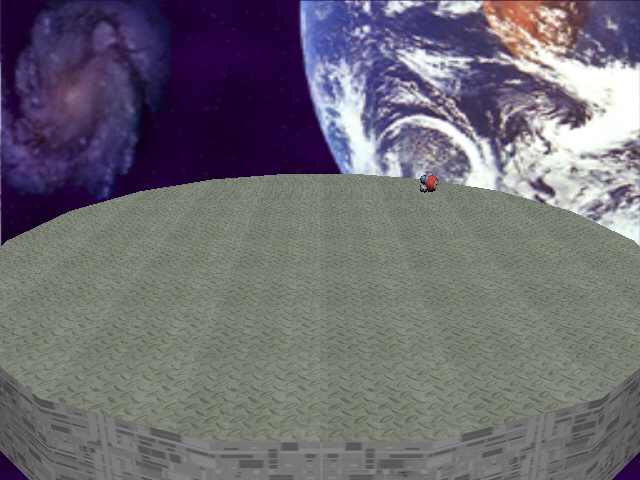
Runtime Snap:
download soure file