青青草原综合久久大伊人导航_色综合久久天天综合_日日噜噜夜夜狠狠久久丁香五月_热久久这里只有精品

Creative Commons License
本Blog采用 知識共享署名-非商業性使用-禁止演繹 3.0 Unported許可協議 進行許可。 —— Fox <游戲人生>

游戲人生

游戲人生 != ( 人生 == 游戲 )
站點遷移至:http://www.yulefox.com。請訂閱本博的朋友將RSS修改為http://feeds.feedburner.com/yulefox
posts - 62, comments - 508, trackbacks - 0, articles - 7

Autotools初體驗

Posted on 2009-12-23 02:18 Fox 閱讀(6970) 評論(5)  編輯 收藏 引用 所屬分類: T技術碎語

本文同步自游戲人生

Writen by Fox(yulefox.at.gmail.com)


從接觸和使用make以來,前前后后寫了不少Makefile(添添減減、修修補補,累計上千行是有的),今天在重新整理代碼的組織結構之后,突然就想:我為什么不使用Autotools呢?

在開始體驗功能強大的Autotools之前,簡單(詳細)回憶總結一下我使用make的經歷和思考的過程,反省一下看看自己在接觸這些新鮮事物的時候到底走了多少彎路。

o Cygwin

今年3月份,拜Kevin Lynx所賜,每次對Linu淺嘗輒止的我終于下決心接觸了Cygwin環境,并一發不可收拾。

剛開始的時候,就像大學剛接觸編程那樣,寫“hello, world”,在終端用gcc命令直接編譯,然后開始寫最簡單的只有一個all的Makefile。因為Emacs、GCC、make對我來說都是嶄新的 工具,后面重心就不是放在寫代碼上了,而是急于掌握他們,以求達到在Windows下的開發效率。

去年11月底,當時還沒有開始用Cygwin,就買了一本《Managing Projects with GNU Make》,此時也算物盡其用了。慢慢開始使用variables、macros、phony targets、functions,按步就班的系統學習應用。

o Ubuntu

磨磨蹭蹭過了半年,其間因為忙著畢業,對Cygwin和Emacs、GCC、make也算比較熟悉了。

今年10月份,開始使用Ubuntu,剛開始在Windows下用wubi安裝,很快就直接用新的硬盤分區物理安裝,并隨著Ubuntu 9.10的發布,升級到了9.10

這前后寫Makefile最大的區別就是,之前純粹是為了寫而寫,之后是為了用而寫。

隨著整個代碼結構的不斷膨脹和修改,Makefile也不斷的變化。

Makefile自身的最大變化是從之前的因為編寫錯誤、通用性差而不斷修改,演變到最后代碼增減不會影響Makefile,只是為了增加tags、優化結構而改動。

經歷了這個過程后,對于Makefile的結構就比較熟悉了,而且可以從其他使用automake的項目的Makefile中學習借鑒了。


之所以想到使用autotools,是因為接觸的很多開源項目的代碼都使用了這一組工具。

對于用戶而言,一般的項目編譯安裝的過程:

o bootstrap:檢測autoconfautomakelibtool及其版本并完成初始化,生成configure;

o configure:檢測系統平臺及軟硬件環境,確定適用本地環境的編譯策略,生成Makefiles;

o make:編譯、鏈接;

o make install:安裝;

o ldconfig:配置環境變量。

對于開發者而言,則需要通過autoconf、automake為用戶組織起上面的過程:
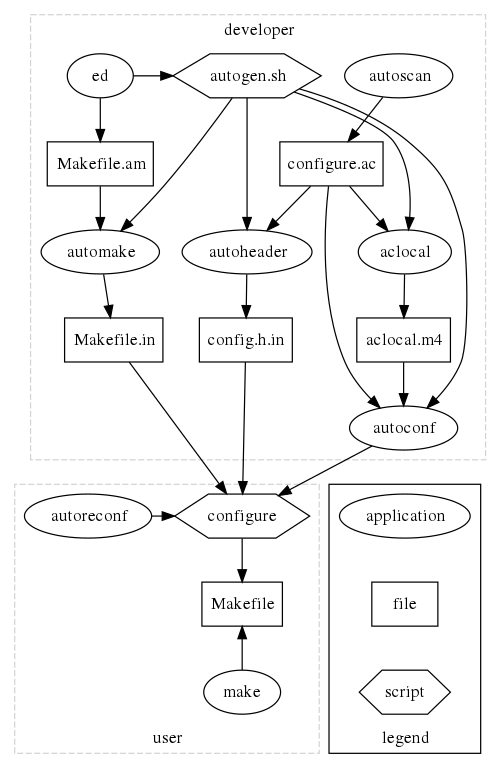
Autoconf 流程
Autoconf 流程

對于這一流程,我的方法是照葫蘆畫瓢,參考OGRE等項目的相關文件和工具的GNU文檔。

寫個Hello, Kitty。

操作的流程和期間出現的幾個問題總結一下:

o cd project_dir:轉到項目目錄;

o emacs Hello.cpp

#include <iostream>

int main(int argc, char** argv)
{
std::cout << "Hello, Kitty!" << std::endl;
return 0;
}

o autoscan:生成configure.scan

#                                               -*- Autoconf -*-
# Process this file with autoconf to produce a configure script.

AC_PREREQ([2.64])
AC_INIT([FULL-PACKAGE-NAME], [VERSION], [BUG-REPORT-ADDRESS])
AC_CONFIG_SRCDIR([Hello.cpp])
AC_CONFIG_HEADERS([config.h])

# Checks for programs.
AC_PROG_CXX

# Checks for libraries.

# Checks for header files.

# Checks for typedefs, structures, and compiler characteristics.

# Checks for library functions.

AC_OUTPUT

o mv configure.scan configure.in:改名;

O emacs configure.in:編輯configure.in

AC_PREREQ([2.64])

# 這個是自動生成的,因為代碼中沒有相關初始化信息,這里手動修改一下,非必要
AC_INIT([CgFox], [0.0.1], [http://www.yulefox.com])

# 這個是必須的,否則無法生成aclocal.m4
AM_INIT_AUTOMAKE([CgFox], 0.0.1)

AC_CONFIG_SRCDIR([Hello.cpp])

o aclocal:生成aclocal.m4(太長了,還沒去仔細了解)和autom4te.cache;

o autoconf:生成configure(也很長,先不看);

o automake --add-missing。

……


本來想等明天(今天)弄完了再詳細整理一下。不過我沒有打算把這個東西搞成一篇教程。記下來更多的只是為了給自己留下一個lable,知道自己這幾天在做什么。

最近又是兩點左右睡。腦子里有個家伙告訴我這樣不好;另一個家伙告訴我他還不困;還一個家伙告訴我明天還要上班。

我去你大爺的!

Feedback

# re: Autotools初體驗[未登錄]  回復  更多評論   

2009-12-23 08:15 by jacky
autotools用起來太繁瑣,OGRE已經用cmake來構建了,很好用。

# re: Autotools初體驗  回復  更多評論   

2009-12-23 09:04 by Fox
In practice, CMake not only lacks a rich platform tests suite, compared to autoconf, it also lacks a lot of features from automake and libtool.

So why should you not switch an autotools-based project over to CMake?

Tedious
First and foremost, your configure.ac script may be large. Porting to CMake can be a time consuming and not so funnny task when it comes to the long tail.
iconv support missing
There are no standard tests for iconv(), neither for finding the compiler flags, nor whether it takes a const pointer.
pkg-config support broken
pkg-config support is reportedly broken as of cmake 2.4 patch 8.
Exported symbols list not implemented
There are no documented ways to specify the list of exported symbols for a shared libraries, so your libraries will unconditionnaly expose all their non-static APIs (libtool can use a flat list or a regular expression).
C99 compiler check missing
There is no built-in support to enable C99 support in the C compiler.
Objective-C flags not supported
You can add flags for the Objective-C compiler, but they propagate to C compilation as well.
Compiler feature checks missing
There are no built-in checks for any of the C99 features, such as variable-sized arrays, restricted pointers, macros with variable number of arguments, etc. nor for GCCisms.
Monolithic installation prefix
There is only one global installation prefix. So the typical Linux distro cannot set the global prefix to /usr while the system configuration (automake's sysconfdir) would be /etc. Very nice for "downstream" Linux packagers...
Installation paths hard-coding
As a consequence of the single prefix, you need to hard-code all paths from the prefix. Instead of ${docdir}, you need to hard-code ${prefix}/share/doc/${package} (${CMAKE_INSTALL_PREFIX}/share/doc/foobar in CMake parliance) and so on and so forth. BSD porters are going to have fun tweaking the paths manually...
Uninstallation not supported
There is sipport for uninstalling. That is a design choice. You'd better never ever try to install a package straight from the build tree, without a proper packaging system.
Installation testsuite not supported
Since there is no uninstallation, there is no of course no distcheck target either. How often did you get your source tarball right from the first attempt before a new release?
No cross-compilation
There is no documented support for cross-compilation. This is scheduled for a future release.
Limited documentation
Compared to autotools, the documentation feels a bit light. At least, there is a wiki, but that cannot replace a good offline reference.
Limited executable renaming
CMake is not quite as powerful as automake (with program-prefix, program-suffix and program-transform-name) when it comes to on-the-fly executable renaming. This little-known feature of automake can be extremely useful when building an operating system distribution with possibly conflicting executable names from different projects. For instance, it is very conveniant along with the Debian alternatives system.
No source tarball packaging
There is no built-in support for making a tarball (make dist). Some Version Control Systems can do it themselves (git does, Subversion does not). This is quite critical a feature for open-source projects.
No source tarball testing
As there is no replacement for make dist, there is no replacement for make distcheck either. From my not-so-humble experience, that is tremendously useful before doing a new release. (NOTE: when I write distcheck, I mean distcheck. I don't mean check which becomes test with CMake)
No gettext integration
Gettext is not supported. Targets for .po and .mo files must be added manually. Nevermind that this is the most widely used localization subsystem in the open-source community.
Awkward feature listing
Whereby ./configure --help gives the list of build option, cmake --help prints the CMake options only. Instead, it seems you have to run cmake in "interactive" mode and answer a question for each and every setting (much like Linux kernel make config).
---------------------------
當然這些問題對于我不是必需的,不過還是等我autotools用一段時間再說:)

# re: Autotools初體驗  回復  更多評論   

2009-12-24 10:31 by 飯中淹
這個相對于IDE來說,有什么優勢?

# re: Autotools初體驗  回復  更多評論   

2009-12-24 10:52 by Fox
@飯中淹
這套工具現在對于我更多的是一個學習和試驗,如果希望和別人交流和共同開發跨平臺(尤其是non-win)的代碼的話,由于需要對依賴庫進行檢測,這個工作可以由autoconf+automake來完成。
青青草原综合久久大伊人导航_色综合久久天天综合_日日噜噜夜夜狠狠久久丁香五月_热久久这里只有精品
  • <ins id="pjuwb"></ins>
    <blockquote id="pjuwb"><pre id="pjuwb"></pre></blockquote>
    <noscript id="pjuwb"></noscript>
          <sup id="pjuwb"><pre id="pjuwb"></pre></sup>
            <dd id="pjuwb"></dd>
            <abbr id="pjuwb"></abbr>
            亚洲视频图片小说| 亚洲中无吗在线| 女女同性精品视频| 在线免费观看日本一区| 久久国产66| 久久成人国产| 在线看欧美日韩| 欧美激情一区二区三区| 欧美了一区在线观看| 亚洲图片在区色| 亚洲在线免费| 红杏aⅴ成人免费视频| 久久综合一区| 欧美黄色视屏| 欧美一级欧美一级在线播放| 欧美一区国产二区| 最新日韩中文字幕| 一区二区高清视频| 国产麻豆视频精品| 欧美成人午夜影院| 国产精品v欧美精品v日本精品动漫 | 免费人成精品欧美精品| 欧美成人福利视频| 亚洲欧美国产高清va在线播| 欧美亚洲免费| 亚洲理论在线观看| 午夜免费电影一区在线观看| 亚洲国产视频直播| 这里只有精品视频在线| 含羞草久久爱69一区| 91久久精品国产91久久性色tv| 欧美日韩不卡在线| 久久欧美肥婆一二区| 欧美人与禽猛交乱配视频| 久久久久国产免费免费| 欧美日韩亚洲高清一区二区| 久久精品视频免费观看| 欧美精品尤物在线| 玖玖精品视频| 国产精品视频成人| 最新亚洲一区| 黄网站免费久久| 亚洲性视频网站| 亚洲精品日韩一| 午夜影视日本亚洲欧洲精品| 日韩视频国产视频| 久久蜜桃资源一区二区老牛| 午夜亚洲福利| 欧美伦理a级免费电影| 久久婷婷久久| 国产精品综合不卡av| 亚洲日本一区二区三区| 曰本成人黄色| 翔田千里一区二区| 亚洲欧美日韩成人高清在线一区| 欧美电影免费观看高清| 麻豆亚洲精品| 狠狠色狠狠色综合日日91app| 亚洲视频专区在线| 亚洲一区二区黄色| 欧美精品国产一区二区| 欧美成人dvd在线视频| 极品中文字幕一区| 久久久久国产精品午夜一区| 欧美中文字幕第一页| 欧美一区二区大片| 亚洲国产mv| 国产精品视频免费观看| 夜夜嗨av一区二区三区四区| 亚洲人成人一区二区在线观看| 久久久天天操| 久热精品视频在线| 永久域名在线精品| 久久夜色精品国产欧美乱极品 | 国产精品综合不卡av| 亚洲一区成人| 欧美一二三视频| 国产精品一卡| 亚洲欧美视频在线观看| 久久黄色网页| 一区二区三区中文在线观看 | 久久精品免费| 久久综合狠狠综合久久综合88| 国模套图日韩精品一区二区| 久久精品视频在线观看| 欧美成人小视频| 一区二区日韩免费看| 欧美色欧美亚洲另类二区| 亚洲在线观看免费| 久久综合九色99| 亚洲精品免费在线播放| 欧美另类在线播放| 制服丝袜亚洲播放| 久久久精彩视频| 亚洲激情影院| 国产精品ⅴa在线观看h| 欧美一区二区三区四区视频| 欧美freesex交免费视频| 在线亚洲激情| 国产自产2019最新不卡| 蜜月aⅴ免费一区二区三区 | 久久久国产一区二区三区| 在线观看一区视频| 欧美日韩国产综合久久| 亚洲欧美日韩中文播放| 欧美国产日韩一区二区在线观看 | 国产一区二区三区直播精品电影 | 国产婷婷色一区二区三区| 老鸭窝毛片一区二区三区| 亚洲精品一区二区三区樱花 | 亚洲综合导航| 亚洲大片免费看| 国产精品成av人在线视午夜片| 久久狠狠亚洲综合| 99av国产精品欲麻豆| 久久一区二区三区四区五区| 一片黄亚洲嫩模| 怡红院av一区二区三区| 国产精品国产三级国产普通话99 | 久久久精品一区| 这里只有视频精品| 亚洲国产精品成人精品| 久久久精品一区二区三区| 亚洲天堂成人在线视频| 樱桃国产成人精品视频| 国产精品专区第二| 欧美午夜激情小视频| 欧美3dxxxxhd| 久久天天躁夜夜躁狠狠躁2022| 亚洲免费网址| 亚洲视频一二| 99香蕉国产精品偷在线观看| 亚洲大胆在线| 免费视频亚洲| 久久亚洲精品网站| 久久激情中文| 午夜在线精品| 午夜视频一区| 篠田优中文在线播放第一区| 亚洲一区不卡| 亚洲欧美视频一区| 亚洲欧美第一页| 亚洲欧美国产视频| 亚洲综合欧美| 午夜精品一区二区三区在线| 亚洲一区网站| 亚洲综合电影一区二区三区| 亚洲一区中文| 欧美一区二区三区免费观看 | 99精品欧美一区二区三区综合在线| 黄色成人av在线| 国内久久婷婷综合| 一区精品在线| 最近看过的日韩成人| 亚洲激情影视| 亚洲视频免费观看| 亚洲无限av看| 欧美一区在线视频| 久久精品视频在线免费观看| 久久蜜桃资源一区二区老牛 | 久久精品亚洲一区二区三区浴池| 性18欧美另类| 久久免费高清视频| 欧美激情麻豆| 一区二区三区国产精华| 亚洲欧美日韩国产一区二区| 久久精品日韩欧美| 欧美成人精品在线视频| 欧美日韩激情网| 国产精品网曝门| 在线观看91精品国产入口| 亚洲国产日韩欧美在线99| av成人激情| 性色av一区二区三区在线观看| 久久久久久久成人| 亚洲国产精品成人精品| 亚洲图片在区色| 久久视频一区| 国产精品久久久久99| 在线激情影院一区| 亚洲一级黄色av| 久久久综合网| 一区二区日本视频| 久久精品国产清自在天天线| 欧美精品日日鲁夜夜添| 国产噜噜噜噜噜久久久久久久久| 一区二区视频欧美| 亚洲视频二区| 欧美成人免费播放| 亚洲午夜精品久久久久久app| 久久婷婷亚洲| 国产精品日产欧美久久久久| 亚洲国产三级| 久久精品日韩一区二区三区| 亚洲国产精品久久久久久女王| 亚洲男人天堂2024| 欧美日本精品| 亚洲国产成人久久综合| 欧美专区日韩专区| 夜夜嗨av一区二区三区网站四季av|