這篇是好久之前自己最初貼在cdsn上的帖子,現在也挪到這里算是開篇吧
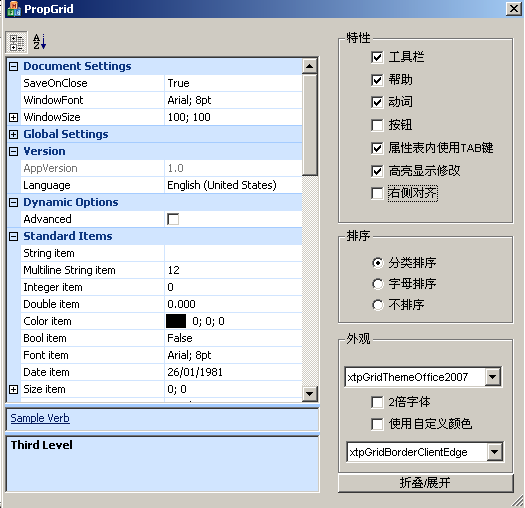
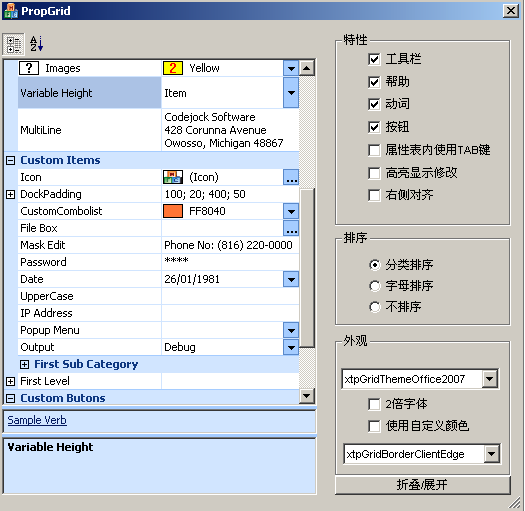
這是根據原代碼例子改的中文版界面,主要是在OnInitDialog里面的代碼我都寫了注釋,有興趣大家一起研究一下
BOOL CPropGridDlg::OnInitDialog()
{
// CDialog::OnInitDialog();
CPropertyGridDlgBase::OnInitDialog();
// 將\“關于...\”菜單項添加到系統菜單中。
// IDM_ABOUTBOX 必須在系統命令范圍內。
ASSERT((IDM_ABOUTBOX & 0xFFF0) == IDM_ABOUTBOX);
ASSERT(IDM_ABOUTBOX < 0xF000);
CMenu* pSysMenu = GetSystemMenu(FALSE);
if (pSysMenu != NULL)
{
CString strAboutMenu;
strAboutMenu.LoadString(IDS_ABOUTBOX);
if (!strAboutMenu.IsEmpty())
{
pSysMenu->AppendMenu(MF_SEPARATOR);
pSysMenu->AppendMenu(MF_STRING, IDM_ABOUTBOX, strAboutMenu);
}
}
// 設置此對話框的圖標。當應用程序主窗口不是對話框時,框架將自動
// 執行此操作
SetIcon(m_hIcon, TRUE); // 設置大圖標
SetIcon(m_hIcon, FALSE); // 設置小圖標
// TODO: 在此添加額外的初始化代碼
//////////////////////////////////////////////////////////////////////////
// 獲得圖片框矩形
CRect rc;
m_wndPlaceHolder.GetWindowRect( &rc );
// 轉為窗口坐標
ScreenToClient( &rc );
// 建立屬性表
if ( m_wndPropertyGrid.Create( rc, this, IDC_PROPERTY_GRID ) )
{
m_wndPropertyGrid.SetVariableItemsHeight(TRUE);
// 獲取邏輯字體
LOGFONT lf;
GetFont()->GetLogFont( &lf );
// create document settings category.
// 建立分類
CXTPPropertyGridItem* pSettings = m_wndPropertyGrid.AddCategory(_T("Document Settings"));
// 設置TOOLTIP
pSettings->SetTooltip(_T("Document Settings Category"));
// add child items to category.
// 建立bool內容
CXTPPropertyGridItem* pItemSaveOnClose = pSettings->AddChildItem(new CXTPPropertyGridItemBool(_T("SaveOnClose"), TRUE));
// 建立字體內容
pSettings->AddChildItem(new CXTPPropertyGridItemFont(_T("WindowFont"), lf));
// 建立size內容
pSettings->AddChildItem(new CXTPPropertyGridItemSize(_T("WindowSize"), CSize(100, 100)));
// 展開
pSettings->Expand();
// 選擇
pItemSaveOnClose->Select();
// create global settings category.
// 建立分類
CXTPPropertyGridItem* pGlobals = m_wndPropertyGrid.AddCategory(_T("Global Settings"));
// add child items to category.
// 建立只讀字符串內容
CXTPPropertyGridItem* pItemGreeting = pGlobals->AddChildItem(new CXTPPropertyGridItem(_T("Greeting Text"), _T("Welcome to your application!")));
pItemGreeting->SetReadOnly(TRUE);
// 建立整數內容
pGlobals->AddChildItem(new CXTPPropertyGridItemNumber(_T("ItemsInMRUList"), 4));
// 設置說明
CXTPPropertyGridItem* pItemRate = pGlobals->AddChildItem(new CXTPPropertyGridItemNumber(_T("MaxRepeatRate"), 10));
pItemRate->SetDescription(_T("The rate in milliseconds that the text will repeat."));
// 建立color內容
pGlobals->AddChildItem(new CXTPPropertyGridItemColor(_T("ToolbarColor"), RGB(255, 192,128)));
//////////////////////////////////////////////////////////////////////////
// Version category.
// 建立分類
CXTPPropertyGridItem* pVersion = m_wndPropertyGrid.AddCategory(_T("Version"));
// add child items to category.
// 建立只讀字符串內容
CXTPPropertyGridItem* pItemVersion = pVersion->AddChildItem(new CXTPPropertyGridItem(_T("AppVersion"), _T("1.0")));
pItemVersion->SetReadOnly(TRUE);
// 使用資源建立字符串內容
CXTPPropertyGridItem* pItemLanguage = pVersion->AddChildItem(new CXTPPropertyGridItem(ID_ITEM_VERSION_LANGUAGE, _T("English (United States)")));
// 展開分類
pVersion->Expand();
// 將combo連接到字符串內容中
// 測試結果 只要不是只讀的字符串內容就可連接combo 步驟如下
// 獲取item的Constraints
CXTPPropertyGridItemConstraints* pList = pItemLanguage->GetConstraints();
// 添加combo內容
pList->AddConstraint(_T("Neutral"));
pList->AddConstraint(_T("Arabic"));
pList->AddConstraint(_T("German"));
pList->AddConstraint(_T("Chinese(Taiwan)"));
pList->AddConstraint(_T("English (United Kingdom)"));
pList->AddConstraint(_T("English (United States)"));
pList->AddConstraint(_T("France"));
pList->AddConstraint(_T("Russian"));
pList->AddConstraint(_T("簡體中文"));
pList->AddConstraint(_T("英文"));
pList->AddConstraint(_T("日文"));
// 設置combo為可編輯組合框
pItemLanguage->SetFlags(xtpGridItemHasComboButton | xtpGridItemHasEdit);
//////////////////////////////////////////////////////////////////////////
// Dynamic Options
// 建立分類
CXTPPropertyGridItem* pCategoryDynamic = m_wndPropertyGrid.AddCategory(_T("Dynamic Options"));
// 建立bool內容
// 這是第2種方式 強制轉換指針方式
CXTPPropertyGridItemBool* pItemBool = (CXTPPropertyGridItemBool*)pCategoryDynamic->AddChildItem(
new CXTPPropertyGridItemBool(_T("Advanced"), FALSE));
// 設置ID
pItemBool->SetID(501);
// 設置checkbox樣式
pItemBool->SetCheckBoxStyle();
// 建立bool內容checkbox樣式并隱藏
pItemBool = (CXTPPropertyGridItemBool*)pCategoryDynamic->AddChildItem(
new CXTPPropertyGridItemBool(_T("Option 1"), FALSE));
pItemBool->SetHidden(TRUE);
pItemBool->SetCheckBoxStyle();
// 建立bool內容checkbox樣式并隱藏
pItemBool = (CXTPPropertyGridItemBool*)pCategoryDynamic->AddChildItem(
new CXTPPropertyGridItemBool(_T("Option 2"), FALSE));
pItemBool->SetHidden(TRUE);
pItemBool->SetCheckBoxStyle();
// 建立bool內容checkbox樣式并隱藏
pItemBool = (CXTPPropertyGridItemBool*)pCategoryDynamic->AddChildItem(
new CXTPPropertyGridItemBool(_T("Option 3"), FALSE));
pItemBool->SetHidden(TRUE);
pItemBool->SetCheckBoxStyle();
// 建立bool內容checkbox樣式并隱藏和只讀
pItemBool = (CXTPPropertyGridItemBool*)pCategoryDynamic->AddChildItem(
new CXTPPropertyGridItemBool(_T("Option 4"), TRUE));
pItemBool->SetHidden(TRUE);
pItemBool->SetCheckBoxStyle();
pItemBool->SetReadOnly();
// create standard items category.
// 建立分類
CXTPPropertyGridItem* pStandard = m_wndPropertyGrid.AddCategory(_T("Standard Items"));
// 建立字符串內容
pStandard->AddChildItem(new CXTPPropertyGridItem(_T("String item")));
// 建立多行字符串下拉框 幫助文件中沒有
pStandard->AddChildItem(new CXTPPropertyGridItemMultilineString(_T("Multiline String item"), _T("1\r\n2")));
// 建立整數內容
pStandard->AddChildItem(new CXTPPropertyGridItemNumber(_T("Integer item")));
// 建立double內容并設置初始值和數據格式
pStandard->AddChildItem(new CXTPPropertyGridItemDouble(_T("Double item"),0,"%0.3f"));
// 建立顏色bool字體
pStandard->AddChildItem(new CXTPPropertyGridItemColor(_T("Color item")));
pStandard->AddChildItem(new CXTPPropertyGridItemBool(_T("Bool item")));
pStandard->AddChildItem(new CXTPPropertyGridItemFont(_T("Font item"), lf));
// mfc時間類COleDateTime
COleDateTime dates(1981, 1, 26, 0, 0, 0 );
// 使用COleDateTime建立時間內容
pStandard->AddChildItem(new CXTPPropertyGridItemDate(_T("Date item"), dates));
// 建立size內容
pStandard->AddChildItem(new CXTPPropertyGridItemSize(_T("Size item")));
// 建立enum內容
CXTPPropertyGridItem* pItem = pStandard->AddChildItem(new CXTPPropertyGridItemEnum(_T("Enum item"), 1));
// 添加enum記錄到enum內容呈combo樣式
pItem->GetConstraints()->AddConstraint(_T("Windows 98"), 1);
pItem->GetConstraints()->AddConstraint(_T("Windows 2000"), 2);
pItem->GetConstraints()->AddConstraint(_T("Windows XP"), 3);
// 建立flag內容 第2個參數"1+2"為初始值 即"Windows 98"和"Windows 2000"為真
// 且flag的元素數值需為1,2,4,8,16,32...
pItem = pStandard->AddChildItem(new CXTPPropertyGridItemFlags(_T("Flag item"), 1 + 2));
pItem->GetConstraints()->AddConstraint(_T("All Windows"), 1 + 2 + 4);
pItem->GetConstraints()->AddConstraint(_T("Windows 98"), 1);
pItem->GetConstraints()->AddConstraint(_T("Windows 2000"), 2);
pItem->GetConstraints()->AddConstraint(_T("Windows XP"), 4);
//////////////////////////////////////////////////////////////////////////
// 建立分類
CXTPPropertyGridItem* pButtons = m_wndPropertyGrid.AddCategory(_T("Standard Buttons"));
// 建立bool內容
pItem = pButtons->AddChildItem(new CXTPPropertyGridItemBool(_T("Combo Button")));
// 設置為combo樣式
pItem->SetFlags(xtpGridItemHasComboButton);
// 建立字符串內容
pItem = pButtons->AddChildItem(new CXTPPropertyGridItem(_T("Expand Button")));
// 設置為可編輯并帶有擴展按鈕樣式
pItem->SetFlags(xtpGridItemHasEdit | xtpGridItemHasExpandButton);
// 建立字符串內容
pItem = pButtons->AddChildItem(new CXTPPropertyGridItem(_T("2 Buttons")));
// 設置ID
pItem->SetID(510);
// 設置為可編輯并帶有擴展按鈕樣式和combo
pItem->SetFlags(xtpGridItemHasEdit | xtpGridItemHasComboButton | xtpGridItemHasExpandButton);
// 添加combo內容
pItem->GetConstraints()->AddConstraint(_T("Windows 2000"), 1);
pItem->GetConstraints()->AddConstraint(_T("Windows 98"), 2);
// 建立字符串內容
pItem = pButtons->AddChildItem(new CXTPPropertyGridItem(_T("Text Button")));
// 添加按鈕到字符串內容行尾
CXTPPropertyGridInplaceButton* pButton = pItem->GetInplaceButtons()->AddButton(new CXTPPropertyGridInplaceButton(1));
// 設置按鈕文本
pButton->SetCaption(_T("Find"));
// 設置按鈕寬度
pButton->SetWidth(100);
// 建立字符串內容
pItem = pButtons->AddChildItem(new CXTPPropertyGridItem(_T("Image Button")));
// 添加按鈕到字符串內容行尾
pButton = pItem->GetInplaceButtons()->AddButton(new CXTPPropertyGridInplaceButton(1));
// 設置按鈕圖標索引
pButton->SetIconIndex(100);
// UINT數組 估計是一個臨時存儲單元用于添加圖標到按鈕
// 上面的100和下面的100以及設置圖標語句中的btnFilter是相聯系的
UINT btnFilter[] = {100};
// 設置圖標
m_wndPropertyGrid.GetImageManager()->SetIcons(IDB_BITMAP_FILTER, btnFilter, 1, 0);
// 設置ToolTip在圖標上
pButton->SetTooltip(_T("Set Filter for item"));
// 建立整形內容
pItem = pButtons->AddChildItem(new CXTPPropertyGridItemNumber(_T("Spin And Slider"), 60));
// 默認0-100暫時沒有找到設置范圍的方法
// 添加水平滑塊連接到整形內容
pItem->AddSliderControl();
// 添加上下按鈕連接到整形內容
pItem->AddSpinButton();
//////////////////////////////////////////////////////////////////////////
// 建立分類
CXTPPropertyGridItem* pMetrics = m_wndPropertyGrid.AddCategory(_T("Custom Metrics"));
// 建立字符串內容
pItem = pMetrics->AddChildItem(new CXTPPropertyGridItem(_T("Value Colors"), _T("")));
// 設置文字顏色 可以采用RGB宏或DWORD
// 文字和背景顏色會呈現混合效果
pItem->GetValueMetrics()->m_clrFore = 0x00ff00;
// 設置背景顏色
pItem->GetValueMetrics()->m_clrBack = RGB(255, 0, 255);
// 建立字符串內容
pItem = pMetrics->AddChildItem(new CXTPPropertyGridItem(_T("Caption Colors"), _T("")));
// 設置文字顏色
pItem->GetCaptionMetrics()->m_clrFore = 0xFF0000;
// 設置背景顏色
pItem->GetCaptionMetrics()->m_clrBack = RGB(235, 235, 235);
// 建立enum內容
pItem = pMetrics->AddChildItem(new CXTPPropertyGridItemEnum(_T("Images"), 2));
// 內加enum記錄并帶有圖片
pItem->GetConstraints()->AddConstraint(_T("Green"), 0, 0);
pItem->GetConstraints()->AddConstraint(_T("Red"), 1, 1);
pItem->GetConstraints()->AddConstraint(_T("Yellow"), 2, 2);
pItem->GetConstraints()->AddConstraint(_T("Blue"), 3, 3);
// 設置enum內容的內容圖片
pItem->GetValueMetrics()->m_nImage = 2;
// 設置enum內容的標題圖片
pItem->GetCaptionMetrics()->m_nImage = 4;
// 設置mask顏色
m_wndPropertyGrid.GetImageManager()->SetMaskColor(0xC0C0C0);
// 設置圖標
m_wndPropertyGrid.GetImageManager()->SetIcons(IDB_BITMAP_CONSTRAINTS, 0, 5, CSize(20, 14));
// 建立字符串內容
pItem = pMetrics->AddChildItem(new CXTPPropertyGridItem(_T("Variable Height"), _T("Item")));
// 建立內容塊高度
pItem->SetHeight(32);
// 設置為combo樣式
pItem->SetFlags(xtpGridItemHasComboButton);
// 建立多行字符串內容
// 貌似在多行中無法真正的多行編輯 沒有找到讓文本換行即支持文本回車的方式
pItem = pMetrics->AddChildItem(new CXTPPropertyGridItem(_T("MultiLine"), _T("Codejock Software\r\n428 Corunna Avenue\r\nOwosso, Michigan 48867 USA")));
// 設置能見得文本行數
pItem->SetMultiLinesCount(3);
// create custom items category.
// 建立分類
// 以下為自定義類型 代碼見CustomItems.h
CXTPPropertyGridItem* pCustom = m_wndPropertyGrid.AddCategory(_T("Custom Items"));
// add child items to category.
// 建立icon內容
CXTPPropertyGridItem* pItemIcon = pCustom->AddChildItem(new CCustomItemIcon(_T("Icon"), m_hIcon));
pItemIcon->SetDescription(_T("This sample shows how to override draw function"));
// 建立DockPadding內容
// DockPadding為4個數的組合
CXTPPropertyGridItem* pItemDock = pCustom->AddChildItem(new CCustomItemChilds(_T("DockPadding"), CRect(100, 20, 400, 50)));
pItemDock->SetDescription(_T("This sample shows how to add item with childs"));
// 建立顏色內容
pCustom->AddChildItem(new CCustomItemColor(_T("CustomCombolist"), RGB(0xFF, 0x80, 0x40)));
// 建立打開對話框內容
pCustom->AddChildItem(new CCustomItemFileBox(_T("File Box")));
// 建立字符串內容
CXTPPropertyGridItem* pItemMaskEdit = pCustom->AddChildItem(new CXTPPropertyGridItem(_T("Mask Edit"), _T("Phone No: (816) 220-0000")));
// 設置字符串MASK
pItemMaskEdit->SetMask(_T("Phone No: (000) 000-0000"), _T("Phone No: (___) ___-____"));
// 建立字符串內容
CXTPPropertyGridItem* pItemPassword = pCustom->AddChildItem(new CXTPPropertyGridItem(_T("Password"), _T("Text")));
// 設置字符串Password
pItemPassword->SetPasswordMask();
// 建立日期內容
COleDateTime date(1981, 1, 26, 0, 0, 0 );
pCustom->AddChildItem(new CXTPPropertyGridItemDate(_T("Date"), date));
// 建立大寫字母內容
pCustom->AddChildItem(new CCustomItemUpperCase(_T("UpperCase")));
// 建立ip地址內容
pCustom->AddChildItem(new CCustomItemIPAddress(_T("IP Address")));
// 建立PopupMenu內容
pCustom->AddChildItem(new CCustomItemMenu(_T("Popup Menu")));
// 建立字符串內容
pCustom->AddChildItem(new CCustomItemEdit(_T("Output"), _T("Debug")));
// add multi level tree node.
// 建立樹形內容
CXTPPropertyGridItem* pCategoryOne = pCustom->AddChildItem(new CXTPPropertyGridItemCategory(_T("First Sub Category")));
CXTPPropertyGridItem* pCategoryTwo = pCategoryOne->AddChildItem(new CXTPPropertyGridItemCategory(_T("Second Sub Category 1")));
pCategoryTwo->AddChildItem(new CXTPPropertyGridItem(_T("Third Level 1"), _T("")));
pCategoryTwo->AddChildItem(new CXTPPropertyGridItem(_T("Third Level 2"), _T("")));
CXTPPropertyGridItem* pCategoryTwo2 = pCategoryOne->AddChildItem(new CXTPPropertyGridItemCategory(_T("Second Sub Category 2")));
pCategoryTwo2->AddChildItem(new CXTPPropertyGridItem(_T("Third Level 1"), _T("")));
// 建立樹形內容
CXTPPropertyGridItem* pItemOne = pCustom->AddChildItem(new CXTPPropertyGridItem(_T("First Level"), _T("")));
CXTPPropertyGridItem* pItemTwo = pItemOne->AddChildItem(new CXTPPropertyGridItem(_T("Second Level"), _T("")));
CXTPPropertyGridItem* pItemThird = pItemTwo->AddChildItem(new CXTPPropertyGridItem(_T("Third Level"), _T("")));
pItemThird->AddChildItem(new CXTPPropertyGridItem(_T("Fourth Level 1"), _T("")));
pItemThird->AddChildItem(new CXTPPropertyGridItem(_T("Fourth Level 2"), _T("")));
// create custom items category.
// 建立分類
pCustom = m_wndPropertyGrid.AddCategory(_T("Custom Butons"));
// 建立上下按鈕內容
CXTPPropertyGridItem* pItemSpin = pCustom->AddChildItem(new CCustomItemSpin(_T("SpinButton")));
pItemSpin->SetDescription(_T("This sample shows how to add new button type"));
// 建立水平滑塊內容
pCustom->AddChildItem(new CCustomItemSlider(_T("Slider")));
// 建立CheckBox內容
CCustomItemCheckBox* pItemCheckBox = (CCustomItemCheckBox*)pCustom->AddChildItem(new CCustomItemCheckBox(_T("Check Box")));
pItemCheckBox->SetValue(_T("agree with conditions"));
pItemCheckBox->SetBool(TRUE);
// 建立自定義按鈕
pCustom->AddChildItem(new CCustomItemButton(_T("Left Origin"), FALSE, TRUE));
pCustom->AddChildItem(new CCustomItemButton(_T("Right Origin"), FALSE, TRUE));
pCustom->AddChildItem(new CCustomItemButton(_T("Pointer"), TRUE, TRUE));
pCustom->AddChildItem(new CCustomItemButton(_T("Gradient"), TRUE, FALSE));
}
m_groupAppearance.SubclassDlgItem(IDC_GBOX_APPEAR, this);
m_groupSort.SubclassDlgItem(IDC_GBOX_SORT, this);
m_groupColor.SubclassDlgItem(IDC_GBOX_COLOR, this);
// Set control resizing.
SetResize(IDC_PROPERTY_GRID, SZ_TOP_LEFT, SZ_BOTTOM_RIGHT);
//
SetResize(IDC_GBOX_APPEAR, SZ_TOP_RIGHT, SZ_TOP_RIGHT);
SetResize(IDC_CHK_TOOLBAR, SZ_TOP_RIGHT, SZ_TOP_RIGHT);
SetResize(IDC_CHK_HELP, SZ_TOP_RIGHT, SZ_TOP_RIGHT);
SetResize(IDC_CHK_VERBS, SZ_TOP_RIGHT, SZ_TOP_RIGHT);
SetResize(IDC_CHK_DOUBLE, SZ_TOP_RIGHT, SZ_TOP_RIGHT);
SetResize(IDC_CHK_TABITEMS, SZ_TOP_RIGHT, SZ_TOP_RIGHT);
SetResize(IDC_CHK_HIGHLIGHT, SZ_TOP_RIGHT, SZ_TOP_RIGHT);
SetResize(IDC_COMBO_THEME, SZ_TOP_RIGHT, SZ_TOP_RIGHT);
SetResize(IDC_GBOX_SORT, SZ_TOP_RIGHT, SZ_TOP_RIGHT);
SetResize(IDC_SORT_CATEGORIES, SZ_TOP_RIGHT, SZ_TOP_RIGHT);
SetResize(IDC_SORT_ALPHABETICAL, SZ_TOP_RIGHT, SZ_TOP_RIGHT);
SetResize(IDC_SORT_NOSORT, SZ_TOP_RIGHT, SZ_TOP_RIGHT);
SetResize(IDC_GBOX_COLOR, SZ_TOP_RIGHT, SZ_TOP_RIGHT);
SetResize(IDC_CHK_CUSTOMCOLORS, SZ_TOP_RIGHT, SZ_TOP_RIGHT);
SetResize(IDC_BUTTON_SWITCHSTATE, SZ_TOP_RIGHT, SZ_TOP_RIGHT);
SetResize(IDC_COMBO_BORDER, SZ_TOP_RIGHT, SZ_TOP_RIGHT);
SetResize(IDC_CHECK_SHOWBUTTONS, SZ_TOP_RIGHT, SZ_TOP_RIGHT);
SetResize(IDC_CHK_RIGHTTOLEFT, SZ_TOP_RIGHT, SZ_TOP_RIGHT);
// Load window placement
AutoLoadPlacement(_T("PropertyGridSample"));
m_cmbTheme.AddString(_T("xtpGridThemeDefault"));
m_cmbTheme.AddString(_T("xtpGridThemeNativeWinXP"));
m_cmbTheme.AddString(_T("xtpGridThemeOffice2003"));
m_cmbTheme.AddString(_T("xtpGridThemeCool"));
m_cmbTheme.AddString(_T("xtpGridThemeSimple"));
m_cmbTheme.AddString(_T("xtpGridThemeDelphi"));
m_cmbTheme.AddString(_T("xtpGridThemeWhidbey"));
m_cmbTheme.AddString(_T("xtpGridThemeOfficeXP"));
m_cmbTheme.AddString(_T("xtpGridThemeOffice2007"));
m_cmbTheme.SetCurSel(0);
m_cmbBorder.AddString(_T("xtpGridBorderNone"));
m_cmbBorder.AddString(_T("xtpGridBorderFlat"));
m_cmbBorder.AddString(_T("xtpGridBorderStaticEdge"));
m_cmbBorder.AddString(_T("xtpGridBorderClientEdge"));
m_cmbBorder.SetCurSel(3);
return TRUE; // 除非設置了控件的焦點,否則返回 TRUE
}